

Introduction
As you know we can apply any Entity Framework approach such as Code First and Database First in the ASP.NET MVC Application, so in this article I am explaining the use of Stored Procedures when we use the Code First Approach of Entity Framework in MVC 5 applications.
We can implement the Stored Procedures in Entity Framework 6 and perform only the Insert, Delete and Update operations. One more feature is that it only works for those applications that use the Code First Approach; that is, we first create the structure of the class and next accomplish the application and the database is created when running the application.
You will also learn the Code First Migrations use in here and perform the operations in the database. We use the functionality of Stored Procedures with the Fluent API. Any implementation occurs through a feature called Fluent API.
Prerequisites
Visual Studio 2013 is the prerequisite to work with this article.
So, let's just use the following sections with which we can implement the functionality,
- Create ASP.NET MVC 5 Application
- Adding Model
- Scaffolding in MVC 5
- View in MVC 5
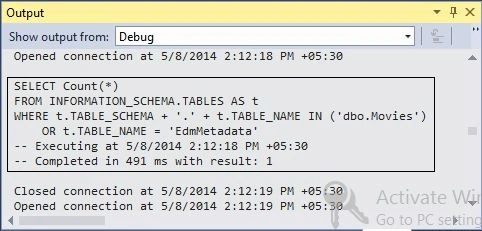
- LOG in Entity Framework
- Working with Stored Procedures
Create ASP.NET MVC 5 Application
In this section we'll create the ASP.NET Web Application with the MVC 5 Project Template. Use the following procedure.
Step 1
Open the Visual Studio 2013 and click on the "New Project".
Step 2
Select the Web from the left pane and create the ASP.NET Web Application.
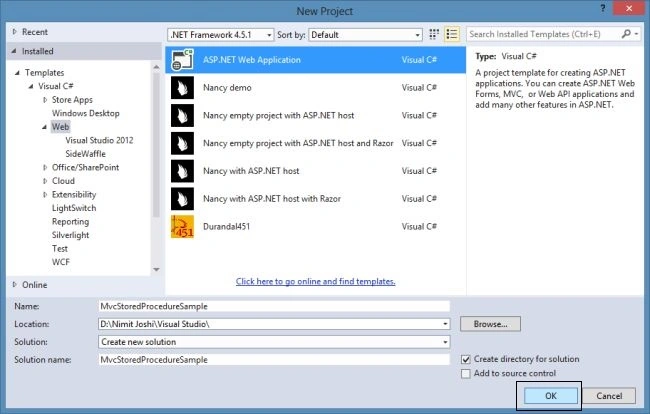
Step 3
Select the MVC Project Template in the next One ASP.NET Wizard.
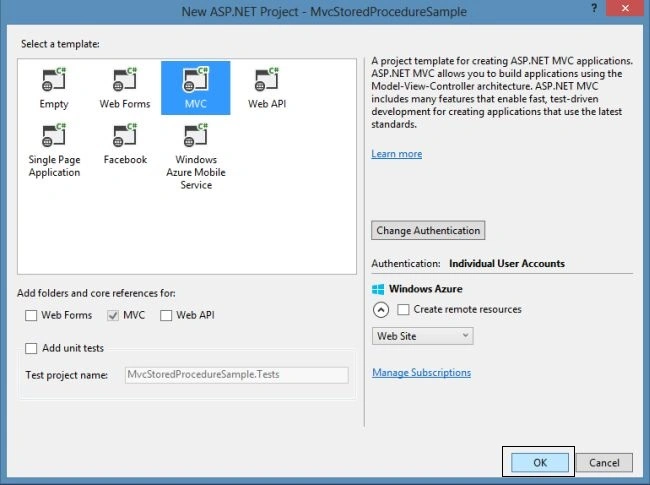
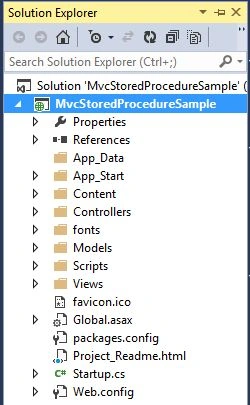
Visual Studio automatically creates the MVC 5 application and adds some files and folders to the solution. Have a look:
Adding Model
In this section, we'll add the class in the models folder. Use the following procedure.
Step 1
Right-click on the Models folder and Add a new Class, "Movie".

Step 2
Edit the code with the following code,
- using System;
- using System.ComponentModel.DataAnnotations;
- namespace MvcStoredProcedureSample.Models
- {
- public class Movie
- {
- public int ID { get; set; }
- [Required]
- public string Name { get; set; }
- [Required]
- [Display (Name="Release Date")]
- public DateTime ReleaseDate { get; set; }
- [Required]
- public string Category { get; set; }
- }
- }
In the code above, the properties are defined in a class. You can also notice that there is no entity key is defined in the preceding code because we are using the Entity Framework 6 and it is not necessary since the key property is composed by class name + ID. As we have the class named Movie, so the ID property is identified automatically as the primary key. You can also add other properties to the class.
Step 3 - Build the solution.
Working with Entity Framework
Generally when we create the latest MVC project, the Entity Framework is installed as a default. It it is not available in the packages.config file; you can install it from the Package Manager Console by entering the following command:
Install-Package EntityFramework
In my solution, the latest version of Entity Framework, EntityFramework 6.1.0, is installed as the default. Have a look:
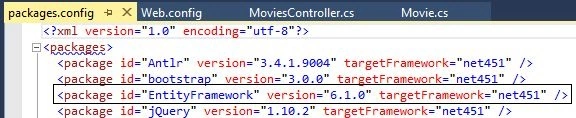
You can also update the package by entering the following command in the Package Manager Console:
Update-Package EntityFramework
Scaffolding in MVC 5
In this section we'll add a new scaffolded controller using Entity Framework. So, follow the procedure below.
Step 1
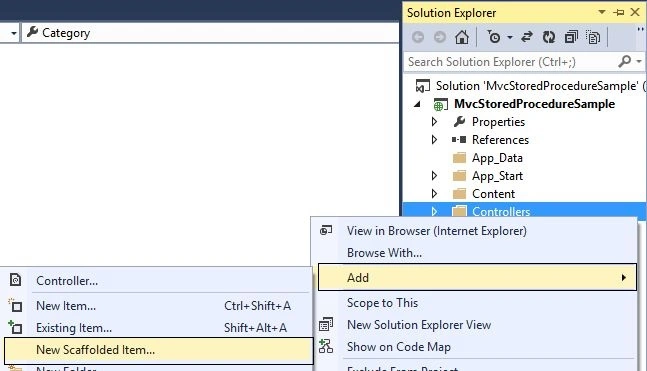
Just right-click on the Controllers folder and click on the Add-> New Scaffolded Item
Step 2
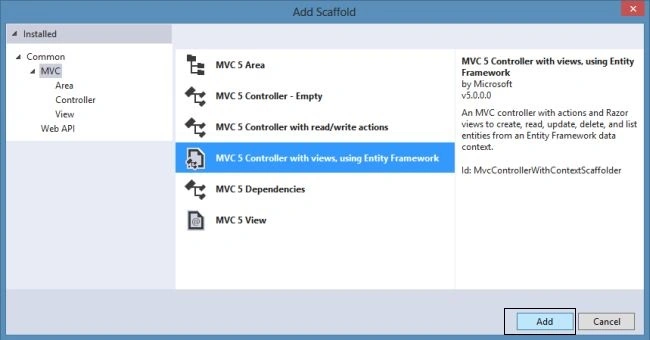
In the next Add Scaffold wizard, select the MVC 5 Controller with views as in the following:
Step 3
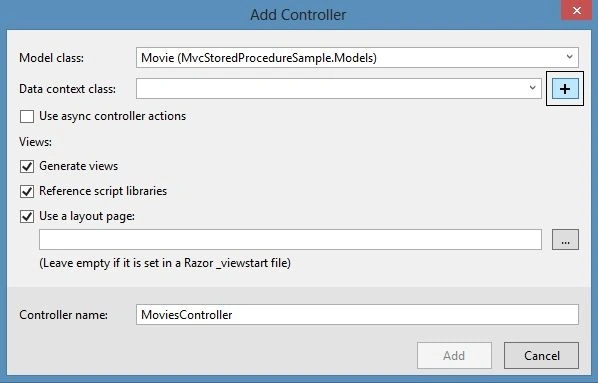
In the next Add Controller wizard, select the Model Class and to use the Data Context class we need to add new.
Step 4
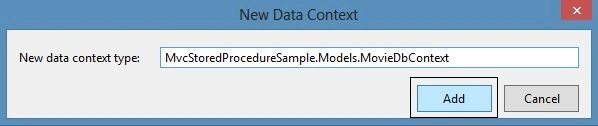
Enter the Data Context class as in the following,
Step 5
Now Add the Controller by clicking the Add button
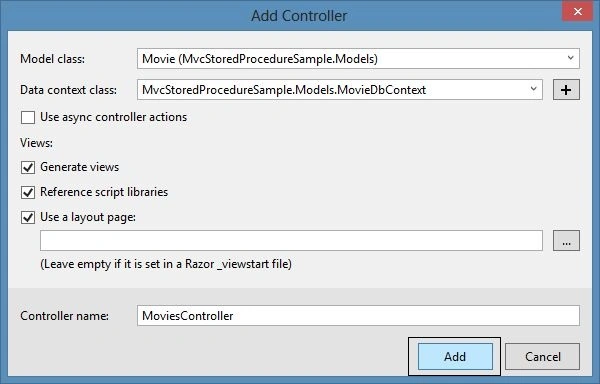
Step 6
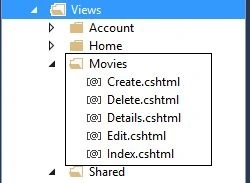
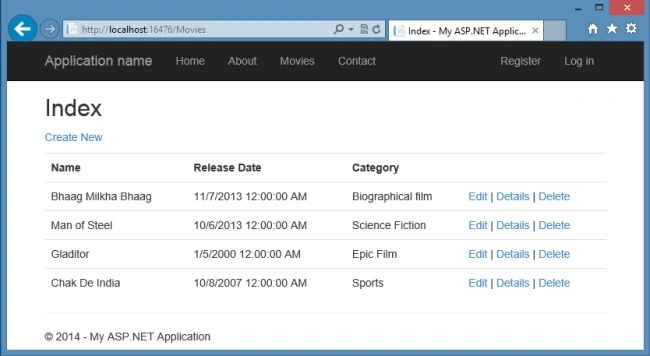
Now we have the MovieDbContext class and MoviesController class after scaffolding the controller. Check it out:
MovieDbContext class,
- using System.Data.Entity;
- namespace MvcStoredProcedureSample.Models
- {
- public class MovieDbContext : DbContext
- {
- public MovieDbContext() : base( "name = MovieDbContext" )
- {
- }
- public DbSet<Movie> Movies { get; set; }
- }
- }
MoviesController class
- using System.Data.Entity;
- using System.Linq;
- using System.Net;
- using System.Web.Mvc;
- using MvcStoredProcedureSample.Models;
- namespace MvcStoredProcedureSample.Controllers
- {
- public class MoviesController : Controller
- {
- private MovieDbContext db = new MovieDbContext();
- // GET: Movies
- public ActionResult Index()
- {
- return View(db.Movies.ToList());
- }
- // GET: Movies/Details/5
- public ActionResult Details(int? id)
- {
- if (id == null)
- {
- return new HttpStatusCodeResult(HttpStatusCode.BadRequest);
- }
- Movie movie = db.Movies.Find(id);
- if (movie == null)
- {
- return HttpNotFound();
- }
- return View(movie);
- }
- // GET: Movies/Create
- public ActionResult Create()
- {
- return View();
- }
- // POST: Movies/Create
- // To protect from overposting attacks, please enable the specific properties you want to bind to, for
- // more details see http://go.microsoft.com/fwlink/?LinkId=317598.
- [HttpPost]
- [ValidateAntiForgeryToken]
- public ActionResult Create([Bind(Include = "ID,Name,ReleaseDate,Category")] Movie movie)
- {
- if (ModelState.IsValid)
- {
- db.Movies.Add(movie);
- db.SaveChanges();
- return RedirectToAction("Index");
- }
- return View(movie);
- }
- // GET: Movies/Edit/5
- public ActionResult Edit(int? id)
- {
- if (id == null)
- {
- return new HttpStatusCodeResult(HttpStatusCode.BadRequest);
- }
- Movie movie = db.Movies.Find(id);
- if (movie == null)
- {
- return HttpNotFound();
- }
- return View(movie);
- }
- // POST: Movies/Edit/5
- // To protect from overposting attacks, please enable the specific properties you want to bind to, for
- // more details see http://go.microsoft.com/fwlink/?LinkId=317598.
- [HttpPost]
- [ValidateAntiForgeryToken]
- public ActionResult Edit([Bind(Include = "ID,Name,ReleaseDate,Category")] Movie movie)
- {
- if (ModelState.IsValid)
- {
- db.Entry(movie).State = EntityState.Modified;
- db.SaveChanges();
- return RedirectToAction("Index");
- }
- return View(movie);
- }
- // GET: Movies/Delete/5
- public ActionResult Delete(int? id)
- {
- if (id == null)
- {
- return new HttpStatusCodeResult(HttpStatusCode.BadRequest);
- }
- Movie movie = db.Movies.Find(id);
- if (movie == null)
- {
- return HttpNotFound();
- }
- return View(movie);
- }
- // POST: Movies/Delete/5
- [HttpPost, ActionName("Delete")]
- [ValidateAntiForgeryToken]
- public ActionResult DeleteConfirmed(int id)
- {
- Movie movie = db.Movies.Find(id);
- db.Movies.Remove(movie);
- db.SaveChanges();
- return RedirectToAction("Index");
- }
- protected override void Dispose(bool disposing)
- {
- if (disposing)
- {
- db.Dispose();
- }
- base.Dispose(disposing);
- }
- }
- }
William OniszkoPosted Jun 17, 2021, 1:47 PM
When i run the project im receiving cannot find _LoginPartial
Firoz RazaPosted Jul 25, 2020, 5:00 PM
Thanks Nimit! Very helpful article for creating Store Procedure using Entity Framework.
Tejashri JadhavPosted Jun 3, 2020, 12:28 AM
In code fist approach how to pass the stored procedure which is already generated at database , just like In dapper we can pass the procedure name and use this . as like that , I want this in MVC code first approach with stored procedure.
Mike KohnPosted Aug 29, 2019, 3:00 PM
I am getting an error stating that my EntityType has no key defined. I'm not using your example data, but rather my own.
Amit MishraPosted May 8, 2019, 7:44 AM
Hello Nimit, I am using MVC Core DBFirst Approach and I have a stored procedure in database and i want to call stored procedure in model Context class. please suggest.
Mahesh MakwanaPosted Apr 5, 2019, 2:22 AM
You are creating a stored procedure in project and use linq query in MVC ? why
Saurav TyagiPosted Sep 17, 2018, 3:50 AM
how you used stored procedure in it? can you explain that to me? Because I'm new to MVC but I used EF before and its the same thing I've done without creating stored procedure, which you had done using stored procedure.
Nicolas BelleyPosted Feb 23, 2018, 6:40 AM
Question, will the stored procs be created on a new database with code first?
Nick VarPosted Nov 27, 2017, 2:30 PM
Thanks mate for the article!
Mohd FidzrinPosted Oct 3, 2017, 10:45 PM
Hi Sir, I am pretty new to this MVC5 framework so I wanted to know what is the advantage when using stored procedure compared to using Linq approach
Ramita ChaudharyPosted May 11, 2017, 5:51 AM
Hello sir ,you have provide for Nathan Siafa http://www.c-sharpcorner.com/UploadFile/4b0136/introducing-microsoft-enterprise-library-in-Asp-Net-part-2/ but this is for asp .net .aspx pages,I want to execute multiple stored procedure at POST method in controller in MVC-5 ,Could you help me please,Thank you
dsasd sdsdsPosted Feb 7, 2017, 1:38 PM
Hello sir please send this ebook to [email protected]. thanks
Nathan SiafaPosted Sep 19, 2016, 6:43 AM
How do I execute a stored that already exist in my database? I want the stored procedure to be executed when I click on a button that resides in a view.
Sr KarthigaPosted Feb 21, 2016, 11:14 PM
nice one
Sr KarthigaPosted Feb 21, 2016, 11:14 PM
Nice explanation
mayank prajapatiPosted Jul 8, 2015, 10:07 AM
keep it up .. nice article
Shridhar SharmaPosted Mar 23, 2015, 12:07 PM
thanks for sharing sir.
Rahul Kumar SaxenaPosted Mar 16, 2015, 3:01 AM
congrats Article Of the DAY... :)
Murali krishnaPosted Dec 19, 2014, 7:57 AM
Thanks Nimit sir, I am new to MVC5 it is very helped to me and sir i have some doubts how we use 1)transctions 2)calling user defined stored procedures from button click 3)how can we write user defined quiries in MVC5.i have done all these things in asp web forms but i dont know how to use those things in mvc5
Anh Nhan RaPosted Dec 4, 2014, 4:26 AM
hi. i create project . connect database i have two choose : LinQ and Stored procedure . Please help me choose solution for project . thank you .
Hozefa SadadiwalaPosted Sep 27, 2014, 10:47 PM
Hi Nimit... IT's a Very Nice article... much helpfull for me... Thanx.
Amit AmitPosted Sep 10, 2014, 10:58 AM
Nimit, but these are Native stored Procs which are related to entities. suppose i need a stored proc which gives me count of user. (though for this i don`t need a SP). how will i implement that. Or any other functionality which is bit complex.for e.g. inserting data from one table(temporary) to other table.
Amit AmitPosted Sep 10, 2014, 10:54 AM
nice article Nimit
Naresh BeniwalPosted Jun 17, 2014, 5:07 AM
nice
Mr chienPosted May 22, 2014, 11:44 PM
like :)
Ashish TopwalPosted May 10, 2014, 2:08 PM
Very Impressive.. Nice Article..
Arvind PradhanPosted May 9, 2014, 4:54 AM
Very Good ..........
Rohatash KumarPosted May 9, 2014, 3:44 AM
Good idea about using stored procedure in Entity framework 6. Thanks
Ravi KumarPosted May 9, 2014, 2:01 AM
Good job nimit...bhai boht badia