

The Problem "Concurrency"
When you build a multithreaded application, your program needs to ensure that shared data should be protected from the possibility of multiple thread engagement with its value. What's going to happen if multiple threads were accessing the data at the same point? The CLR can suspend any thread for a while who's going to update the value or is in the middle of updating the value and at same time a thread comes to read that value which is not completely updated, that thread is reading an uncompleted/unstable data.
To illustrate the problem of concurrency let us write some line of code.
class Program
{
    static void Main(string[] args)
    {
        Console.WriteLine("----Synchronnization of Threads-----");
        Console.WriteLine("Main Thread {0}", Thread.CurrentThread.ManagedThreadId);
        Printer p = new Printer();

        Thread[] threads = new Thread[5];

        //Queue 5 threads
        for (int i = 0; i < 5; i++)
        {
            threads[i] = new Thread(new ThreadStart(p.PrintNumbersNonSync));
        }
        foreach (Thread t in threads)
        {
            t.Start();
        }
        Console.ReadLine();
    }
}

class Printer
{
    public void PrintNumbersNonSync()
    {
        Console.WriteLine(" ");
        Console.WriteLine("Executing Thread {0}", Thread.CurrentThread.ManagedThreadId);
        for (int i = 1; i <= 10; i++)
        {
            Console.Write(i + " ");
        }
    }
}
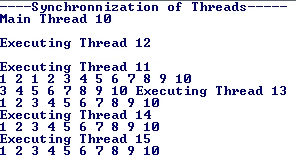
Run this program multiple times and watch the output:
Output 1:
Output 2:
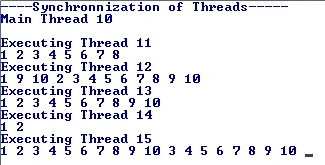
As you can see all the output will vary each time you run the program.
What is happening here is that all the threads are sharing the same object of the Printer class and trying to execute the same function at the same time so every time the shared data is being updated randomly which is an unstable state.
Synchronization of threads Solution to the problem of concurrency
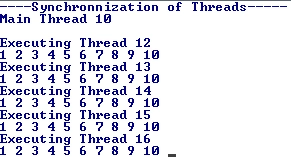
Use the locks whenever there's a Shared section. C# provides a Lock keyword that can be used to lock the section that is being accessed by multiple threads. This is the very basic technique to avoid the instability in a multithreaded environment while programming with C#.
The Lock keyword requires you to specify the token (an object reference) that must be acquired by a thread to enter within the lock scope. In the case of a private method you can lock it down by passing the reference of the current type using the "this" keyword.
For e.g.
public void PrintNumbersSynchronized()
{
    //Synchronization thread
    lock (this)
    {
        Console.WriteLine(" ");
        Console.WriteLine("Executing Thread {0}", Thread.CurrentThread.ManagedThreadId);

        for (int i = 1; i <= 10; i++)
        {
            Console.Write(i + " ");
        }

    }
}
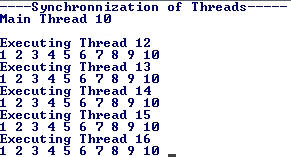
However if you are locking down a region of code within a public member, it is safer (and best practice) to declare a private object member variable to serve as the lock token:
RAHUL NEHAREPosted Jun 9, 2016, 6:20 AM
Nice article..very useful..
Sr KarthigaPosted Feb 26, 2016, 9:15 AM
good one
Sr KarthigaPosted Feb 26, 2016, 9:15 AM
nice explanation
Amit ChoudharyPosted Jun 6, 2015, 11:51 AM
That's why the only statement that needs to be in sync is inside the Lock statement not whole loop. The locks are to avoid Race conditions and dirty reads. Which is why we keep the functions separate those needs to be in sync. and there are ways to do that. You'll understand timely how thread can change the performance and improve user experience of an application.
Himanshu UpretiPosted Jun 1, 2015, 1:50 AM
Got it!!! Question is : how it is differentiating output if i have called PrintNumbersNonSync() inside loop... how threading helps in this scenario... if you use lock it means till u finishes looping it wont call next thread same is the case of direct function call inside loop... than how thread is useful please explain ?????
Rohatash KumarPosted Jul 26, 2011, 7:06 AM
Helpful article. thanks
Angelina ErinPosted Jul 26, 2011, 3:18 AM
Useful Article