

Introduction
Until now, the programs we have discussed so far were sequential ones, i.e. each of the them has a beginning, an execution sequence, and an end. While the program is being executed, at any point of time, there is a single line of execution. One thing that you must note that a thread in itself is not a program, as it cannot run on its own. However it can be embedded with any other program.
There are many definition of thread some of the A thread is a lightweight process, a thread is a basic processing unit to which an operating system allocates processor time and more than one thread can be executing code inside a process.
States of thread
1-New-This is a state when a thread is not started. But the thread is created.
2-Runnable- This is the execution state of the thread.
3-Blocked- This is the state when a thread is waiting for a lock to access an object.
4-Waiting-In this state a thread is waiting indefinitely for another thread to perform an action.
5-Timed__Waiting. A state in which a thread is waiting for up to a specified period of time for another thread to perform an action.
6-Not Runnable- after Runnable states these three states are assumed to be in a not Runnable state. These three states are waiting, Timed_waiting and Terminated.
7-Terminated- In this state the thread is dead.
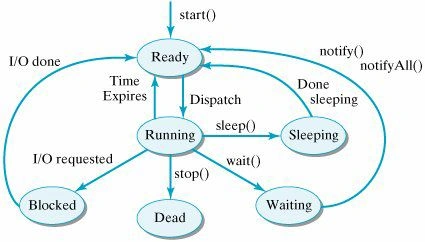
Life Cycle of a thread
Crating a thread
There are two ways for creating a thread.
Method-1 : By extend the Thread class of java.lang package.
Syntax
class MyThread extends Thread
{ -----------------;
-----------------;
}
public void run()
{
----------------;
----------------;
}
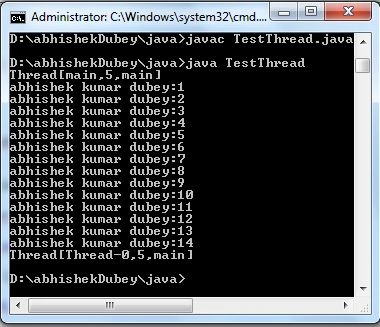
Example- In this Example we are going to create a thread with the help of the extends Thread class.
- class MyThread extends Thread
- {
- int i;
- MyThread(int i)
- {
- this.i=i;
- }
- public void run() //this method overrid from thread class
- {
- while(true)
- {
- System.out.println("abhishek kumar dubey:"+i++);
- try
- {
- Thread.sleep(1500); // use for break 1500 mili second
- }
- catch(InterruptedException e)
- {
- System.out.println(e);
- }
- if (i==15 ) // use for terminate the infinite loop
- {
- System.out.println(Thread.currentThread());
- break;
- }
- }
- }
- }
- public class TestThread
- {
- public static void main(String []args)
- {
- MyThread m1=new MyThread(1);
- m1.start(); // for start thread
- System.out.println(Thread.currentThread());
- }
- }
Output:
Method :2 By Implements Runnable Interface.
Note- If you make a thread by using Runnable Interface then it must override the run() method.
public MyThread implements Runnable {
-----------
-----------
public void run()
{
------
------
}
}
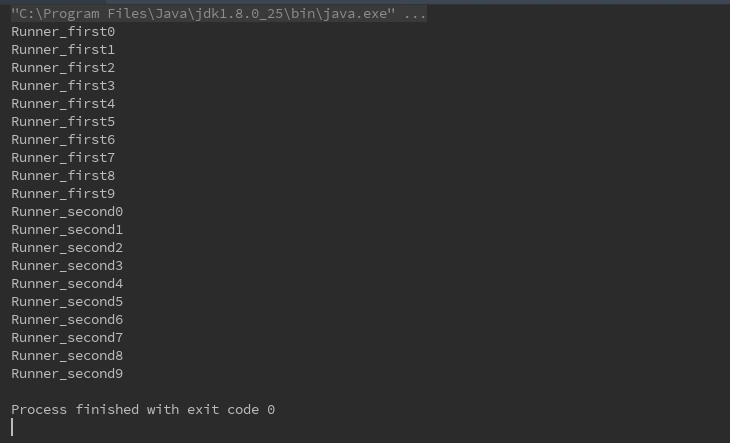
Example-
- import java.lang.*;
- class Runner1 implements Runnable {
- int i;
- public void run() //this method overrid from Runnable interface must be,fuctionality as per reqairements
- {
- i = 0;
- while (true) {
- System.out.println("Runner_first" + i++);
- if (i == 10)
- break;
- }
- }
- }
- class Runner2 implements Runnable {
- int i;
- public void run() {
- i = 0;
- while (true) {
- System.out.println("Runner_second" + i++);
- if (i == 10)
- break;
- }
- }
- }
- public class ThreadDemo {
- public static void main(String[] args) {
- Runner1 r = new Runner1();
- Thread t = new Thread(r); // I M P
- /*from here run() method call which is override in Runner class*/
- t.start(); // for start thread 4 execution
- Runner2 r1 = new Runner2();
- Thread t1 = new Thread(r1);
- /*from here run() method call which is override in Runner class*/
- t1.start();
- }
- }
Output
Summary
In this article, we learned about Threading in Java and creation of threads in our Java program.
Resource
First Step to Java's Multithreading
Use of ByteStreams and CharacterStreams in JAVA
Learning JDBC (Java Database Connectivity)
Working with Hibernate - Display , Insert, Update and Delete in JAVA
Matrix Multiplication in Java
Use of ByteStreams and CharacterStreams in JAVA
Learning JDBC (Java Database Connectivity)
Working with Hibernate - Display , Insert, Update and Delete in JAVA
Matrix Multiplication in Java
Comments
Join the conversation! Your thoughts help the community grow.