

Recently, Microsoft announced various new features in C# 7.0 with Visual Studio 2017. In C# 7.0, some new feature of tuples are enhanced with Visual Studio 2017. Tuples aren’t new in C# or.NET. They were first introduced as a part of.NET Framework 4.0. This useful feature of the tuple is all about returning multiple value without having:
- A class and list<> of the class.
- Array, observableCollection, ArrayList or Dictionary.
- A series of ref or out parameters.
It is similar to the code snippet given below.
- public (string name, string dept, int id) GetData()
- {
- return ("Avnish", "R&D", 001);
- }
Before C# 7.0, the use of tuple is given below.
- public Tuple<string, string, int> GetData2()
- {
- return new Tuple<string, string, int>("Rakesh", "Marketing", 002);
- }
Let's create a console project for demo.
Step 1
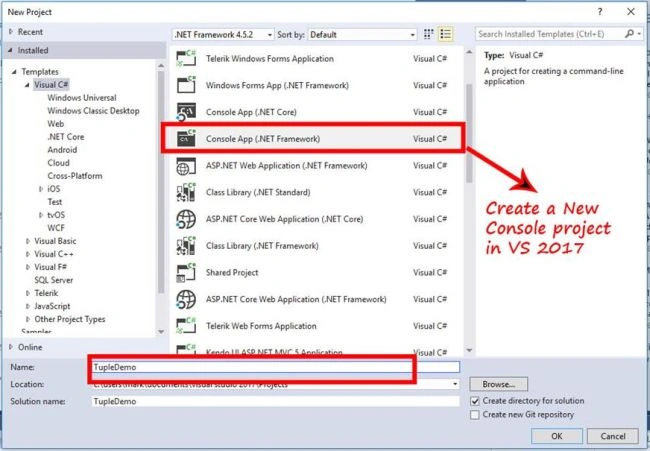
Create a new 'Console App' in Visual Studio 2017 RC or Visual Studio 2017.
Step 2
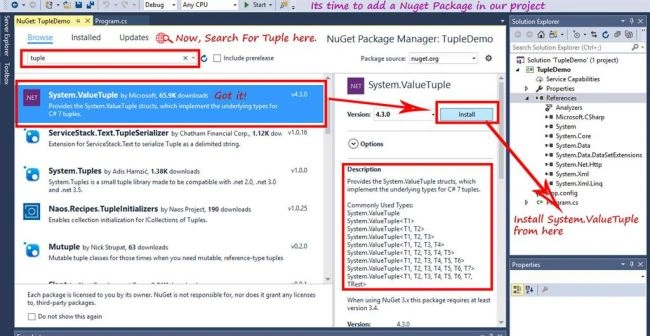
Go to add a NuGet package. By right click to "References" in Solution Explorer, click on "Manage NuGet Package". Now, search for "System.ValueTuple" and install such package.
Step 3
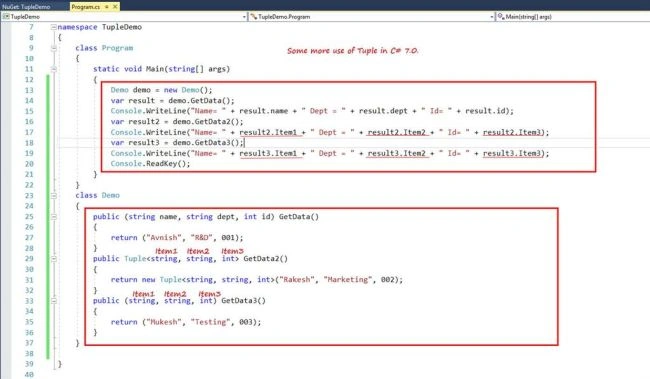
For use of tuples, add the code given below in Program.cs.
Create a new 'Console App' in Visual Studio 2017 RC or Visual Studio 2017.
Step 2
Go to add a NuGet package. By right click to "References" in Solution Explorer, click on "Manage NuGet Package". Now, search for "System.ValueTuple" and install such package.
Step 3
For use of tuples, add the code given below in Program.cs.
- namespace TupleDemo
- {
- class Program
- {
- static void Main(string[] args)
- {
- Demo demo = new Demo();
- var result = demo.GetData();
- Console.WriteLine("Name= " + result.name + " Dept = " + result.dept + " Id= " + result.id);
- var result2 = demo.GetData2();
- Console.WriteLine("Name= " + result2.Item1 + " Dept = " + result2.Item2 + " Id= " + result2.Item3);
- var result3 = demo.GetData3();
- Console.WriteLine("Name= " + result3.Item1 + " Dept = " + result3.Item2 + " Id= " + result3.Item3);
- Console.ReadKey();
- }
- }
- class Demo
- {
- public (string name, string dept, int id) GetData()
- {
- return ("Avnish", "R&D", 001);
- }
- public Tuple<string, string, int> GetData2()
- {
- return new Tuple<string, string, int>("Rakesh", "Marketing", 002);
- }
- public (string, string, int) GetData3()
- {
- return ("Mukesh", "Testing", 003);
- }
- }
- }
Step 4
Build and run the project.
Build and run the project.

Thanks for reading.
Avnish KumarPosted Mar 21, 2018, 4:20 AM
Thanks for your valuable feedback...
Avnish KumarPosted Mar 21, 2018, 4:18 AM
If you target a Framework that doesn’t yet include those types, you can instead pick them up from NuGet
Archana SainiPosted Mar 21, 2018, 4:08 AM
great information . Thanks :)
Md GhousePosted Jan 31, 2017, 11:56 PM
Good work u did Freind .... NiceExplination