

Introduction
In my previous article, “ Working with Claims Mapping Policies in Microsoft Entra ID ”, I explained how to configure Claims Mapping Policies to add custom claims such as first name and last name to tokens issued by Microsoft Entra ID.
Claims Mapping Policies are extremely useful when applications require additional user attributes beyond the default claims included in authentication tokens.
However, after configuring the Claims Mapping Policy and assigning it to the Service Principal, you may sometimes encounter the following authentication error while running the application:
OpenIdConnectProtocolException: Message contains error: 'invalid_request',
error_description: 'AADSTS50146'
At first glance, this error can be confusing because the Claims Mapping Policy itself may already be configured correctly.
This article explains:
Why the AADSTS50146 error occurs
The role of acceptMappedClaims
How to resolve the issue
Important security considerations
Best practices when working with Claims Mapping Policies
Understanding the Scenario
Suppose your application requires additional optional claims such as:
First Name
Last Name
inside the ID token or access token issued by Microsoft Entra ID.
Using Claims Mapping Policies, you configured the token to include:
{
  "given_name": "John",
  "family_name": "Doe"
}
You are successfully:
Created the Claims Mapping Policy
Assigned the policy to the Service Principal
Authenticated the application
However, during sign-in, the application throws the following exception:
OpenIdConnectProtocolException: Message contains error: 'invalid_request',
error_description: 'AADSTS50146'.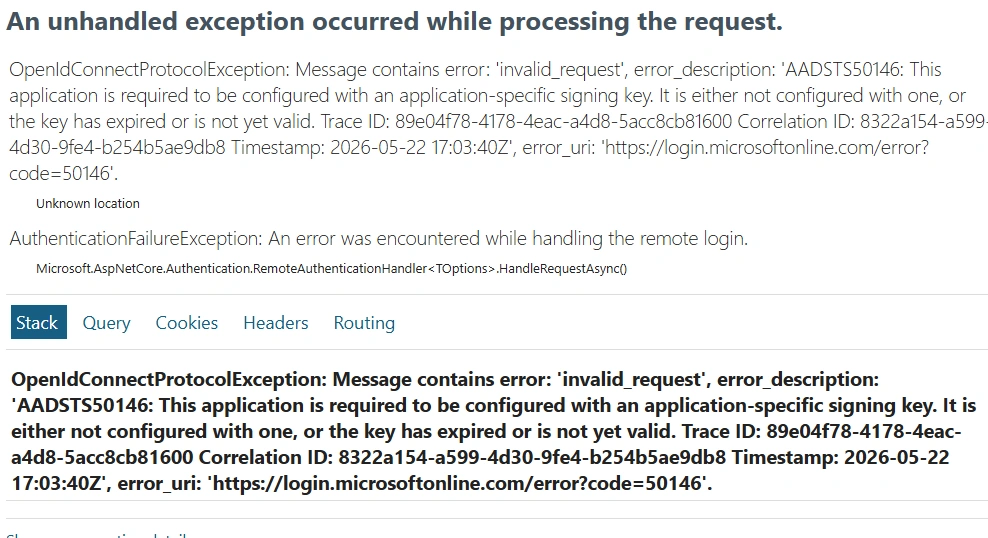
Why AADSTS50146 Happens?
By default, Microsoft Entra ID protects applications from receiving unexpected or modified token claims.
When a Claims Mapping Policy customizes the token payload, Microsoft Entra ID requires the application to explicitly acknowledge that it trusts these customized claims.
This is controlled using the following application manifest setting:
"acceptMappedClaims": trueIf this property is not enabled, Microsoft Entra ID blocks the token issuance and returns:
AADSTS50146
What Is acceptMappedClaims?
The acceptMappedClaims property tells Microsoft Entra ID:
This application explicitly accepts customized claims generated through Claims Mapping Policies.
Without this setting, Microsoft Entra ID assumes the application only expects the standard built-in token claims.
This is an important security mechanism because Claims Mapping Policies can alter the token structure and content.
How to Resolve the Error?
To resolve the issue, enable:
"acceptMappedClaims": true
in the application manifest.
Step-by-Step Configuration
Step 1 - Open Microsoft Entra ID
Navigate to: Microsoft Entra ID → App registrations, select your application.
Step 2 - Open the Manifest
From the left navigation menu, select: Manifest
Step 3 - Locate acceptMappedClaims
Find the following property: "acceptMappedClaims": null
Step 4 - Update the Value
Modify the value to: "acceptMappedClaims": true, save the manifest.
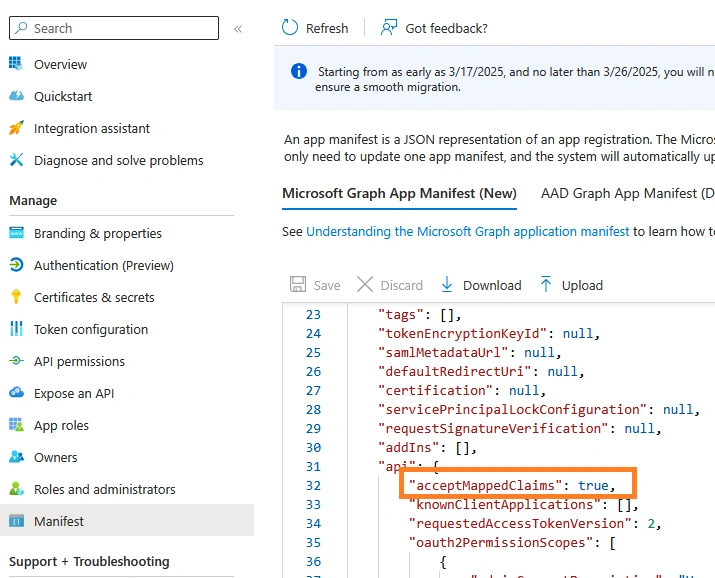
Verify the claim using my sample MVC application Entra-ID-MVC-App, just by replacing with your MS Entra ID Application configuration.

Summary
Claims Mapping Policies in Microsoft Entra ID provide a powerful mechanism for customizing tokens with additional user attributes and optional claims.
However, applications consuming customized claims must explicitly opt in by enabling:
"acceptMappedClaims": truein the application manifest.
If you are implementing token customization in Microsoft Entra ID, enabling acceptMappedClaims is a critical step to ensure successful authentication when using Claims Mapping Policies.
Join the conversation! Your thoughts help the community grow.