

Introduction
In this series of articles, we’ll learn all about OWIN features included in ASP.NET 4 and above. We will learn what OWIN is, how it works with ASP.NET, and what features it provides.
From the past few years, web application development has been extremely evolved and it's moving from monolithic frameworks towards more modular, loosely coupled individual working components that can be used and swapped easily without affecting the rest of the application. Basically, the architecture says, to use only what you need and this gives us benefits like better performance and flexibility.
ASP.NET web stack including ASP.NET (MVC, WebForms, Web Pages, Web APIs, SignalR) is dependent on System.Web assembly. In fact, every feature of ASP.NET is written in System.Web and System.Web assembly is part of the .NET framework. This is where problems start occurring because we can’t add new functionality without a new framework release. As .NET is huge and it has other components as well besides ASP.NET, so frequent release of a new framework is not possible. This means we can’t frequently add new features to ASP.NET in this modern evolutionary era of web technologies. Another problem with ASP.NET is its hard reliance on IIS. IIS is Microsoft's Internet Information Services which provides hosting services for .NET web apps at production.

Due to rapid changes in web technologies, the ASP.NET team is also changing the framework toward modern web development architecture which contains individually working pluggable components that can be used and swapped with each other independently from the host. This is where OWIN plays its role and provides solutions to the problems that we have with existing architecture. Now, let’s see how it fits into the picture.
What is OWIN?
OWIN is an acronym for Open Web Interface .NET. The name doesn’t really explain what OWIN is yet it gives us some hint that it’s something related to the Web and it is Open and for . NET. The www.owin.org website gives the following definition of OWIN,

The goal of OWIN is to decouple a web application from a web server so that we don’t have to worry about how the application will be deployed; instead, we just focus on solutions to our problems. OWIN provides an abstraction layer between a web server and a web application. Now, the question is how someone abstracts a web server from a web application.
Abstracting away a web server from a web application is, for sure, a very complex job and it should be understandable to the average developer. But OWIN has made it very simple and it abstracts a web server with a standard .NET delegate called AppFunc that takes System.Collections.Generic.IDictionary<string, object> as an argument and returns a System.Threading.Tasks.Task.

Every OWIN middleware takes an AppFunc as a parameter to communicate with each other and with the Server as well. The dictionary object is called the environment dictionary and it contains all information about HTTP requests that the server has passed to the application and the returning task object tells the server when the application has done processing.
Remember, OWIN is just a specification, it’s not a framework that you can download and install or get from NuGet Package Manager. It’s just a specification and it can have many implementations. Katana is one such implementation of OWIN that Microsoft has written for .NET web developers and introduced into the ASP.NET 4 framework release. The new ASP.NET Core is way ahead in that direction.
Parts of the OWIN Application
Now that we know about what Owin is and about the functionality it provides, let’s look into different parts one by one that are involved in the execution of the OWIN app from starting the app to receiving incoming HTTP requests and returning HTTP responses.
Host
Host is someone that hosts everything else, and starts an application along with the other parts of it. For an OWIN, the host can be any running Windows process from a console app to Windows service and even IIS.

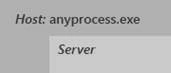
Server
The server is responsible for listening to incoming HTTP requests and returning responses to clients. In the case of IIS, both, the server and the host are IIS.
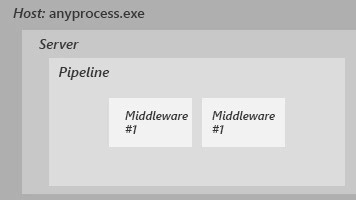
Pipeline
The server passes the request into the application through a pipeline of OWIN middleware using AppFunc. OWIN middleware is a self-contained piece of code that can inspect and modify both, incoming requests and outgoing responses. When a middleware receives a request using AppFunc, it performs some processing and when it completes the work, it passes the dictionary object to the next middleware. The idea is very similar to HTTP modules but instead, OWIN middleware is not event-driven and it's independent of IIS.
Application
Application is part of the system that is responsible for generating the actual response for an application that will be sent back to the client. Technically, there is no difference between an OWIN middleware and an application despite the application being intended to generate a response.
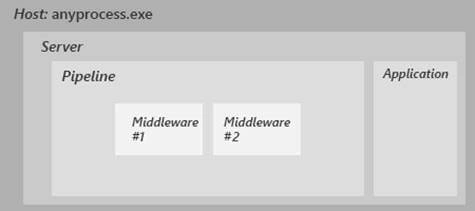
So, these are the parts that are involved in building an OWIN-based application.
Application Flow
Let’s take a step-by-step tour of an OWIN-based application from incoming requests to outgoing responses.
Step 1. At first, a client of some kind creates a connection to the server and sends an HTTP request.

Step 2. When the Server receives a request from a client, it then parses the request into predefined pieces of information, stores them into a dictionary object with specific keys, and passes it to the application.
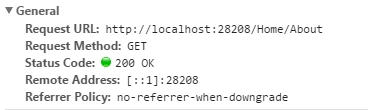
Step 3. The application then passes the environment dictionary to the first OWIN middleware in the pipeline to do its things. The middleware returns a System.Threading.Tasks.Task to tell the server when it has completed its processing.
Remember, OWIN is also part of the application.
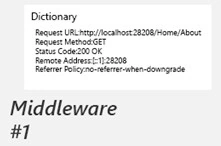
Step 4. When the first middleware completes its processing, it then passes the dictionary object to the next middleware in the pipeline and so on, until the request reaches the end of the pipeline. When the application part of the system receives a dictionary object from the last middleware in the pipeline, it generates a response for a client based on the request information in the object.
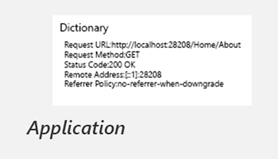
Step 5. When an application has done preparing a response and adding necessary response headers, it then signals the webserver to do its first write to the response stream. First, the server sends response header information to the client available at that point. After that, no one can modify the response header information because it has already been sent to the client but instead response body can be modified because the connection to the response stream is still open.
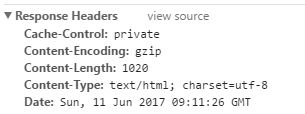
Step 6. At this point, the application part of the system passes the dictionary object to the last middleware pipeline allowing it to do its things. Remember at this point connection to the response stream is still open and OWIN middlewares can happily write into the response stream. Whatever will be written to the response stream will be sent back to the client as part of the application response.
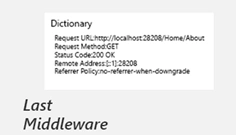
When the last middleware has finished its processing, it passes the dictionary object to the previous middleware and so on until the dictionary object reaches the beginning of the pipeline.
Step 7. Once the dictionary object reaches the beginning of the pipeline the application notifies the server that it completed its processing by the returning System.Threading.Tasks.Task.The server then sends a response back to the client before closing the connection to the response stream.
As I told you earlier the application and middleware are exactly the same thing despite the fact that the application is specifically built for generating a response. Middleware can also short-circuit the pipeline and generate and return the response to a client before the request reaches the application.
Environment Dictionary Keys
Owin' specification defined a lot of keys that will be available in the environment dictionary when the server passes a request to OWIN middleware using AppFunc. Here are some keys that you will be using in the OWIN environment dictionary object and the names of keys are nice looking and self-explanatory.
- RequestPath(string): contains information about the requested path.
- RequestHeaders(IDictionary<string, string[]>): contains information about request headers.
- RequestBody(Stream): contains a stream connection to the request body.
- ResponseStatusCode(Int32): contains response status code information.
- ResponseHeaders(IDictionary<string,string[]>): contains information about response headers.
- ResponseBody(Stream): contains the actual response body Stream connection.
You can see all the keys start with owin prefix so we may not mistakenly override any key already defined in the environment dictionary.
In the environment dictionary, there is also a key defined for a call back to register and this call back “OnSendingHeaders” will be called before when the server sends response headers to the client. Registering to call back will give us a nice opportunity to modify the response headers at the last point when they will be just about sent to the client.
[server: OnSendingHeaders(Action<Action<object>, object>)]
There is also a key defined to access the version of OWIN to enable and disable specific features based on different versions of OWIN.
Version(string versionString)
What is Project Katana?
As I have mentioned earlier OWIN is just a specification. Project Katana is Microsoft's implementation of OWIN specification for .Net web developers. Katana is an open-source project and is available at https://github.com/aspnet/AspNetKatana/. Project Katana is not a book implementation of OWIN instead people at Microsoft added some extra features to it for the ease of use of developers. Owin is already included for use in ASP.Net 4 with Project Katana and it’s an integral part of the framework now. Some identity-related features of ASP.Net are implemented as OWIN middlewares and available at Nuget to download. ASP.Net identity features like authentication and authorization are implemented as OWIN middleware so it can be used with any OWIN-based technology. Let me show you an inside look at an ASP.Net MVC project with framework release ASP.Net 4 and above.
Now let’s just create a new ASP.Net MVC application with individual user accounts selected as authentication type.
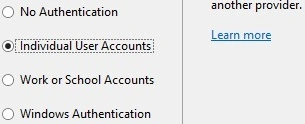
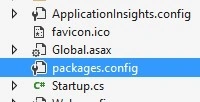
Now press OK to create the project, once the project is ready open packages.config file from Solution Explorer.
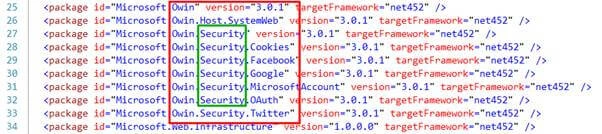
Inside the file, you will see some OWIN packages are already installed in your project and most of them are identity-related related will be used to add OWIN-based authentication and authorization features to the project.
To manage the length of this article we have to wrap up by discussing the summary of what we have learned so far. In the next article, we will learn how we can build our own OWIN pipeline and middleware. I will be writing more on OWIN features included in ASP.Net 4 and above, So I’ll see you in the next writing.
Summary
In this write-up, we have discussed the following concepts briefly.
- Modern web development architecture is based on the individual working components decoupled from other parts of the application.
- The goal of OWIN is to decouple .Net web applications from web servers.
- OWIN application has different working parts (Host, Server, Middleware Pipeline, and Application).
- Katana is a Microsoft implementation of OWIN specification built for .Net web developers, and it's open source, and available at GitHub.
Nitin JainPosted Jul 4, 2019, 2:07 PM
Nice one...simple but precise article...waiting for next one. Thanks
Prasad korhalePosted Jun 14, 2019, 1:37 PM
Very informative and precise article Mobeen. Thank you!
Ehsan SajjadPosted Jun 13, 2017, 2:27 PM
Very well wrote, will be waiting for other parts :)
Manikandan MurugesanPosted Jun 13, 2017, 1:14 PM
Lot of information abt ASP.NET....That's cool...waiting for nxt part..Keep sharing..