

Introduction
100's and 1000's of classes are defined in .NET Framework and all the classes are organized under various namespaces. You can think of namespaces as boxes with names at the top and all the classes relevant to the box are put in the box. In other words, under that namespace. So when we want to use a class, we can first refer to the namespace. Referring to the namespace gives access to all the classes under that namespace. It is like opening a box and we have access to all the files inside the box. We can also directly reference a class using the namespace . (dot) class name ( for example, namespace.classname). That also known as a fully-qualified name.
In C#, namespaces have been used extensively, first when using the .NET Framework classes and secondly when we create our own types. We can create our own user-defined namespaces.
In C#, namespaces have been used extensively, first when using the .NET Framework classes and secondly when we create our own types. We can create our own user-defined namespaces.
Benefits of having Namespace
Having namespaces helps you to control the scope of the class and its methods. If there are no namespaces, we would not be able to use multiple classes with the same name.
Having namespaces helps you to control the scope of the class and its methods. If there are no namespaces, we would not be able to use multiple classes with the same name.
For example, assume we have a class called Console with a method WriteLine() under the namespace MyNamespace. (Such as MyNameSpace.Console.WriteLine. I agree it's a bad idea to create such class and method, since we already know there's a similar class in the .NET Framework under System Namespace.System.Console.WriteLine().)
But in reality we might encounter a situation wherein we have the same class name as a class in the .NET Framework or third-party DLLs may have a similar class with the same names. In such cases, namespaces help us to differentiate the classes and use them efficiently.
Note: The Visual Studio IDE helps us to organize the classes under multiple namespaces by defaulting the project name as the namespace of the class, but it is not required. Namespaces do not refer to or correspond to a file or directory.
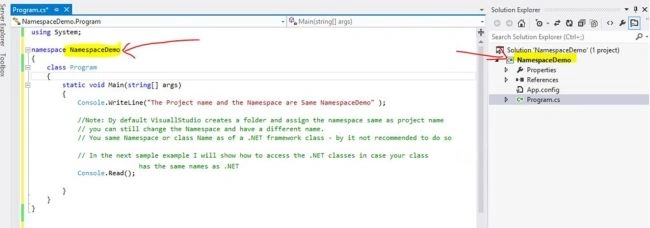
Using namespaces: A class can be invoked from a namespace using the following 3 ways.
But in reality we might encounter a situation wherein we have the same class name as a class in the .NET Framework or third-party DLLs may have a similar class with the same names. In such cases, namespaces help us to differentiate the classes and use them efficiently.
Note: The Visual Studio IDE helps us to organize the classes under multiple namespaces by defaulting the project name as the namespace of the class, but it is not required. Namespaces do not refer to or correspond to a file or directory.
Using namespaces: A class can be invoked from a namespace using the following 3 ways.
- Writing the fully qualified name (see the following example).
- Implementing a using directive
- Implementing a using alias (see the following example).
Note: The preceding ways are used for calling classes for both .NET namespaces or from custom/own namespaces.
The using directive allows us to use the types (class) without having to specify the namespace.
The using alias allows us to create an identifier for a namespace or type / class. The identifier is assigned a fully qualified name.
Example
- using Proj = MyProjectNamespace.MyProjectClass;
The namespace alias qualifier (::) is used to search for identifiers. It is used to reference a namespace alias and global:: is used to reference the global namespace. (Note: global is not a predefined alias qualifier, it gets this special status after it's used with (::). Also you cannot use the global word with using alias (for example, using global = MyProjectNamespace.MyProjecClass), this is a compiler error, because as mentioned earlier, global :: always references the global namespace and not an alias.
Use of global namespace alias global:: is used to access the global namespace.
The global namespace access is required in scenarios where the user defined a class / type has the same name as the .NET Framework class and the .NET defined class is now hidden from the class in the current namespace. See the following example for understanding.
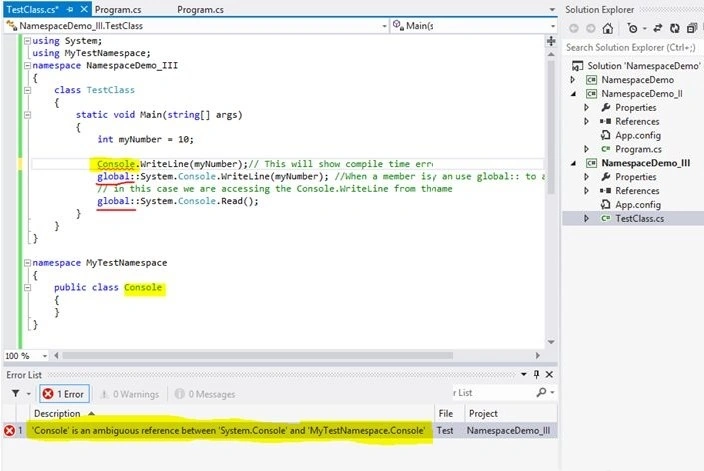
Note: For simplicity and a better understanding I have defined all the classes and namespace in the same file. You can have multiple files for each class. (See the attachments for the complete code.).
In the preceding example I have defined a namespace (MytestNamespace) having one public class (Console).
In the TestClass (that is a console application) I am referencing the MyTestNamespace (using MyTestNamespace). Also I want to display the value of myNumber using the System.Console.WriteLine() method.
As using System is defined above when I try to use Console.WriteLine(myNumber); we will the following compile time error:
Error 1 'Console' is an ambiguous reference between 'System.Console' and 'MyTestNamespace.Console'
So .NET is not sure which console we are trying to use in such s scenario. We can use the global namespace alias (::) to access the global namespace.
In the next line we are using the following.
- global::System.Console.WriteLine(myNumber);
- global::System.Console.Read();
SubashPosted Sep 9, 2016, 10:42 AM
Very nice explanation
Ratnesh SinghPosted Jun 18, 2015, 3:35 AM
good show
Santhakumar MunuswamyPosted Jun 17, 2015, 3:21 PM
Welcome
Santhakumar MunuswamyPosted Jun 17, 2015, 3:21 PM
Good Start
Debasis SahaPosted Jun 17, 2015, 7:53 AM
good start
Afzaal Ahmad ZeeshanPosted Jun 17, 2015, 3:48 AM
It is beauty of C# that it allows you to create different namespaces in the same project. But, I don't see any requirement why you should be using the global context here. You can directly, just write System.Console, and/or MyTestNamespace.Console. It would work. So, please remove the wrong (unnecessary) code part.
Hussain PatelPosted Jun 17, 2015, 3:45 AM
thanks
Pankaj Kumar ChoudharyPosted Jun 17, 2015, 3:12 AM
Nice Start........