

Process
A process is an operating system concept and it is the smallest unit of isolation provided by Windows OS. Each application or piece of code runs in Windows runs under the boundary of a process. Application isolation makes sure the failure of one process does not affect the functioning of another process. It is also necessary to ensure that code running in one application cannot adversely affect other, applications.
When you run an application, Windows creates a process for the application with a specific process id and other attributes. Each process is allocated with necessary memory and a set of resources.
Every Windows process contains at least one thread which takes care of the application execution. Processes can have many threads and they speed up execution and give more responsiveness but a process that contains a single primary thread of execution is considered to be more thread-safe.
In Figure 1, you can see how the processes running in the machine are listed. Each process has name, id, description, etc. and each process can be uniquely identified using process ID.
System.Diagnostics provides a number of classes to deal with processes including Process class.
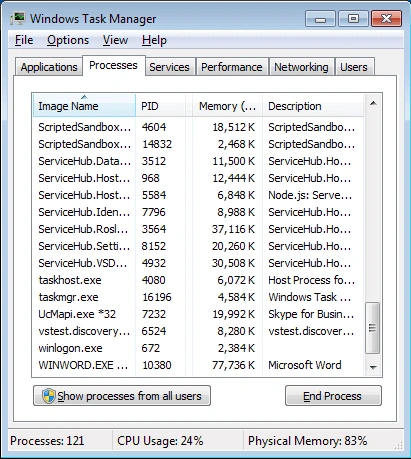 Figure 1
Let us try an application using C# to demonstrate working with the process. The code in Listing 1 explains two things,
How to start a process, how to kill/terminate a process.
- using System;
- using System.Diagnostics;
- namespace SampleProcess
- {
- public class SomeProcess
- {
- public static void Main(string[] args)
- {
- Process myProcess = new Process();
- try
- {
- // myProcess.StartInfo.UseShellExecute = false;
- // You can start any process, HelloWorld is a do-nothing example.
- myProcess.StartInfo.FileName = @"C:\Users\[UserID]\source\repos\BMIRuleEngine\BMIRuleEngine.exe";
- // myProcess.StartInfo.CreateNoWindow = true;
- myProcess.Start();
- // The process you are starting should terminate itself.
- // If you set CreateNoWindow = true, the application will run without a window and
- // it must terminate itself or you can do it programmatically from this application using the Kill method.
- // Do your other tasks here
- // Let us kill the process which we created because my application doesn’t terminate by itself.
- Process[] processes = Process.GetProcessesByName("BMIRuleEngine");
- foreach(Process process in processes)
- {
- process.Kill();
- }
- }
- catch (Exception ex)
- {
- Console.WriteLine(ex.Message);
- }
- }
- }
- }
Listing 1
- StartInfo - gets or sets the properties to pass to the Process.Start() of the Process.
- StartInfo.CreateNoWindow - help you specify whether you need to run the application with a window or without a window.
- StartInfo.UseShellExecute - help you specify whether to use the operating system shell to start the process or not. If you set UseShellExecute=True, the application will use the operating system shell to start processes. With OS shell, you can start any document (which is any registered file type associated with an executable that has a default open action) and perform operations on the file, such as printing, by using the Process object. If you set UseShellExecute to false, you can start only executables by using the Process object.
- Arguments – help you specify arguments to be passed to the application.
There are many other useful properties available for the Process class, please check it out.
Application Domain
Application Domain or AppDomain is one of the most powerful features of the .NET framework. AppDomain can be considered as a light-weight process. An application domain is a .NET concept whereas the process is an operating system concept. Both have many characteristics in common. A process can contain multiple app domains and each one provides a unit of isolation within that process. Most importantly, only those applications are written in .net, or in other words, only managed applications will have application domain.
Application domain provides isolation between code running in different app domains. App Domain is a logical container for code and data just like process and has separate memory space and access to resources. App domain also serves as a boundary like a process that does avoid any accidental or illegal attempts to access the data of an object in one running application from another.
System.AppDomain class provides you ways to deal with the application domain. It provides methods to create a new application domain, unload domain from memory, etc.
Why we need App Domain while we have Process
This is the first question that came to my mind while I first heard about application domains.
A Process is much heavier and expensive to create and maintain. So, the server would have a tough time managing the processes. So, when Microsoft developed the .Net framework, they introduced the concept of Application Domain and it is an integral part of the .net framework.
While AppDomains still offer many of the features that a Windows process offers, they are more efficient than a process by enabling multiple assemblies to be run in separate application domains without the overhead of launching separate processes. An App Domain is relatively cheaper when compared to the process to create, and has relatively less overhead to maintain.
Think about a server that hosts hundreds of applications. Before the app domain was introduced, each running application used to create one process. AppDomain is of great advantage for ISP (Internet Service Provider) who hosts hundreds of applications. Because each application can be contained in an application domain and a process can contain many such AppDomains, thus providing a lot of cost-saving.
In short, any process running a managed application will have at least one app domain in it. Since AppDomain is a .NET concept, any process running unmanaged code will not have any application domain.
Figure 2 will help you understand the concept better.
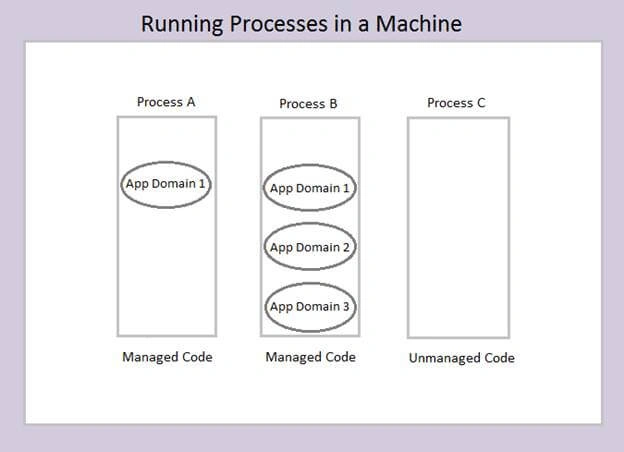 Figure 2
Process A runs managed code with one application domain while Process B runs managed code has three application domains. Note that Process C which runs unmanaged code has no application domain.
Code and data are safely isolated using the boundary provided by the AppDomain. If two AppDomains want to communicate with each other pass objects, .NET techniques such as Remoting or Web Services should be used.
Application Domain Example
Create a Console Application
I am using Visual Studio 2017 for this demo.
File -> New -> Project
From the left pane, Visual C# -> Windows classic desktop
On the right pane, choose Console App.
Alternatively, you can type the console app in the search box which is located at the top right corner of the window, and choose the type of solution you want to create.
There will be a Console App (.NET Framework) and Console App (.NET Core).
If you are going to use the application only in windows, choose .NET framework one.
.NET Core project will help you create a command-line application that can work on .NET Core on Windows, Linux, and macOS.
For our purpose, the .NET framework is enough.
There is a Visual C# version and a Visual Basic version for the above two types of application, choose the right one based on which language you are going to use.
I am going to use C# one instead of the VB one.
Name the project as AppDomainSample and click OK.
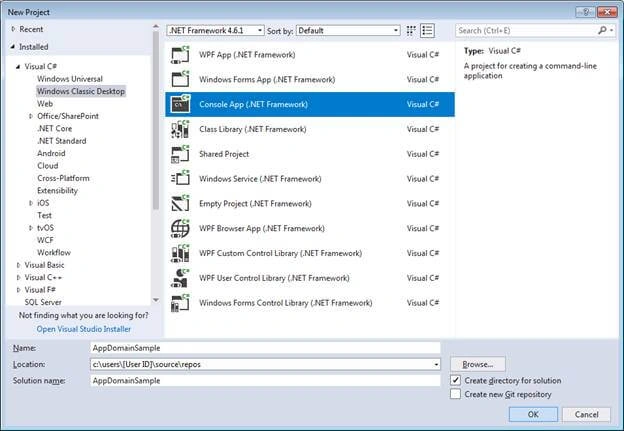 Figure 3
Add the below code shown in Listing 2 to the Program class and build the application.
I will show you how to create an application domain.
- using System;
- namespace AppDomainSample
- {
- class Program
- {
- static void Main(string[] args)
- {
- // Get the current application domain
- AppDomain appDomain1 = AppDomain.CurrentDomain;
- Console.WriteLine("App Domain Name : '{0}'", AppDomain.CurrentDomain.FriendlyName);
- Console.WriteLine("ID of the Domain : '{0}'", AppDomain.CurrentDomain.Id);
- Console.ReadKey();
- }
- }
- }
Listing 2
You can see in Figure 4; an application domain is created by default and code is running under that app domain.
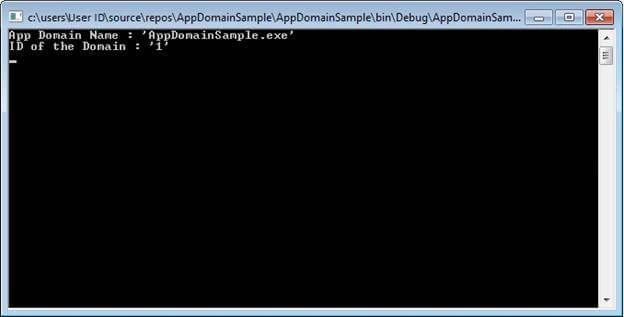 Figure 4
To create a new app domain, just add the following line of code.
- AppDomain newAppDomain = AppDomain.CreateDomain("NewAppDomain");
It will create an application domain with the name NewAppDomain.
Assemblies
As per Microsoft, “An assembly is a collection of types and resources that forms a logical unit of functionality. All types in the .NET Framework must exist in assemblies; the common language runtime does not support types outside of assemblies. An assembly is a unit at which security permissions are requested and granted.”.
In more simple terms, when you create a console application, or a windows forms application or a class library, or other types of applications in .NET, you are creating an assembly. Assembly can be a .exe or .dll. A console application creates and .exe while a class library creates a .dll.
When you add a reference to another project or a .dll in your application, you are loading an assembly into your project. It is a static way of assembly binding since you know which assembly to be loaded before compilation. So, it is easy for you to create objects of classes in those assemblies and to use their methods.
There are situations when you will have to dynamically load an assembly during runt time. System.Reflection.Assembly class provides different ways to load Assemblies – Assembly.Load(), Assembly.LoadFrom(), Assembly.LoadFile().
Use these methods to load an assembly, into the current application domain.
Assembly Loading Example
I am going to create another console application.
This time I am leaving the default name as it is.
This will create a new Console Application with the name ConsoleApp1.
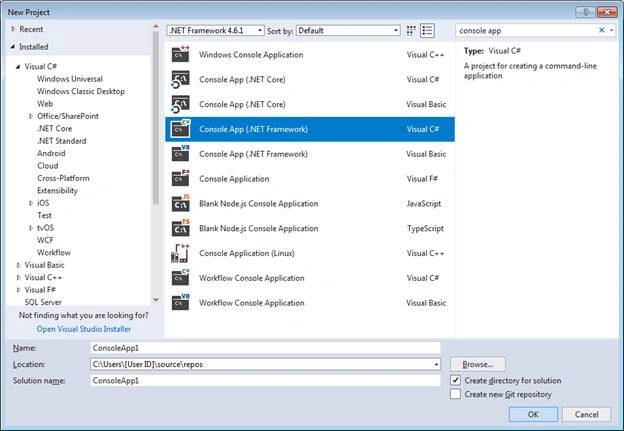 Figure 5
Just added a line of code in the Main method and added GetAssemblyName() as a public method.
- using System;
- namespace ConsoleApp1
- {
- public class Program
- {
- static void Main(string[] args)
- {
- Console.WriteLine("Assembly Loading Demo.");
- }
- public string GetAssemblyName()
- {
- Console.WriteLine("This is ConsoleApp1!");
- Console.WriteLine("App Domain Name : '{0}'", AppDomain.CurrentDomain.FriendlyName);
- Console.WriteLine("ID of the Domain : '{0}'", AppDomain.CurrentDomain.Id);
- return AppDomain.CurrentDomain.FriendlyName;
- }
- }
- }
Listing 3
Creating an object of a class/type in the dynamically loaded assembly and Dynamically invoking a method with Reflection
Now go back to the AppDomainSample project and add the below code to the Main method.
- // Use the path to load the assembly into the current application domain.
- Assembly a = Assembly.LoadFrom(@"C:\Users\u23027\source\repos\ConsoleApp1\ConsoleApp1\bin\Debug\ConsoleApp1.exe");
- // Get the Program class of the ConsoleApp1 to use here.
- Type programClass = a.GetType("ConsoleApp1.Program");
- // Get the method GetAssemblyName method to make a call.
- MethodInfo getAssemblyName = programClass.GetMethod("GetAssemblyName");
- // Create an instance o.
- object programObject = Activator.CreateInstance(programClass);
- // Execute the GetAssemblyName method.
- getAssemblyName.Invoke(programObject, null);
- Console.ReadKey();
Listing 4
You need to add a reference to the System.Reflection namespace.
The assembly ConsoleApp1.exe will be loaded to the same application domain as the AppDomainSample is running.
You can verify this by looking at the output of the program as shown in Figure 6.
The assembly is loaded onto the current AppDomain even when you statically load assemblies, I mean by adding a reference to your project before compilation.
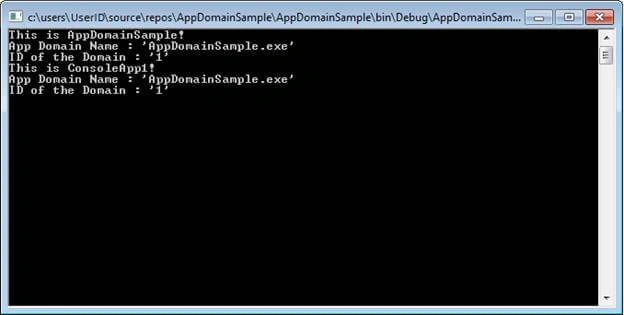 Figure 6
Dynamically invoking a static method with Reflection
For invoking a static method, you only need to do a few changes to the code for invoking an instance method.
You don’t need to create an instance of the class.
In this example, you can comment on the line:
- object programObject = Activator.CreateInstance(programClass);
While invoking the method, you don’t need to pass the object as a parameter, so pass it as null.
So, the code will change like:
- getAssemblyName.Invoke(null, null);
Memory and Performance
As we have seen the assemblies are loaded onto the current application domain. This may create memory issues when there are large assemblies to load or the number of assemblies increases.
So, it is better to unload the unwanted assemblies once it is executed.
You can use the Unload method of the AppDomain class to unload the contents (all assemblies) of an application domain.
- AppDomain.Unload(appDomainObject);
But, once an assembly is loaded an application domain, you cannot unload the assembly alone from the AppDomain.
To overcome this, we can create a new Application Domain and load the new assemblies there. Then, after the new assemblies are executed, you can safely unload the new app domain.
This approach has two benefits,
- All the unwanted assemblies are removed from the memory.
- Main application thread and related references are maintained in the memory.
Create a new application domain.
- AppDomain newAppDomain = AppDomain.CreateDomain("NewAppDomain");
NewAppDomain is the name of the AppDomain.
- newAppDomain.ExecuteAssembly(@"C:\Users\u23027\source\repos\ConsoleApp1\ConsoleApp1\bin\Debug\ConsoleApp1.exe");
The above line of code will load the assembly ConsoleApp1 into the NewAppDomain application domain and will start executing it.
After you have done executing the new assembly, you can unload it using:
- AppDomain.Unload(newAppDomain);
To test if ConsoleApp1 is loaded into the new application domain, go to the ConsoleApp1 project and add the following two lines to the Main method.
- Console.WriteLine("App Domain Name : '{0}'", AppDomain.CurrentDomain.FriendlyName);
- Console.WriteLine("ID of the Domain : '{0}'", AppDomain.CurrentDomain.Id);
Now build the ConsoleApp1 project and build and run the AppDomainSample project.
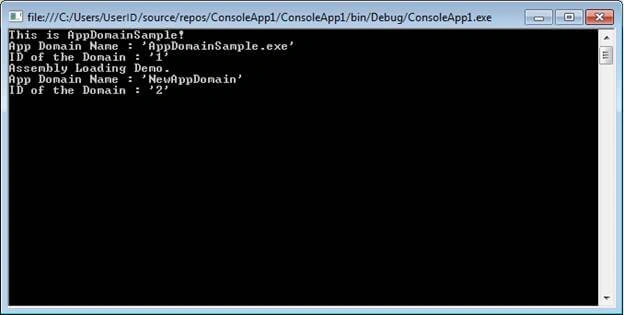 Figure 7
You can see that the ConsoleApp1 project is loaded into the NewAppDomain application domain we created.
Source code is attached to this article.
You can try other methods available with Assembly, AppDomain, and Process class.
References
- https://msdn.microsoft.com/en-us/library/system.diagnostics.process(v=vs.110).aspx
- https://docs.microsoft.com/en-us/dotnet/framework/app-domains/application-domains
- https://docs.microsoft.com/en-us/dotnet/framework/deployment/best-practices-for-assembly-loading
- https://msdn.microsoft.com/en-us/library/43wc4hhs(v=vs.100).aspx
- https://docs.microsoft.com/en-us/dotnet/framework/app-domains/how-to-load-assemblies-into-an-application-domain
- https://www.c-sharpcorner.com/UploadFile/84c85b/clr-internals-process-and-application-domain/
- https://www.dotnetspider.com/forum/ViewForum.aspx?ForumId=139934
- https://www.codeproject.com/Articles/597398/Loading-Assemblies-using-Assemb
Joandre TaitPosted Mar 29, 2023, 10:46 PM
Think your tutorial here is being sold by a 3rd party. Seems that their screenshots match yours exactly and the blurred out pages in the "preview" can clearly be made out as screenshots from this C# Corner content: https://www.studocu.com/row/document/government-college-university-faisalabad/web-design-and-development/application-domain/35343312
RomainPosted Oct 20, 2020, 2:41 AM
Firstly thank you for this article.Also, I have a question. I am working on a application which works with C# , C++/ClI and C++ code.The entry point is C# dll and after we move to C++/CLI wrapper in order to launch a C++ executable. The C++ executable is launched in a new thread and in this new thread context, some assembly files are not loaded. My question is how to load them ? Or many there is a technical way to load assembly for different threads.
Tridip BhattacharjeePosted Jan 8, 2018, 4:15 AM
How two routine running in 2 different app domain in same process can communicate with each other?