

Introduction
In this article, we will see how to create one of the most used cognitive services in Azure, which is Azure form recognizer,
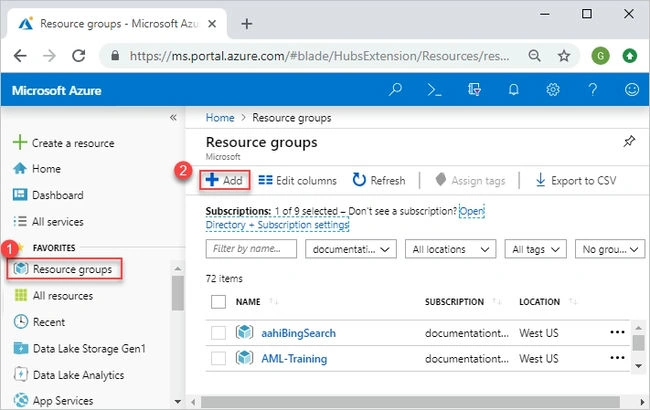
in order to create a form recognizer, follow the steps below.
Step 1. Log in to the Azure portal at https://portal.azure.com using your credential.

Step 2. In the window, click on +create resource, and a new window appears. Type create storage account on the search bar and click search.
- After the resource group is created, navigate to the resource tab.
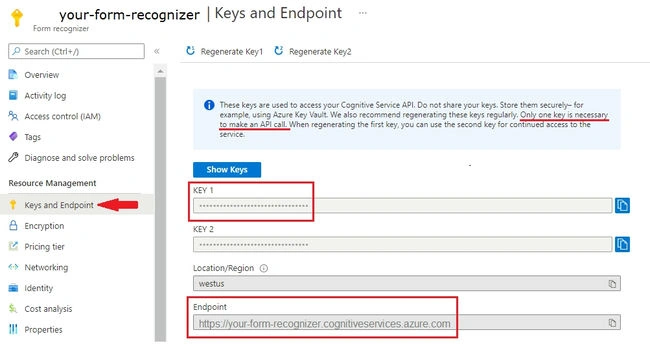
- Where the API endpoints and the access keys can be found for the form recognizer.
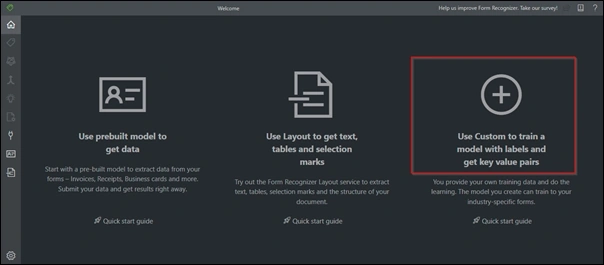
Step 3. Train a custom model in the Form recognizer
- prepare a set of documents given as samples to train your module.
- Generally, there are two ways to train a custom model:
- Labeled data:
- Unlabeled data with pre-built models:
- now you have to train the model by feeding the sample data; remember to label them
- the more images you train, the more accurate your module will become.
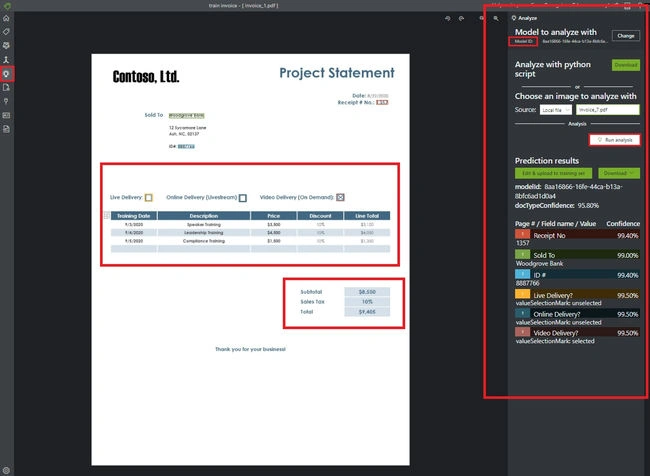
Step 4. Analyzing the module
- After successfully training the module, you now have to analyze the module.
- Here you can integrate using the API endpoints and access keys as told in Step 3
- An API can be used in analyzing the document.
Step 5. Finally, you can now integrate with the application
- The extracted data can be used as per your requirements.
- Here, we can use this and integrate the form recognizer with your application,
- Remember to refer to the official documentation part, which may give you more insights.
Conclusion
Microsoft has a lot of cognitive services; in this article, we have created a Form recognizer, step by step integration process; I hope this is useful; good Luck.
VamsiPosted May 18, 2023, 7:36 AM
Great article with fantastic content! Highly informative and well-explained