

Update record in Database using textbox in TypeScript
Note: This program will work only with Internet Explorer.
In this article, I will explain how to update a record from a database using a TextBox in TypeScript.
First I created the database EmpDetail and then I created a table in this database.
Query Code
- CREATE TABLE [dbo].[EmpSalary_Info](
- [id] [int] NULL,
- [name] [varchar](50) NULL,
- [salary] [int] NULL
- ) ON [PRIMARY]
Now insert some data in the EmpSalary_Info table. Then use the following procedure.
Step 1
Open Visual Studio 2012 and click "File" -> "New" -> "Project...". A window is opened. In this window, click "HTML Application for TypeScript" under Visual C#.
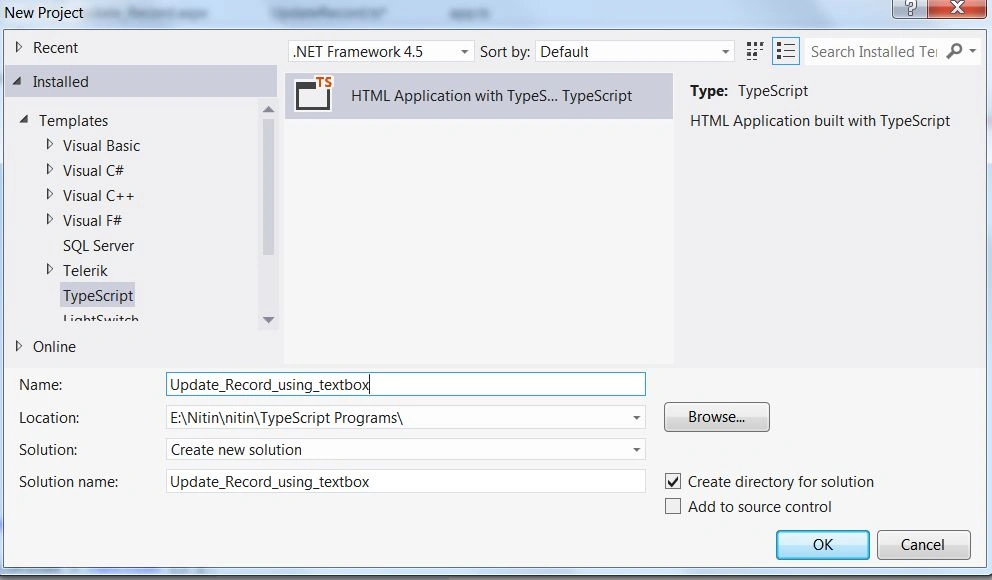
Give the name of your application as "Update_Record_using_textbox" and then click "Ok".
Step 2
The project will then be created and a new window is opened on the right side. This window is called the Solution Explorer. The Solution Explorer contains the ts file, js file and CSS and aspx files.

Coding
UpdateRecord.ts
- class Update_Record
- {
- update_record()
- {
- var txtid = ( < HTMLTextAreaElement > document.getElementById('txtid')).value;
- var txtname = ( < HTMLTextAreaElement > document.getElementById('txtname')).value;
- if (txtid.length != 0 && txtname.length != 0) {
- var connection = new ActiveXObject("ADODB.Connection");
- var connectionstring = "Data Source=.;Initial Catalog=EmpDetail;Persist Security Info=True;User ID=sa;Password=password@123;Provider=SQLOLEDB";
- connection.Open(connectionstring);
- var rs = new ActiveXObject("ADODB.Recordset");
- rs.Open("update EmpSalary_Info set EmpName = '" + txtname + "' where EmpId=" + txtid, connection);
- alert("Update Record Successfuly");
- connection.close();
- } else
- {
- alert("Please textbox's value");
- }
- }
- ShowAll()
- {
- var connection = new ActiveXObject("ADODB.Connection");
- var connectionstring = "Data Source=.;Initial Catalog=EmpDetail;Persist Security Info=True;User ID=sa;Password=password@123;Provider=SQLOLEDB";
- connection.Open(connectionstring);
- var rs = new ActiveXObject("ADODB.Recordset");
- rs.Open("select * from EmpSalary_Info ", connection);
- rs.MoveFirst();
- var span = document.createElement("span");
- span.style.color = "Blue";
- span.innerText = " ID " + " Name " + " Salary";
- document.body.appendChild(span);
- while (!rs.eof) {
- var span = document.createElement("span");
- span.style.color = "green";
- span.innerText = "\n " + rs.fields(0) + " | " + rs.fields(1) + " | " + rs.fields(2);
- document.body.appendChild(span);
- rs.MoveNext();
- }
- rs.close();
- connection.close();
- }
- }
- window.onload = () =>
- {
- var bttnupdate = document.getElementById("update");
- var bttnshow = document.getElementById("showall");
- var obj = new Update_Record();
- bttnshow.onclick = function()
- {
- obj.ShowAll();
- }
- bttnupdate.onclick = function()
- {
- obj.update_record();
- }
- };
Update_Record.aspx


Join the conversation! Your thoughts help the community grow.