

Here we will first insert some records into an Insert.aspx page. After inserting the records the control will move to the Default.aspx page where we can visualize the records that we have already inserted. Here the first record will be displayed as a link. So if we need to update some values other than the first record, then we will click the corresponding record link and the control moves to the Update.aspx page. We can update the records with an update button or if we don't want to update the record then click the cancel button, so that the control will move to the Default.aspx page.
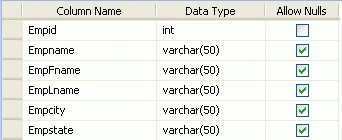
Table Creation
Insert.aspx code
<%@ Page Language="vb" AutoEventWireup="false" CodeBehind="Insert.aspx.vb"Inherits="Gridview_update_other_page_vb.Insert" %>

<!DOCTYPE html PUBLIC "-//W3C//DTD XHTML 1.0 Transitional//EN""http://www.w3.org/TR/xhtml1/DTD/xhtml1-transitional.dtd">

<html xmlns="http://www.w3.org/1999/xhtml" >
<head runat="server">
    <title>Untitled Page</title>
</head>
<body>
    <form id="form1" runat="server">
    <div>
    <h2>Insert Employee Details</h2>
    <asp:Label ID="Label1" runat="server" Text="EmpName" Font-Bold="True"
        Width="100px"></asp:Label>
    <asp:TextBox ID="txtFullName" runat="server"></asp:TextBox><br />

     <asp:Label ID="Label2" runat="server" Text="FName" Font-Bold="True"
        Width="100px"></asp:Label>
    <asp:TextBox ID="txtFName" runat="server"></asp:TextBox><br />

     <asp:Label ID="Label3" runat="server" Text="LName" Font-Bold="True"

        Width="100px"></asp:Label>
    <asp:TextBox ID="txtLName" runat="server"></asp:TextBox><br />

     <asp:Label ID="Label4" runat="server" Text="City" Font-Bold="True"
        Width="100px"></asp:Label>
    <asp:TextBox ID="txtcity" runat="server"></asp:TextBox><br />

     <asp:Label ID="Label5" runat="server" Text="State" Font-Bold="True"
        Width="100px"></asp:Label>
    <asp:TextBox ID="txtstate" runat="server"></asp:TextBox><br />
    <asp:Button ID="btn_insert" runat="server" Text="Insert Records"
        Font-Bold="True" onclick="btn_insert_Click" />
    </div>
    </form>
</body>
</html>
Insert.aspx.vb code
Imports System.Data
Imports System.Data.SqlClient

Partial Public Class Insert
    Inherits System.Web.UI.Page
    Dim strConnString As String = System.Configuration.ConfigurationManager.ConnectionStrings.Item("ConnectionString").ToString()
    Dim con As New SqlConnection(strConnString)

    Dim str As String
    Dim com As SqlCommand
    Dim sqlda As SqlDataAdapter
    Dim ds As DataSet

    Protected Sub btn_insert_Click(ByVal sender As Object, ByVal e As EventArgs) Handlesbtn_insert.Click
        con.Open()
        str = "insert into employee(Empname,EmpFname,EmpLname,Empcity,Empstate) values('" & txtFullName.Text & "','" & txtFName.Text & "','" &
txtLName.Text & "','" & txtcity.Text & "','" & txtstate.Text & "')"
        com = New SqlCommand(str, con)
        com.ExecuteNonQuery()
        con.Close()
        Response.Redirect("Default.aspx")
    End Sub
End Class
Default.aspx code
<%@ Page Language="vb" AutoEventWireup="false" CodeBehind="Default.aspx.vb"Inherits="Gridview_update_other_page_vb._Default" %>

<!DOCTYPE html PUBLIC "-//W3C//DTD XHTML 1.0 Transitional//EN""http://www.w3.org/TR/xhtml1/DTD/xhtml1-transitional.dtd">

<html xmlns="http://www.w3.org/1999/xhtml" >
<head runat="server">
    <title>Untitled Page</title>
</head>
<body>
    <form id="form1" runat="server">
    <div>
    <asp:GridView runat="server" ID="GridView1"  AutoGenerateColumns="false"
            HeaderStyle-BackColor="#7779AF" HeaderStyle-ForeColor="White"
            DataKeyNames="Empid" ForeColor="#663300" Font-Bold="True">
    <Columns>
    <asp:TemplateField HeaderText="Employee">
    <ItemTemplate>
    <a href ='<%#"Update.aspx?Empid=" & DataBinder.Eval(container.dataitem,("Empid")) %>'><%#Eval("Empname")%>  </a>
    </ItemTemplate
    </asp:TemplateField>
    <asp:BoundField DataField="Empname" HeaderText="EmpName" />
    <asp:BoundField DataField="EmpFname" HeaderText="EmpFname" />
    <asp:BoundField DataField="EmpLname" HeaderText="EmpLname" />
    <asp:BoundField DataField="Empcity" HeaderText="Empcity" />
    <asp:BoundField DataField="Empstate" HeaderText="Empstate" />
    </Columns>

<HeaderStyle BackColor="Red" ForeColor="White"></HeaderStyle>
            <AlternatingRowStyle ForeColor="#003300" />
    </asp:GridView>
    </div>
    </form>
</body>
</html>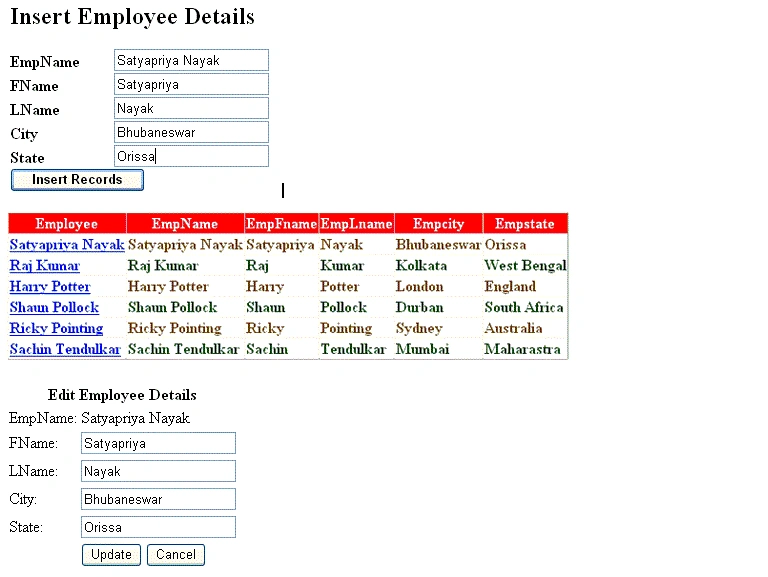
Deepak VermaPosted Aug 26, 2018, 6:27 AM
Hi i Need this code in C#.net my email is [email protected]
SharadPosted Jul 22, 2015, 12:32 AM
nice work
kedar pawgiPosted Feb 25, 2013, 9:25 AM
This is fine example. But my question is if i am making a sales invoice, where i to insert multiple items, and if an item have more sub items then how should i make it give me a bit of suggestions. It a Desktop application in C#. Thanks in Advance.
darsh antaniPosted Feb 23, 2013, 10:35 PM
thnx... can this be converted into c#.net? how?
Thien VuongPosted Nov 21, 2012, 9:17 AM
i need C# by 3tier ! can you send to my email ! [email protected]
Muhammad UzairPosted Sep 13, 2012, 4:09 AM
thanks man. great work
Akash AhlawatPosted Jan 3, 2012, 10:50 AM
You have applied the great logic for updation..I am looking for this kind of article
Akshay TeotiaPosted Jan 3, 2012, 10:46 AM
Nice work.
Akshay TeotiaPosted Jan 2, 2012, 11:54 AM
great work Nayak.
Vikas MishraPosted Jan 2, 2012, 11:46 AM
Hi satyapriya you have done good work.........
Arjun PanwarPosted Jan 2, 2012, 11:46 AM
Thanks Mr.Satyapriya Nayak
Satyapriya NayakPosted Jan 2, 2012, 7:21 AM
Thanks to all
Abhi KumarPosted Jan 2, 2012, 5:59 AM
Very useful article.
Emmy DickensPosted Jan 2, 2012, 5:58 AM
Thank you in enhancing my knowledge...its really useful for me
Monika AroraPosted Jan 2, 2012, 5:50 AM
Hi Satyapriya. Very nice presentation of an article.