

Hello Learners. I hope you all are doing fine. This particular article is about updating the dynamic columns on the go. There are certain situations where you have a table and then you have to pivot the table depending upon the data in any specific column, and you may have to update those columns as well.
In this article, I will be creating a table, pivoting it based on the values of a specific column, and then showing you how to update the values of such columns as well.
Let’s get started.
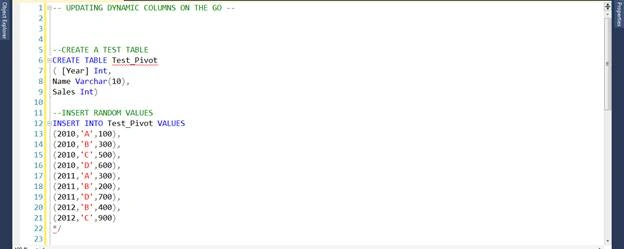
First, we will create a Test_Pivot Table and insert random data into the table.
In this article, I will be creating a table, pivoting it based on the values of a specific column, and then showing you how to update the values of such columns as well.
Let’s get started.
First, we will create a Test_Pivot Table and insert random data into the table.
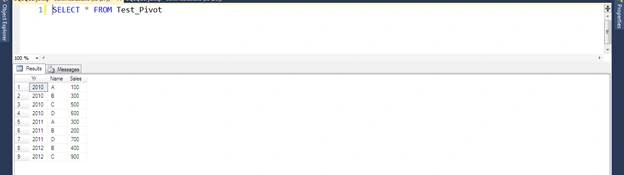
Let’s check the result of the table.
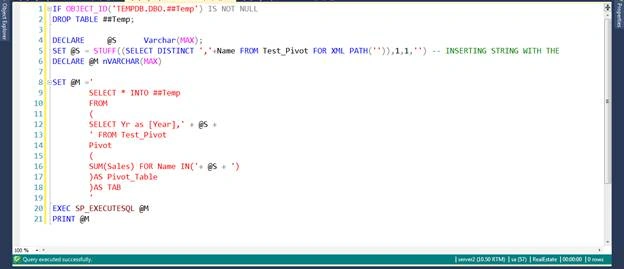
Now, we have to pivot this table on the basis of Name Column. So, we will run this code to make it a pivot on the basis of Name column.
Here, I will show you how this query will look when we print this Dynamic SQL variable @M.
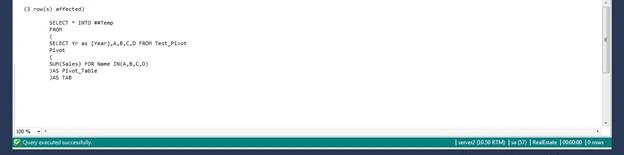
When you check the Global Temporary Table ##Temp you will see the data is pivoted. Here it is.

Now, we have dynamically inserted the data in the Global Temporary Table and checked the records. There are NULLs in the table so now our next step would be to update the NULLs to ZEROs as it is not presentable. Furthermore, this is just a simple example of how to update the values of Dynamic Columns on the go. You can use this logic and customize accordingly to your needs.
So, here is the code to update the table values dynamically.
So, here is the code to update the table values dynamically.
- -- @I IS SET TO 2 AS THERE WOULD BE A DELIMITER AFTER EACH STRING OR IF YOU SET IT TO 1, ADD PLUS 1 TO THE COUNTER AT THE END
- DECLARE @I Int = 2,
- @K Int = LEN(@S), -- SET @K AS THE LENGTH OF VARIABLE @S
- @SQL NVarchar(MAX)
- WHILE (@I < @K)
- BEGIN
- DECLARE @A Varchar(20);
- -- IF THERE IS A CHARINDEX IN THE STRING THIS WILL RUN
- IF ((SELECT CHARINDEX(',',@S)) !=0)
- BEGIN
- SET @A = SUBSTRING(@S,1,CHARINDEX(',',@S)-1);
- SET @S = (SELECT REPLACE(@S,@A+',',''));
- END
- --IF THERE IS NO CHARINDEX IN THE STRING THIS WILL RUN
- ELSE IF ((SELECT CHARINDEX(',',@S)) =0) BEGIN
- SET @A = @S
- --SET @A = SUBSTRING(@S,1,LEN(@S))
- END
- Print @A
- --DYNAMIC SQL TO UPDATE THE CONTENTS OF TEMPORARY TABLE
- SET @SQL = 'UPDATE ##Temp SET '+@A+' = 0 WHERE '+@A+' IS NULL'; EXEC SP_ExecuteSql @SQL --EXECUTING DYNAMIC SQL
- --INCREMENTING @I WITH THE LENGTH OF THE SINGLE COLUMN EXTRACTED FROM THE STRING OF DYNAMIC COLUMNS
- SET @I = @I + LEN(@A);
- END
I apologize for the editing. But please see the entire code for updating the values of Dynamic Columns. Below is the complete code.
- -- UPDATING DYNAMIC COLUMNS ON THE GO --
- /*
- --CREATE A TEST TABLE
- CREATE TABLE Test_Pivot
- ( [Year] Int,
- Name Varchar(10),
- Sales Int)
- --INSERT RANDOM VALUES
- INSERT INTO Test_Pivot VALUES
- (2010,'A',100),
- (2010,'B',300),
- (2010,'C',500),
- (2010,'D',600),
- (2011,'A',300),
- (2011,'B',200),
- (2011,'D',700),
- (2012,'B',400),
- (2012,'C',900)
- */
- GO
- ALTER PROC USP_UPDATE_DYNAMIC_COLUMNS
- AS
- BEGIN
- -- DECLARING VARIABLES
- DECLARE @S Varchar(MAX);
- SET @S = STUFF((SELECT DISTINCT ','+Name FROM Test_Pivot FOR XML PATH('')),1,1,'') -- INSERTING STRING WITH THE DYNAMIC COLUMNS NAME
- --PRINT @S
- -- INSERTING THE PIVOT DATA INTO TEMPORARY TABLE
- IF OBJECT_ID('TEMPDB.DBO.##Temp') IS NOT NULL
- DROP TABLE ##Temp;
- DECLARE @M nVARCHAR(MAX)
- SET @M ='
- SELECT * INTO ##Temp
- FROM
- (
- SELECT Yr as [Year],' + @S +
- ' FROM Test_Pivot
- Pivot
- (
- SUM(Sales) FOR Name IN('+ @S + ')
- )AS Pivot_Table
- )AS TAB
- '
- EXEC SP_EXECUTESQL @M
- -- @I IS SET TO 2 AS THERE WOULD BE A DELIMITER AFTER EACH STRING OR IF YOU SET IT TO 1, ADD PLUS 1 TO THE COUNTER AT THE END
- DECLARE @I Int = 2,
- @K Int = LEN(@S), -- SET @K AS THE LENGTH OF VARIABLE @S
- @SQL NVarchar(MAX)
- WHILE (@I < @K)
- BEGIN
- DECLARE @A Varchar(20);
- IF ((SELECT CHARINDEX(',',@S)) !=0) -- IF THERE IS A CHARINDEX IN THE STRING THIS WILL RUN
- BEGIN
- SET @A = SUBSTRING(@S,1,CHARINDEX(',',@S)-1);
- SET @S = (SELECT REPLACE(@S,@A+',',''));
- END
- --IF THERE IS NO CHARINDEX IN THE STRING THIS WILL RUN
- ELSE IF ((SELECT CHARINDEX(',',@S)) =0)
- BEGIN
- SET @A = @S
- --SET @A = SUBSTRING(@S,1,LEN(@S))
- END
- Print @A
- --DYNAMIC SQL TO UPDATE THE CONTENTS OF TEMPORARY TABLE
- SET @SQL = 'UPDATE ##Temp SET '+@A+' = 0 WHERE '+@A+' IS NULL'; EXEC SP_ExecuteSql @SQL --EXECUTING DYNAMIC SQL
- --INCREMENTING @I WITH THE LENGTH OF THE SINGLE COLUMN EXTRACTED FROM THE STRING OF DYNAMIC COLUMNS
- SET @I = @I + LEN(@A);
- END
- END
- EXEC USP_UPDATE_DYNAMIC_COLUMNS
- SELECT * FROM ##TEMP
So this is how we can update the dynamic columns dynamically.
Please note that we have used a Global Temporary Table rather than a Local Temporary Table. There is a reason for using this, i.e., the ‘Select * from #Temp ‘ after the EXEC SP_ExecuteSql will not run because Select * from #Temp will be out of the scope of the EXEC SP_ExecuteSql. So, this is the reason to use Global Temporary Table instead of Local Temporary Table.
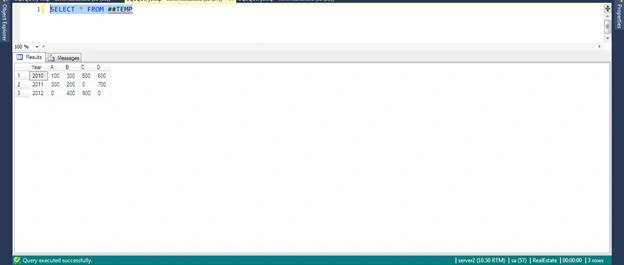
Now, if we see the result of ##TEMP, we will see that the NULLs are replaced by ZEROs.
Please note that we have used a Global Temporary Table rather than a Local Temporary Table. There is a reason for using this, i.e., the ‘Select * from #Temp ‘ after the EXEC SP_ExecuteSql will not run because Select * from #Temp will be out of the scope of the EXEC SP_ExecuteSql. So, this is the reason to use Global Temporary Table instead of Local Temporary Table.
Now, if we see the result of ##TEMP, we will see that the NULLs are replaced by ZEROs.
Any feedback will be welcomed in order to improve the query or code. I hope this will help. Happy Learning!
Join the conversation! Your thoughts help the community grow.