

There are many good tutorials available on the web about uploading large files in Web API. C# Corner also has a very nice article Upload Large Files To MVC / WebAPI Using Partitioning by one of the great authors Allen O'Neill.
In this article, we will see a very simple method to upload large files in the Web API project using MultipartFormDataStreamProvider.
We can create a Web API project in Visual Studio 2017/2015. I am using Visual Studio 2017 community edition.
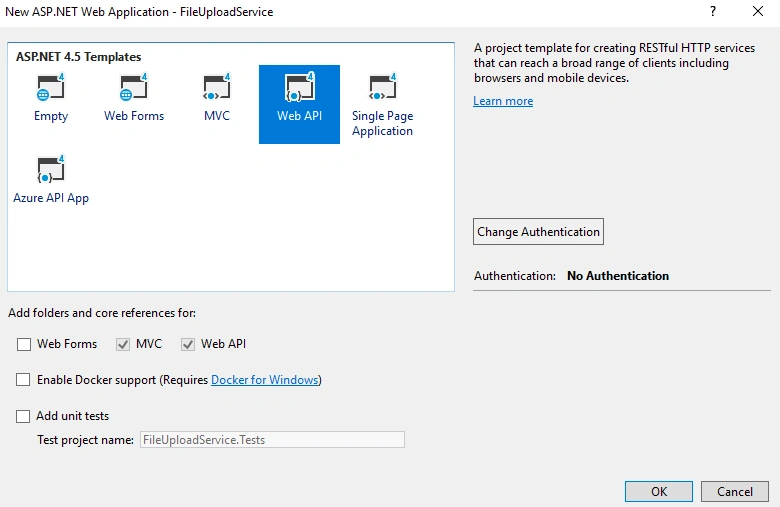
After some time, our project will be created with default templates.
We must change the value of “maxAllowedContentLength” in “requestLimits” in web configuration file to 1GB. If your upload file size is more than 1GB, please change the settings accordingly.
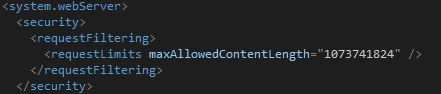
We gave the value in Bytes.
We must change the settings under system.webServer node in the web.config file.
We can add more settings in the web.config file for the location of our files to be stored.
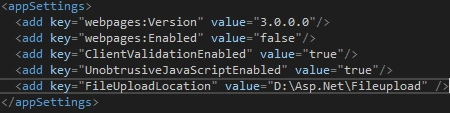
Our configuration part is over. Now, let’s create a new API controller.
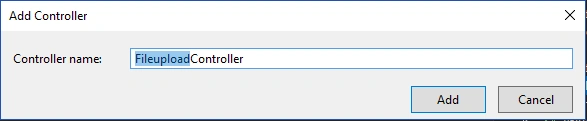
We can add the below code to this controller.
We can create a Web API project in Visual Studio 2017/2015. I am using Visual Studio 2017 community edition.
After some time, our project will be created with default templates.
We must change the value of “maxAllowedContentLength” in “requestLimits” in web configuration file to 1GB. If your upload file size is more than 1GB, please change the settings accordingly.
We gave the value in Bytes.
We must change the settings under system.webServer node in the web.config file.
We can add more settings in the web.config file for the location of our files to be stored.
Our configuration part is over. Now, let’s create a new API controller.
We can add the below code to this controller.
- public class FileuploadController : ApiController
- {
- public async Task<bool> Upload()
- {
- try
- {
- var fileuploadPath = ConfigurationManager.AppSettings["FileUploadLocation"];
- var provider = new MultipartFormDataStreamProvider(fileuploadPath);
- var content = new StreamContent(HttpContext.Current.Request.GetBufferlessInputStream(true));
- foreach (var header in Request.Content.Headers)
- {
- content.Headers.TryAddWithoutValidation(header.Key, header.Value);
- }
- await content.ReadAsMultipartAsync(provider);
- return true;
- }
- catch (Exception)
- {
- return false;
- }
- }
- }
We created a provider variable with “MultipartFormDataStreamProvider” and content variable with “StreamContent”. Then we added the Request headers to a content variable using a FOR Loop.
Finally, we read the multi-part data from the content variable asynchronously. It will automatically create a file in the given folder. (We gave the output path as a web configuration parameter)
We can use the postman tool to test our WebAPI. Please run our Web API now. After our Web API loaded, we can come to postman tool and using POST method we can send a request to Web API. We must choose “form-data” in the body part and choose “File” as type.
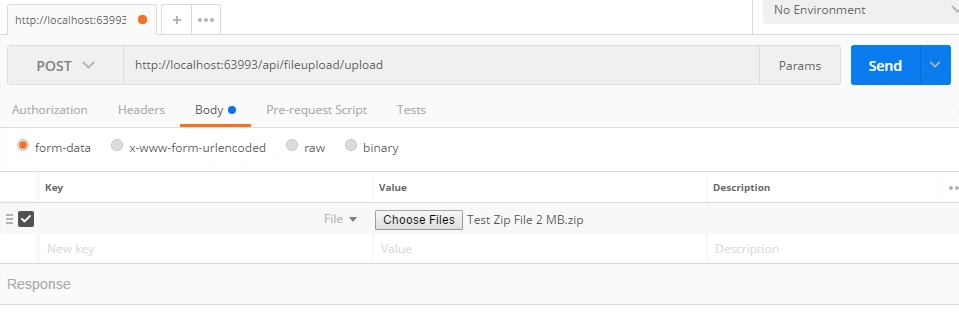
We can click the “Send” button now. After some time, we will get a result.

We got a “true” result. That means, our file upload successfully completed. Now we can check the file location (which we mentioned in the theweb.config file).

Please note though our file uploaded successfully, we got a different random file name in the uupload location without any extension.
We can add one simple step to rename the file name with the original file name.
We can use the postman tool to test our WebAPI. Please run our Web API now. After our Web API loaded, we can come to postman tool and using POST method we can send a request to Web API. We must choose “form-data” in the body part and choose “File” as type.
We can click the “Send” button now. After some time, we will get a result.
We got a “true” result. That means, our file upload successfully completed. Now we can check the file location (which we mentioned in the theweb.config file).
Please note though our file uploaded successfully, we got a different random file name in the uupload location without any extension.
We can add one simple step to rename the file name with the original file name.
- //Code for renaming the random file to Original file name
- string uploadingFileName = provider.FileData.Select(x => x.LocalFileName).FirstOrDefault();
- string originalFileName = String.Concat(fileuploadPath, "\\" + (provider.Contents[0].Headers.ContentDisposition.FileName).Trim(new Char[] { '"' }));
- if (File.Exists(originalFileName))
- {
- File.Delete(originalFileName);
- }
- File.Move(uploadingFileName, originalFileName);
- //Code renaming ends...
Please execute the postman with the same file again and see the difference.

Please note, our file successfully uploaded with the original file name. We tested the application with a very small file (less than 2MB).
Now we can test with a large-sized file (File size is 708 MB).


tanmay shahPosted Oct 6, 2022, 4:51 AM
This is awesome, your code works so smooth. thank you
Tuhin DeyPosted Sep 27, 2022, 7:30 AM
Very Nice article Thanks for sharing , could you please give any idea how we can upload a zip file in cloud shared location like onedrive ...
vo tanliemPosted Sep 6, 2021, 11:54 AM
Hi Sarathlal Saseendran! How to change file name after upload ? tks
Surender SardanaPosted Jun 20, 2020, 10:01 AM
I am trying to upload Video/Mp4/mov file. In my local m/c with Fiddler it is working fine. But when i upload on server and with iphone app (objective c language) it saves file of 0kb. While Actual size is 10 mb. It just create video file but not uploads. Please help me. Thanks
d mPosted Dec 20, 2019, 7:59 AM
The base code for the controller method works for me. But when i add the code for renaming the random file to Original file name it will first exception on the provider.Contents[0].Headers.ContentDisposition.FileName. I found a way to fix that. but after that the File.Move seems to throw a exception. The exception that i am gettin with File.Move is {"Message":"File name cannot be null.\r\nParameter name: sourceFileName"}. With your code for the Headers.ContentDisposition.FileName this exception is thrown {"Message":"Index was out of range. Must be non-negative and less than the size of the collection.\r\nParameter name: index"}.
kostan epishinPosted Dec 3, 2019, 1:56 PM
Hello what about send progres to client ?
waqar iqbalPosted Oct 9, 2019, 8:38 AM
Can u see if it works with .net core ?
Linda RawsonPosted Aug 20, 2019, 8:50 AM
This article was amazing. Just what I was looking for. I downloaded your example, compiled it and it runs perfectly. Thank you so much!
Ed SamprakosPosted Aug 13, 2019, 3:28 PM
Great article thank you. Unfortunately, in my env StreamContent doesn't have the ReadAsMultipartAsync method (.net core)...is that an extension method or something?
taranPosted Jul 25, 2019, 4:46 PM
Nice Article! i have a query.....Does it use streaming to transfer content and is it asyn, wondering if it blocks the server resources?
Madan ShekarPosted Jun 26, 2019, 1:47 AM
Nice information thanks for sharing
BablooPosted Jun 17, 2019, 6:01 AM
Very nice and helpful artice
Siddhartha SharmaPosted Jun 14, 2019, 1:36 AM
Hey , can I upload the file of 10gb using this approach?
Noman KurkurPosted Apr 19, 2019, 7:00 AM
How to pass data from web to this service ?
Ano MepaniPosted Mar 26, 2019, 4:18 AM
Updated code for multiple files wrapped logic in Loops: foreach (var item in provider.FileData) { //Code for renaming the random file to Original file name string uploadingFileName = item .LocalFileName;//provider.FileData.Select(x => x.LocalFileName).FirstOrDefault(); string originalFileName = String.Concat(fileuploadPath, "\\" + (item.Headers.ContentDisposition.FileName).Trim(new Char[] { '"' })); if (File.Exists(originalFileName)) { File.Delete(originalFileName); } File.Move(uploadingFileName, originalFileName); //Code renaming ends... }
Ano MepaniPosted Mar 26, 2019, 3:45 AM
@Sarath While uploading multiple files I have found that uploaded file names are changed "BodyParts_Guid" like name But for single file upload it works like a charm
Ano MepaniPosted Mar 26, 2019, 3:22 AM
Very useful snippet with a working demo. Thanks for sharing.
Sharad GuptaPosted Mar 6, 2019, 5:12 AM
Thanks for sharing. I am looking the same.
Harikrishnan SivarajanPosted Feb 20, 2019, 7:14 AM
Very good article. One doubt Please help. I wish to upload a folder(It may contain multiple files/folders etc)and its not a zip file. Is it possible?
Sachin AkalankaPosted Feb 13, 2019, 2:54 AM
Impressive. Very much Useful to me. Thanks Sarathlal <3
Divyang DesaiPosted Jan 11, 2019, 7:12 AM
Useful information, thanks for sharing. One question though, is it possible to add size validation before file saved to the physical location?
Ankur MistryPosted Sep 12, 2018, 11:02 AM
Helpful staff thank you for sharing