

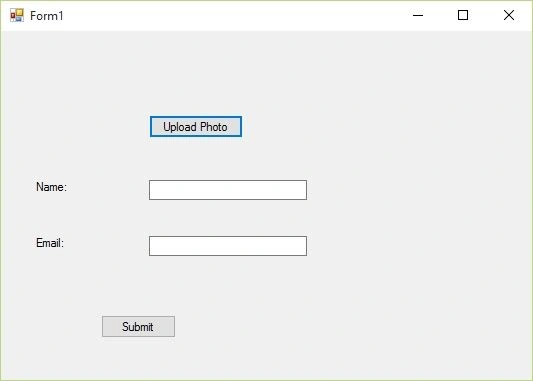
We write some upload code to set our profile pic with some necessary details and pass/display it to the other form.
Initial chamber
Step 1: Open Your Visual Studio 2010, Go to File, New , Projects, then under Visual C# select Windows.
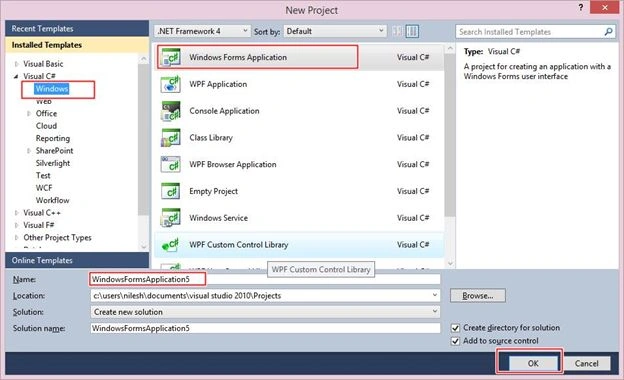
You can change the name of the project and browse your project to different location too. And then press – OK.
Design chamber
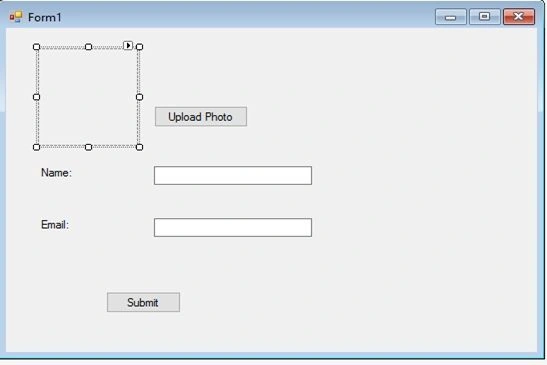
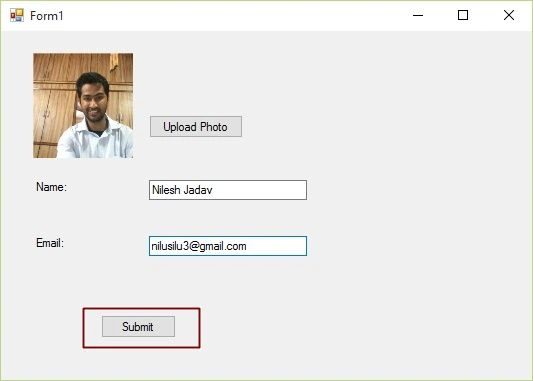
Step 2: Now open your Form1.cs file, where we create our design for Upload Image. We will drag PictureBox, two buttons, two labels and two textboxes from toolbox to Form1.cs. You will see your Form look like this.
Form1.cs [Design]:
Add another form that is Form2.cs to your Project by going to solution explorer- Right Click to your Project, Add New item, select Window Form and Add it.
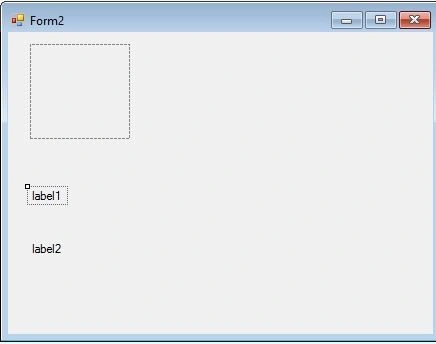
Form2.cs [Design]:
Here you have to add PictureBox and two Labels from the toolbox to the Form2.cs. Just Like you see in the following image.
Code chamber
Right click on the blank part of Form1.cs and View Code. You will see you entered in the code part of the form. Write the following code for Form1.cs.
Form1.cs
- using System;
- using System.Collections.Generic;
- using System.ComponentModel;
- using System.Data;
- using System.Drawing;
- using System.Linq;
- using System.Text;
- using System.Threading.Tasks;
- using System.Windows.Forms;
- namespace UploadControl
- {
- public partial class Form1 : Form
- {
- public static string l1;
- public static string l2;
- public Form1()
- {
- InitializeComponent();
- }
- private void button1_Click(object sender, EventArgs e)
- {
- OpenFileDialog opnfd = new OpenFileDialog();
- opnfd.Filter = "Image Files (*.jpg;*.jpeg;.*.gif;)|*.jpg;*.jpeg;.*.gif";
- if (opnfd.ShowDialog()== DialogResult.OK)
- {
- pictureBox1.Image = new Bitmap(opnfd.FileName);
- }
- }
- private void button2_Click(object sender, EventArgs e)
- {
- l1 = textBox1.Text;
- l2 = textBox2.Text;
- Form2 frm2 = new Form2(pictureBox1.Image);
- frm2.Show();
- }
- }
- }

NEW KNOWLEDGEPosted Dec 22, 2018, 3:44 AM
How to two picturebox add
Arul RPosted Oct 28, 2015, 5:31 AM
Good one !!!
Sibeesh VenuPosted Oct 6, 2015, 9:45 AM
Nice Share
Harshad PansuriyaPosted Oct 6, 2015, 8:51 AM
Nice One
RakeshPosted Oct 6, 2015, 8:24 AM
Good one
Ankit BansalPosted Oct 6, 2015, 3:15 AM
nice..
Santhakumar MunuswamyPosted Oct 5, 2015, 11:47 PM
Nice Share
Vinodh NarayananPosted Oct 5, 2015, 10:57 PM
thanks for sharing
Rajeesh MenothPosted Oct 5, 2015, 2:46 PM
Good Explanation..