

Introduction
This article showsan example of uploading a file in the ASP.NET Web API. Uploading the file from the client is a basic operation. The file can be upload to the web server. By default, the process of file uploading is asynchronous. The developers of ASP.NET use the HTML file input field.
Now I illustrate the process of uploading a file to the web server.
Step 1
Create a MVC4 Web API application "FileUpload".
- Start Visual Studio 2010 and select "New Project" from the Start Page.
- In the Template window, select "Installed template" -> "Visual C#" -> "Web".
- Choose "ASP. NET MVC 4 Web Application" then change its name.
- Click on the "OK" button.
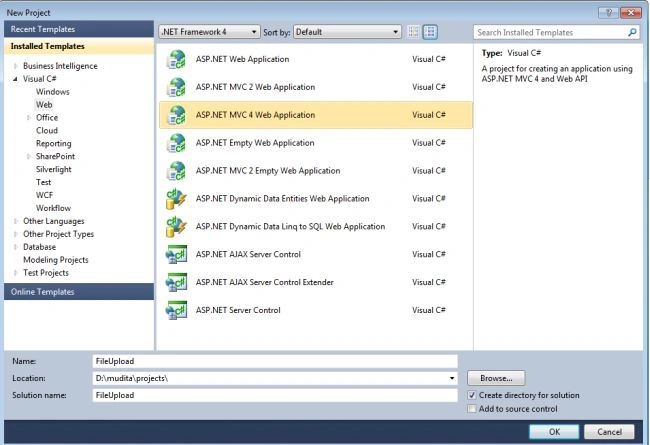
- MVC 4 Project window:

- Select "Web API" and click on the "OK" button.
Step 2
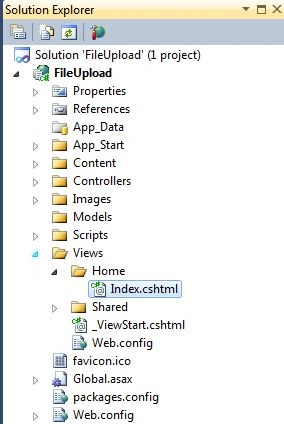
Change the name of "ValuesController" to "DocFileController.cs".
- In the Solution Explorer.
- Select "Controller Folder" -> "ValuesController.cs".
- Rename the "ValuesController" to "DocFileController".
Write this code:
- using System;
- using System.Collections.Generic;
- using System.Linq;
- using System.Net;
- using System.Net.Http;
- using System.Web.Http;
- using System.Web;
- using System.IO;
- namespace FileUpload.Controllers
- {
- public class DocFileController : ApiController
- {
- public HttpResponseMessage Post()
- {
- HttpResponseMessage result = null;
- var httpRequest = HttpContext.Current.Request;
- if (httpRequest.Files.Count > 0)
- {
- var docfiles = new List<string>();
- foreach (string file in httpRequest.Files)
- {
- var postedFile = httpRequest.Files[file];
- var filePath = HttpContext.Current.Server.MapPath("~/" + postedFile.FileName);
- postedFile.SaveAs(filePath);
- docfiles.Add(filePath);
- }
- result = Request.CreateResponse(HttpStatusCode.Created, docfiles);
- }
- else
- {
- result = Request.CreateResponse(HttpStatusCode.BadRequest);
- }
- return result;
- }
- }
- }


Ganesh LokePosted Jun 8, 2021, 11:56 AM
How to achieve same thing , but using async ?
Mark NongkhlawPosted Oct 16, 2020, 6:53 AM
Works perfectly fine in VStusio, but getting error in IIS :HTTP Error 405.0 - Method Not AllowedThe page you are looking for cannot be displayed because an invalid method (HTTP verb) is being used.
Bilal FarooquiPosted Nov 2, 2019, 12:23 AM
How to run this API on Postman...
Muhammad SaleemPosted Jun 22, 2019, 4:25 PM
Webapi and system.web ?!
Abuzar AnsariPosted Jan 18, 2019, 4:15 AM
Its very nice article, but i want to know how do i consume it from post man?
Neeraj SinghPosted Dec 14, 2017, 4:28 AM
Very good article Nice :)
manish sharmaPosted Oct 6, 2017, 7:03 AM
How we can consumer this webapi to other project by a url
manish sharmaPosted Oct 6, 2017, 7:02 AM
How We Can Consume it in c#
Naqi ZaidiPosted Jun 4, 2017, 12:05 AM
Nice Article What is the maximum length of the file that can be uploaded
Devang JaniPosted Nov 8, 2016, 4:34 AM
How it will work with android device
seney seanPosted Jun 29, 2016, 10:01 PM
Thank you, but how can we upload file to separate server e.g. file server?
Ravi PatelPosted Nov 13, 2015, 6:09 AM
nice article
Upendra Pratap ShahiPosted Oct 22, 2015, 7:43 AM
How to increase this size as like approx 50-100mb
Upendra Pratap ShahiPosted Oct 22, 2015, 7:43 AM
from this we can upload approx 4mb size of file which I've checked with my code..
vivek tripathiPosted Oct 20, 2015, 1:41 AM
hi, you can't upload more than 2GB using IIS hosting ,but its possible using self hosting.Another approach is to create chunks at client side then upload .
Afzaal Ahmad ZeeshanPosted Jun 4, 2015, 10:53 AM
Akhil Mittal why do you even need to upload the file of such size? Compress it and then transfer it in chunks. :)
Akhil MittalPosted Jul 12, 2013, 3:08 AM
What is the maximum length of the file that can be uploaded?