

URL Rewriting
A URL rewriting is very important when you are running a community website where user posts articles, forum messages etc. URL rewriting is the process of intercepting an incoming Web request and automatically redirecting it to a different URL. Discusses the various techniques for implementing URL rewriting.
For example
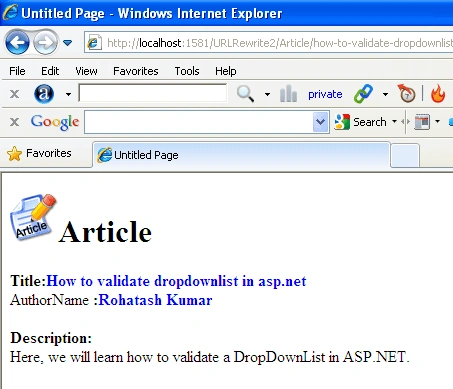
In this example we create a database table with title, description and author name. Title link will be create in the asp .net GridView control. when we click on the title link it will be redirect to the dynamic page.
Create a table in database named as Articletable. Table looks like this.
CREATE TABLE [dbo].[Articletable](
[ID] [int] NOT NULL,
[Title] [varchar](200) NULL,
[Description] [varchar](400) NULL,
[Author] [varchar](50) NULL
)
Inserting data in the articletable.
INSERT INTO Articletable VALUES(1,'How to validate dropdownlist in asp.net','Here, we will learn how to validate a DropDownList in ASP.NET.','Rohatash Kumar');
GO
INSERT INTO Articletable VALUES(2,'Introduction to .NET Assemblies in VB.NET',' Here is a comprehensive introduction to .NET assemblies.','sunil Kumar');
go
INSERT INTO Articletable VALUES(3,'BinaryReader and BinaryWriter classes in VB.NET','In this article I will explain about BinaryReader and BinaryWriter Classes in VB.NET.','Deepak Kumar');
go
INSERT INTO Articletable VALUES(4,'StreamWriter class in VB.NET','This article shows how to create a new text file and write a string to it.','Rohatash Kumar');
go
select * from articletable;
OUTPUT
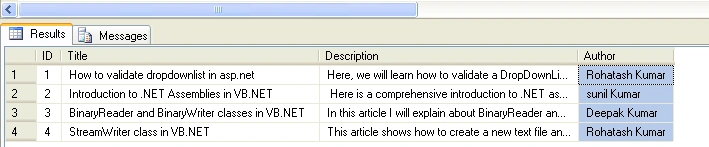
Table1
Now in ASP. NET
- Open Visual Studio.
- Add two webForm to your website, name it Gridview.aspx and dynamicpage.aspx.
Now drag and drop a GridView control from the Toolbox on the gridview.aspx page.
Gridview.aspx
The form looks like this.
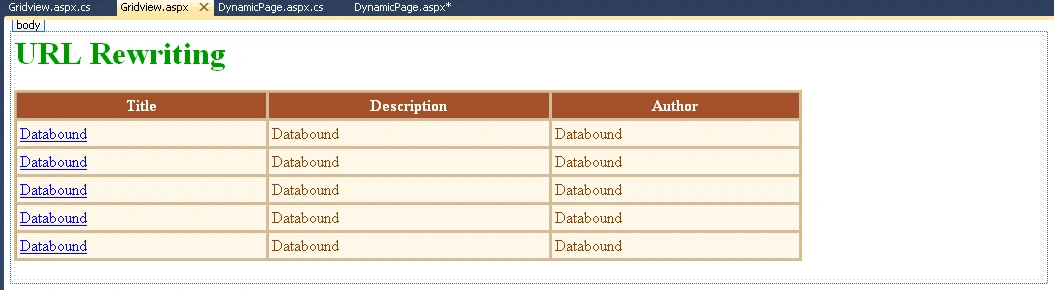
Figure1
The ASP. NET code for the gridview.aspx page.|
<form id="form1" runat="server"> <div> <h1> <span style="color: #009900">URL Rewriting</span></h1> <asp:GridView ID="GridView1" runat="server" AutoGenerateColumns="False" BackColor="#DEBA84" BorderColor="#DEBA84" BorderStyle="None" BorderWidth="1px" CellPadding="3" CellSpacing="2" Width="788px" Height="80px"> <FooterStyle BackColor="#F7DFB5" ForeColor="#8C4510" /> <Columns> <asp:TemplateField HeaderText="Title"> <ItemTemplate> <asp:HyperLink ID="hlTitle" runat="server" Text='<%#DataBinder.Eval(Container.DataItem,"Title")%>' NavigateUrl='<%#GenerateURL(DataBinder.Eval(Container.DataItem,"Title"), DataBinder.Eval(Container.DataItem,"Id"))%>'></asp:HyperLink> </ItemTemplate> </asp:TemplateField> <asp:TemplateField HeaderText="Description"> <ItemTemplate>
<asp:Label
ID="lblDesc"
runat="server"
Text='<%#DataBinder.Eval(Container.DataItem,"Description")%>'></asp:Label> </ItemTemplate> </asp:TemplateField>
<asp:TemplateField HeaderText="Author"> <ItemTemplate> <asp:Label ID="lblauthor" runat="server" Text='<%#DataBinder.Eval(Container.DataItem,"Author")%>' NavigateUrl='<%#GenerateURL(DataBinder.Eval(Container.DataItem,"Author"), DataBinder.Eval(Container.DataItem,"Id"))%>'></asp:Label> </ItemTemplate> </asp:TemplateField> </Columns> <RowStyle BackColor="#FFF7E7" ForeColor="#8C4510" /> <SelectedRowStyle BackColor="#738A9C" Font-Bold="True" ForeColor="White" /> <PagerStyle ForeColor="#8C4510" HorizontalAlign="Center" /> <HeaderStyle BackColor="#A55129" Font-Bold="True" ForeColor="White" /> </asp:GridView>
</div> </form> |
.CS code
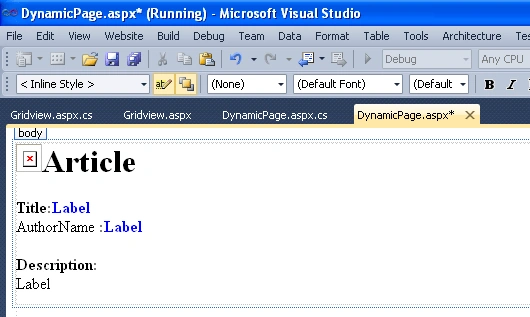
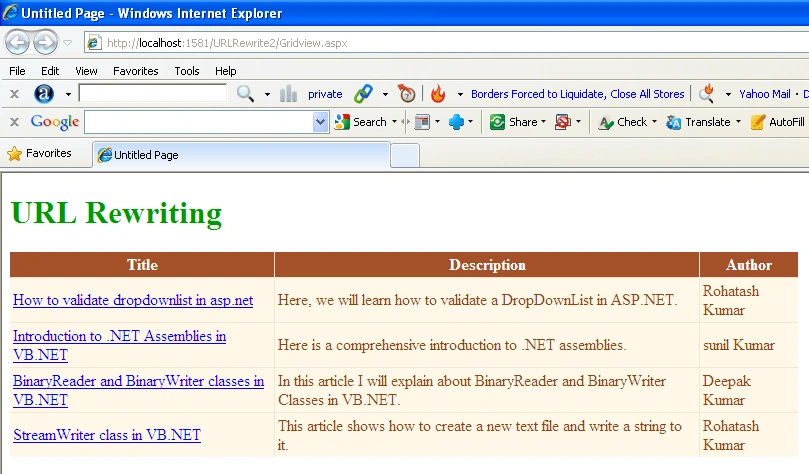
Lokesh RavindraPosted Jun 10, 2015, 9:02 AM
In local it is working fine.. but in server I got HTTP 404. The resource you are looking for (or one of its dependencies) could have been removed, had its name changed, or is temporarily unavailable. how to fix it ?
sachindra singhPosted Jun 8, 2015, 7:35 AM
Thanks i Get solution its my mistake thanks
sachindra singhPosted Jun 8, 2015, 7:22 AM
i got HTTP 404. The resource you are looking for (or one of its dependencies) could have been removed, had its name changed, or is temporarily unavailable. Please review the following URL and make sure that it is spelled correctly. error
sachindra singhPosted Jun 8, 2015, 7:21 AM
sir when make a copy of both page gridview and dynamicpage and remane and in web.congif create a <rewrite url="~/sachin/(.+)-(.+).aspx" to="~/myfiles.aspx?MyTitleId=$2"/> and in also change strTitle = "~/sachin/" + strTitle + "-" + strId + ".aspx"; the not working
Lokesh RavindraPosted Jun 6, 2015, 7:38 AM
I'm getting cannot use a leading .. to exit above the top directory error while applying same code to my application. how to fix it ?
Firoz KhanPosted May 8, 2014, 8:58 AM
thanks man, great
Aman MiglaniPosted Jan 21, 2014, 12:25 AM
please check the url when you host your site on server and do re-writeing according to your URL which is showing when it is upload on server Thank you
abc abceditedPosted Apr 22, 2013, 5:38 PMEdited Apr 22, 2013, 5:42 PM
Help me! How to get catergory_id from url: domain.com/catergory-name/product-name.html to show other products same catergory_id?
abc abcPosted Apr 10, 2013, 12:02 PM
Thank you very much!
Guest UserPosted Oct 25, 2012, 3:43 AM
goood idea. specially GenerateUrl method.
P MeditedPosted Oct 23, 2012, 12:08 PMEdited Oct 23, 2012, 12:09 PM
works fine for me locally... not sure about on the server
samidha dokePosted Jul 14, 2012, 1:41 AM
this is not working.. am getting error as "resource can not be found" ..
Jayesh GorePosted May 16, 2012, 5:55 AM
your url rewriting example is not working fine on server. it show error " the resource cannot be found " but working fine in localhost but on server in show error " the resource cannot be found " plz give me the solution.
AntonioeditedPosted Feb 28, 2012, 7:04 AMEdited Feb 28, 2012, 7:05 AM
How can I use the function on multiple pages without having to rewrite the function at all? Thank you, very good article.
irfan irfanPosted Dec 9, 2011, 6:19 AM
your url rewriting example is not working fine on server. it show error " the resource cannot be found " but working fine in localhost but on server in show error " the resource cannot be found " plz give me the solution.