

Introduction
In this article we will learn about how to use Angular as a desktop application using the Electron plug-in, and also we will see how to create a set up for Windows.
To read and understand this article we should have the below prerequisites:
- Familiarity with Angular and TypeScript
- Node.js and npm installed on your development machine.
Create a new project using the below commands:
- npm install -g @angular/cli
- ng new sampleWebDeskApp
- cd ./ sampleWebDeskApp
- ng serve – To launch web the application
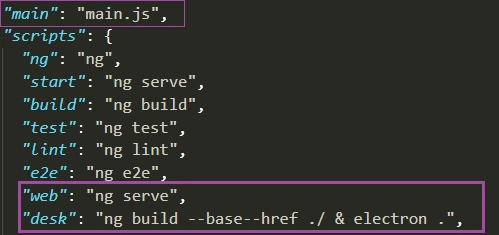
Create main.js file at path ProjectDir/main.js as below. Add the below source code in main.js file:
- const { app, BrowserWindow } = require('electron')
- var path = require('path')
- let win;
- function createWindow() {
- // Create the browser window.
- win = new BrowserWindow({
- width: 600,
- height: 600,
- backgroundColor: '#ffffff',
- })
- win.setMenu(null);
- win.loadURL(`file://${__dirname}/dist/sampleWebDeskApp/index.html`)
- // uncomment below to open the DevTools.
- //win.webContents.openDevTools()
- // Event when the window is closed.
- win.on('closed', function () {
- win = null
- })
- }
- // Create window on electron intialization
- app.on('ready', createWindow)
- // Quit when all windows are closed.
- app.on('window-all-closed', function () {
- // On macOS specific close process
- if (process.platform !== 'darwin') {
- app.quit()
- }
- })
- app.on('activate', function () {
- // macOS specific close process
- if (win === null) {
- createWindow()
- }
- })
Karthik RPosted Feb 13, 2020, 10:25 AM
Good to know about the Electron in angular