

Here are the steps,
1. Create a new Web site project.
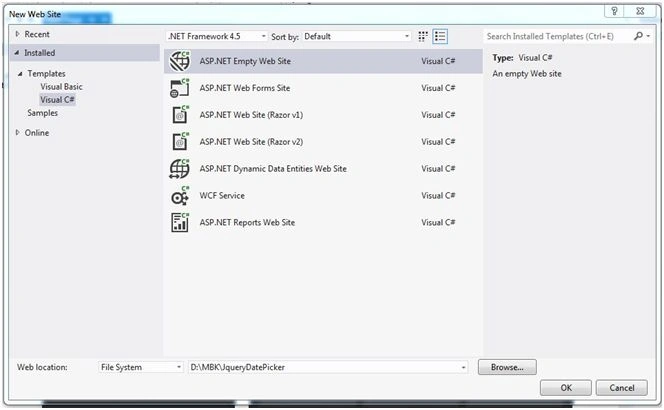
Click File, New Web Site, then select ASP.NET Empty Web Site.
2. Right click on project.
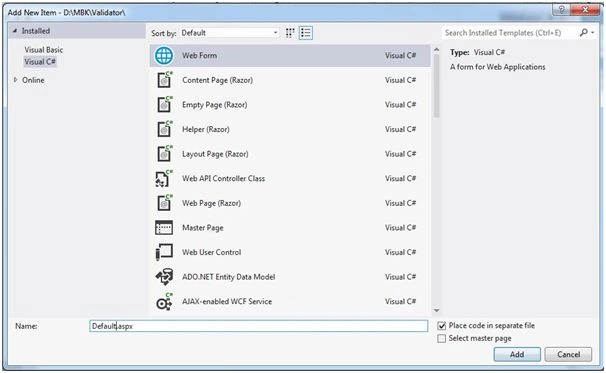
Click Add, then Add New Item and Web Form, then name it Default.aspx.
3. JQuery Datepicker is a part of JQueryUI and first we have to download JQueryUI from the JQueryUI site. Here's the link.
You can see the following widgets are available under JQueryUI. We are going to use Datepicker.

Click on Datepicker or you can directly type the following address.
The JQueryUI website shows all HTML implementations, code, and demos. We just have to mold them as per our requirements and options depending on the scenario.
4. I would suggest you play around on this page with different flavors of Datepicker settings.

5. For attaching JQuery in our project or page follow this.
6. We are going to download code from JQueryUI and attach with our project.
7. We need three files.
- Jquery-ui.css
- Jquery.js
- Jquery-ui.js
The above listed three files can be taken from CDN or locally from the project. Before taking from the project first we have to download and give the reference.
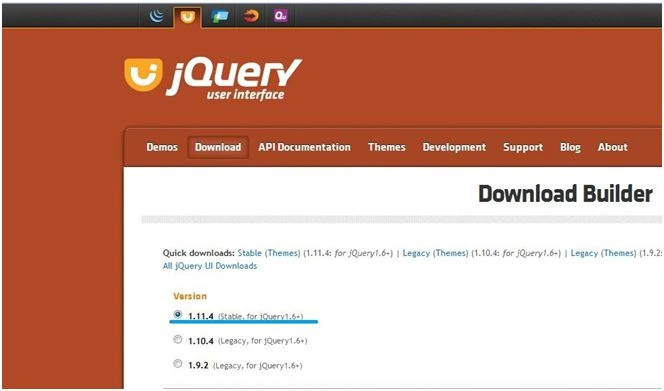
As JQuery UI site displays the 1.11.4 stable version, we have used the same.
Download JQuery from jquery.com.
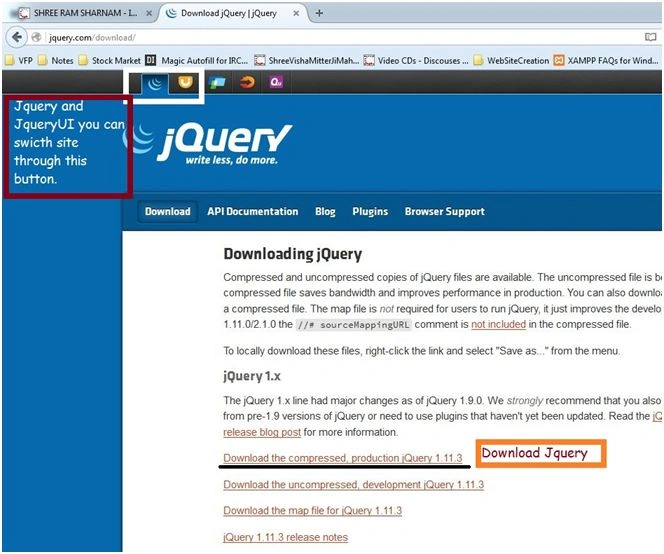
8. Download jquery-ui-1.11.4custom.zip file and extract.

9. After extracting it on your location, now add the above mentioned three files into your project.
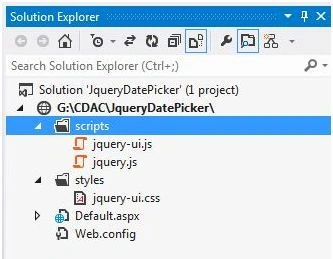
I havw created two folders.
- Styles: In style folder we will keep all the CSS files.
- Scripts: In scripts folder we will keep all the JS files.
Right click on Project (Solution Explorer) - Add Existing Item, then select the following files from your extracted folder.
- Jquery-ui.css: Add this file inside Styles folder.
- Jquery-1.11.3.min.js: Add this file inside Scripts folder.
- Jquery-ui.js: Add this file inside Scripts folder.
10. Give reference in default.aspx file.
<link href="styles/jquery-ui.css" rel="stylesheet" />
<script src="scripts/jquery-1.11.3.min.js"></script>
<script src="scripts/jquery-ui.js"></script>
11. Main logic of Datepicker.
<script>
$(function() {
    $('#txtDatePicker').datepicker({
        dateFormat: 'dd/mm/yy',
        changeMonth: true,
        changeYear: true,
        yearRange: '1950:2100'
    });
});
</script>
12. We have created a textbox whose ID= txtDatePicker. In the above code we attached ID with Jquery-UI and Jquery.

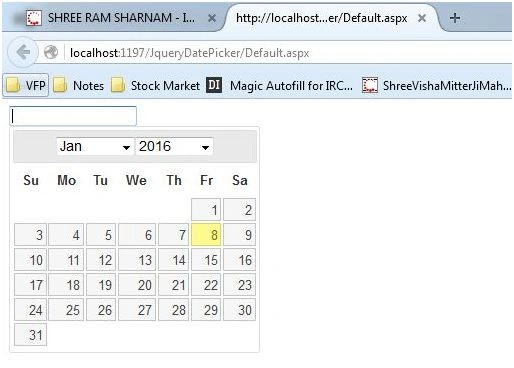
You can see Datepicker attached with textbox.
Nur HaulaPosted Sep 10, 2018, 3:03 AM
How about if I wanna save this date into oracle sql developer. what should I do?
joshua salifuPosted Jul 11, 2017, 10:51 AM
Good day thanks for the nice article, but the code for the datetimePicker is not working in my project, there was no error displayed and still not working
Manoj KallaPosted Apr 19, 2016, 3:50 AM
Thank you, Humayun
Humayun Kabir MamunPosted Apr 19, 2016, 12:51 AM
Nice...
Santhakumar MunuswamyPosted Jan 10, 2016, 11:42 AM
Thanks for nice article
Karthikeyan KPosted Jan 10, 2016, 9:47 AM
Thanks for sharing
Karthikeyan KPosted Jan 10, 2016, 9:47 AM
Good one sir..
Ankit BansalPosted Jan 10, 2016, 2:47 AM
nice one..keep sharing..
Muhammad Aqib ShehzadPosted Jan 9, 2016, 1:58 PM
good elaboration
Sthitaprajnya Debasis NayakPosted Jan 9, 2016, 1:11 PM
Thanks For Sharing !!!
Ankur MistryPosted Jan 9, 2016, 10:59 AM
Helpful, thanks for sharing
Former memberPosted Jan 9, 2016, 10:11 AM
nice
Pankaj Kumar ChoudharyPosted Jan 9, 2016, 7:24 AM
Nice Explain Sir,,,
Raja TPosted Jan 9, 2016, 6:28 AM
Nice Sir,Thanks for sharing