

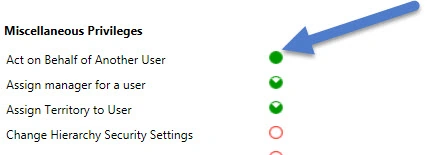
In this article we are going to provide sample code for impersonating users using Web API in Dynamics CRM 2016. Impersonation is a process where user A can execute some business logic on behalf of user B. To use impersonation both user should have privileges to perform the action. For example if user A wants to impersonate user B while creating account entity record, both user A and B should have create privileges on account entity. Also in addition to create privilege user A should have Act on Behalf of Another User privileges that can be set from Miscellaneous Privileges under Business Management tab in security role.
To impersonate user using Web API, we can set request header like below:
- request.setRequestHeader("MSCRMCallerID", <<GUID of the impersonated user>>);
- function createAccount() {
- var ImpersonatedUserID = "1F7709D9-B31E-E611-80EC-4346BDDA181";//replace GUID here
- var serverURL = Xrm.Page.context.getClientUrl();
- var account = {};
- account["name"] = "Web API Impersonation Example";
- var req = new XMLHttpRequest();
- req.open("POST", serverURL + "/api/data/v8.0/accounts", false);
- req.setRequestHeader("Accept", "application/json");
- req.setRequestHeader("Content-Type", "application/json; charset=utf-8");
- req.setRequestHeader("OData-MaxVersion", "4.0");
- req.setRequestHeader("OData-Version", "4.0");
- req.setRequestHeader("MSCRMCallerID", ImpersonatedUserID);
- req.onreadystatechange = function() {
- if (this.readyState == 4 /* complete */ ) {
- req.onreadystatechange = null;
- if (this.status == 204) {
- var accountUri = this.getResponseHeader("OData-EntityId");
- var ID = accountUri.substr(accountUri.length - 38).substring(1, 37); //get only GUID
- Xrm.Utility.openEntityForm("account", ID); //Open newly created account record
- } else {
- var error = JSON.parse(this.response).error;
- alert(error.message);
- }
- }
- };
- req.send(JSON.stringify(account));
- }
Vignesh ManiPosted May 22, 2016, 4:12 PM
Nice