In this post, we are going to explore how to implement user-based notification using ASP.NET MVC and SignalR. If you are new to SignalR, please get some basics here.
Why SignalR?
SignalR provides "real-time" web functionality in our application using Javascript function calls in the client browser from the server (Server-sent Events). It has several connections for management like
- connect/disconnect/reconnect events,
- grouping connections,
- authorization etc
Go to http://signalr.net for more.
We will focus on.
- Creating a new ASP.Net MVC Web Application
- Add SignalR
- Creating Hub
- Enable SignalR
- Database Modification
- Send specific user Notification using SignalR
Create ASP.Net MVC Web application
Open Visual Studio go to > File >New Project Choose ASP.Net MVC application.
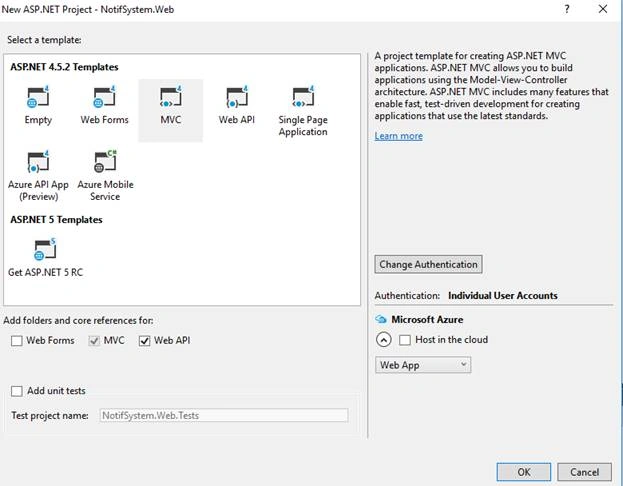
Choose a template. In my case, I have used MVC. Check the Web API reference then hit the ok button, that’s it. Build & run the application for the first time.
Add SignalR
Get it on NuGet! Right-click the project > Manage NuGet package > Browse to install.

Browse the package then install to application, it’ll automatically do the rest.
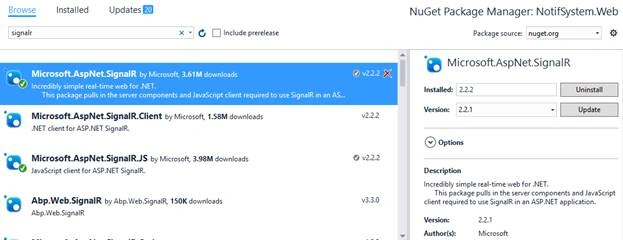
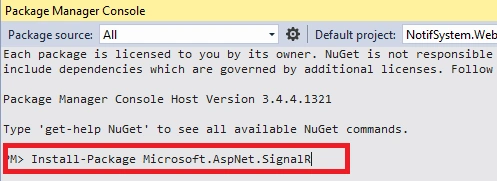
OR Install using the package manager console
Install-Package Microsoft.AspNet.SignalR
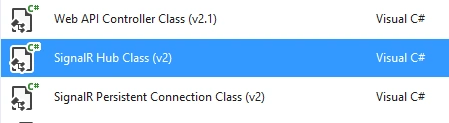
Creating HubAdd a new Hub Class, name it NotificationHub.cs.
public class NotificationHub : Hub
{
    private static readonly ConcurrentDictionary<string, UserHubModels> Users =
        new ConcurrentDictionary<string, UserHubModels>(StringComparer.InvariantCultureIgnoreCase);
    public override Task OnConnected()
    {
        string userName = Context.User.Identity.Name;
        string connectionId = Context.ConnectionId;
        var user = Users.GetOrAdd(userName, _ => new UserHubModels
        {
            UserName = userName,
            ConnectionIds = new HashSet<string>()
        });
        lock (user.ConnectionIds)
        {
            user.ConnectionIds.Add(connectionId);
            if (user.ConnectionIds.Count == 1)
            {
                Clients.Others.userConnected(userName);
            }
        }
        return base.OnConnected();
    }
    public override Task OnDisconnected(bool stopCalled)
    {
        string userName = Context.User.Identity.Name;
        string connectionId = Context.ConnectionId;
        UserHubModels user;
        Users.TryGetValue(userName, out user);
        if (user != null)
        {
            lock (user.ConnectionIds)
            {
                user.ConnectionIds.RemoveWhere(cid => cid.Equals(connectionId));
                if (!user.ConnectionIds.Any())
                {
                    UserHubModels removedUser;
                    Users.TryRemove(userName, out removedUser);
                    Clients.Others.userDisconnected(userName);
                }
            }
        }
        return base.OnDisconnected(stopCalled);
    }
}
Enable SignalR Startup. cs
using Microsoft.Owin;
using Owin;
[assembly: OwinStartupAttribute(typeof(NotifSystem.Web.Startup))]
namespace NotifSystem.Web
{
    public partial class Startup
    {
        public void Configuration(IAppBuilder app)
        {
            app.MapSignalR();
        }
    }
}
Layout page
<script src="~/Scripts/jquery.signalR-2.2.2.min.js"></script>
<script src="~/signalr/hubs"></script>
<script type="text/javascript">
    $(document).ready(function () {
        var hub = $.connection.notificationHub;
        $.connection.hub.start()
            .done(function () {
                console.log("Hub Connected!");
            })
            .fail(function () {
                console.log("Could not Connect!");
            });
    });
</script>
Test SignalR
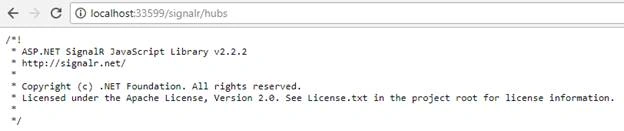
Run the application go to url modified by /signalr/hubs. This will show the magic SignalR JavaScript Library with the current version like the below screenshot.
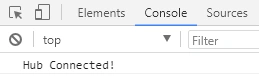
In Browser Console it’ll show a message about Hub Connection.
Database Modification
Create a new database then modify the connection string in the web. config file. Restore the database from the attached script file in the App_Data folder.
We need to create a table to store Notifications.
CREATE TABLE [dbo].[Notification](
    [Id] [int] IDENTITY(1,1) NOT NULL,
    [Type] [int] NULL,
      NULL,
      NULL,
      NULL,
      NULL,
    [Date] [date] NULL,
    [IsRead] [bit] NULL,
    [IsDeleted] [bit] NULL,
    [IsReminder] [bit] NULL,
      NULL,
    [NotificationType] [nvarchar](100) NULL,
    CONSTRAINT [PK_Notification] PRIMARY KEY CLUSTERED
    (
        [Id] ASC
    )WITH (PAD_INDEX = OFF, STATISTICS_NORECOMPUTE = OFF, IGNORE_DUP_KEY = OFF, ALLOW_ROW_LOCKS = ON, ALLOW_PAGE_LOCKS = ON) ON [PRIMARY]
) ON [PRIMARY]
GO
Send specific user Notification using SignalR
In this section, we will work with a view to send notifications to specific users.
Index. cshtml
<div class="col-md-12">
    <h2>Say Hello</h2>
    <div id="messages"></div>
    <hr />
    <div class="form-group">
        <label for="email">User Email:</label>
        <input type="email" class="form-control" id="toUser" value="" placeholder="[email protected]"/>
    </div>
    <div class="form-group">
        <label for="pwd">Message:</label>
        <input type="password" class="form-control" id="myMessage" value="" placeholder="message"/>
    </div>

    <button type="submit" class="btn btn-default" id="submit">Submit</button>
</div>
Javascript
<script type="text/javascript">
    $("#submit").click(function (e) {
        e.preventDefault();
        var message = $("#myMessage").val();
        var sendtouser = $("#toUser").val();
        var Notification = { UserID: sendtouser, Message: message };
        $.ajax({
            type: "POST",
            url: "/api/Values/SendNotification",
            data: JSON.stringify(Notification),
            contentType: 'application/json; charset=utf-8',
            success: function (data) {
                //reset field
                $("#myMessage").val("");
            },
            error: function () {
                alert("Error occurred!!");
            }
        });
    });
</script>
API
public class ValuesController : ApiController
{
    private NotifEntities context = new NotifEntities();
    [HttpPost]
    public HttpResponseMessage SendNotification(NotifModels obj)
    {
        NotificationHub objNotifHub = new NotificationHub();
        Notification objNotif = new Notification();
        objNotif.SentTo = obj.UserID;
        context.Configuration.ProxyCreationEnabled = false;
        context.Notifications.Add(objNotif);
        context.SaveChanges();
        objNotifHub.SendNotification(objNotif.SentTo);
        //var query = (from t in context.Notifications
        //             select t).ToList();
        return Request.CreateResponse(HttpStatusCode.OK);
    }
}
Modify Hub
We need to add additional methods in our Hub class.
private NotifEntities context = new NotifEntities();
// Logged Use Call
public void GetNotification()
{
    try
    {
        string loggedUser = Context.User.Identity.Name;
        // Get TotalNotification
        string totalNotif = LoadNotifData(loggedUser);
        // Send To
        UserHubModels receiver;
        if (Users.TryGetValue(loggedUser, out receiver))
        {
            var cid = receiver.ConnectionIds.FirstOrDefault();
            var context = GlobalHost.ConnectionManager.GetHubContext<NotificationHub>();
            context.Clients.Client(cid).broadcaastNotif(totalNotif);
        }
    }
    catch (Exception ex)
    {
        ex.ToString();
    }
}
// Specific User Call
public void SendNotification(string SentTo)
{
    try
    {
        // Get TotalNotification
        string totalNotif = LoadNotifData(SentTo);

        // Send To
        UserHubModels receiver;
        if (Users.TryGetValue(SentTo, out receiver))
        {
            var cid = receiver.ConnectionIds.FirstOrDefault();
            var context = GlobalHost.ConnectionManager.GetHubContext<NotificationHub>();
            context.Clients.Client(cid).broadcaastNotif(totalNotif);
        }
    }
    catch (Exception ex)
    {
        ex.ToString();
    }
}
private string LoadNotifData(string userId)
{
    int total = 0;
    var query = (from t in context.Notifications
                 where t.SentTo == userId
                 select t)
                .ToList();
    total = query.Count;
    return total.ToString();
}
Finally the Hub
public class NotificationHub : Hub
{
    private static readonly ConcurrentDictionary<string, UserHubModels> Users =
        new ConcurrentDictionary<string, UserHubModels>(StringComparer.InvariantCultureIgnoreCase);
    private NotifEntities context = new NotifEntities();
    // Logged User Call
    public void GetNotification()
    {
        try
        {
            string loggedUser = Context.User.Identity.Name;

            // Get TotalNotification
            string totalNotif = LoadNotifData(loggedUser);
            // Send To
            UserHubModels receiver;
            if (Users.TryGetValue(loggedUser, out receiver))
            {
                var cid = receiver.ConnectionIds.FirstOrDefault();
                var context = GlobalHost.ConnectionManager.GetHubContext<NotificationHub>();
                context.Clients.Client(cid).broadcaastNotif(totalNotif);
            }
        }
        catch (Exception ex)
        {
            ex.ToString();
        }
    }
    // Specific User Call
    public void SendNotification(string SentTo)
    {
        try
        {
            // Get TotalNotification
            string totalNotif = LoadNotifData(SentTo);

            // Send To
            UserHubModels receiver;
            if (Users.TryGetValue(SentTo, out receiver))
            {
                var cid = receiver.ConnectionIds.FirstOrDefault();
                var context = GlobalHost.ConnectionManager.GetHubContext<NotificationHub>();
                context.Clients.Client(cid).broadcaastNotif(totalNotif);
            }
        }
        catch (Exception ex)
        {
            ex.ToString();
        }
    }
    private string LoadNotifData(string userId)
    {
        int total = 0;
        var query = (from t in context.Notifications
                     where t.SentTo == userId
                     select t)
                    .ToList();
        total = query.Count;
        return total.ToString();
    }
    public override Task OnConnected()
    {
        string userName = Context.User.Identity.Name;
        string connectionId = Context.ConnectionId;

        var user = Users.GetOrAdd(userName, _ => new UserHubModels
        {
            UserName = userName,
            ConnectionIds = new HashSet<string>()
        });

        lock (user.ConnectionIds)
        {
            user.ConnectionIds.Add(connectionId);
            if (user.ConnectionIds.Count == 1)
            {
                Clients.Others.userConnected(userName);
            }
        }
        return base.OnConnected();
    }
    public override Task OnDisconnected(bool stopCalled)
    {
        string userName = Context.User.Identity.Name;
        string connectionId = Context.ConnectionId;

        UserHubModels user;
        Users.TryGetValue(userName, out user);

        if (user != null)
        {
            lock (user.ConnectionIds)
            {
                user.ConnectionIds.RemoveWhere(cid => cid.Equals(connectionId));
                if (!user.ConnectionIds.Any())
                {
                    UserHubModels removedUser;
                    Users.TryRemove(userName, out removedUser);
                    Clients.Others.userDisconnected(userName);
                }
            }
        }
        return base.OnDisconnected(stopCalled);
    }
}
Output
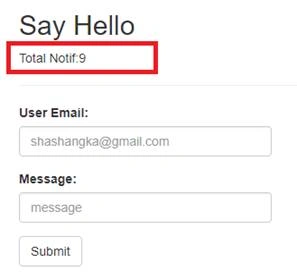
Hope this will help.


R koyeePosted Aug 6, 2021, 11:15 AM
Very confusing, please this need to be explained clearly and mention that you are using code first, not database first.
eslam hatemPosted Apr 20, 2021, 11:28 AM
How we call GetNotification method
Prashanth APosted Nov 2, 2020, 11:51 AM
UserHubModels asking missed namespace
jitendra sawantPosted Jul 15, 2020, 4:19 AM
What id UserHubModel? Please elaborate the code used. Please avoid posting codes without details
Vivek SharmaPosted Sep 17, 2019, 6:14 AM
Not working
Bahar TutulPosted Jun 17, 2019, 7:20 AM
Didn't work bro .... error occured alltime
bala krishnanPosted Sep 18, 2018, 8:10 AM
Message not sending to corresponding user
bala krishnanPosted Sep 18, 2018, 8:10 AM
List<string> HotelUsername = new List<string>(DsNotify.Tables[0].Rows[0]["UserName"].ToString().Trim().Split(',')); HotelUsername.Remove(""); for (int n = 0; n < HotelUsername.Count; n++) { obj.UserName = HotelUsername[n].ToString();// "[email protected]"; //Get TotalNotification string totalNotif = string.Empty; totalNotif = LoadNotifData(obj.UserName); //Send To UserHubModels receiver; if (Users.TryGetValue(obj.UserName, out receiver)) { var cid = receiver.ConnectionIds.FirstOrDefault(); var context = GlobalHost.ConnectionManager.GetHubContext<NotificationHub>(); context.Clients.Client(cid).broadcaastNotif(totalNotif); } }
bala krishnanPosted Sep 18, 2018, 8:09 AM
UserHubModels receiver; if (Users.TryGetValue(loggedUser, out receiver)) { var cid = receiver.ConnectionIds.FirstOrDefault(); var context = GlobalHost.ConnectionManager.GetHubContext<NotificationHub>(); context.Clients.Client(cid).broadcaastNotif(totalNotif); }
Anas AlSadiPosted Sep 12, 2018, 1:53 AM
Can explains how it works Sir
jaskirat singhPosted Sep 7, 2018, 2:42 PM
How you supposed to get value for string userName = Context.User.Identity.Name; -- you didn't even use any login mechanism which stores the identity value ?
Thanseem NazarPosted Jun 11, 2018, 1:13 AM
Where is broadcastnotif() method in client ?
irfan fazalPosted Mar 26, 2018, 7:33 AM
Sir kindly provide a videos which explains how it works that you write in your article
Arvind SinghPosted Jan 4, 2018, 7:07 AM
Nice share...........