

this article, we will see how to use Azure Redis cache to cache your data and provide a faster way of loading the web pages to the users.
What is the Azure Redis cache?
Azure Redis Cache is based on the popular open source Redis cache. It gives you access to a secure, dedicated Redis cache, managed by Microsoft and accessible from any application within Azure.
Why would I use the Azure Redis Cache?
Azure Redis Cache helps your application become more responsive even as the customer load increases. It takes advantage of the low-latency, high-throughput capabilities of the Redis engine. This separate, distributed cache layer allows your data tier to scale independently for more efficient use of the compute resources in your application layer.
Let's go to the best part.. follow these steps to reproduce:
First, you must have your Azure Redis Cache set up.
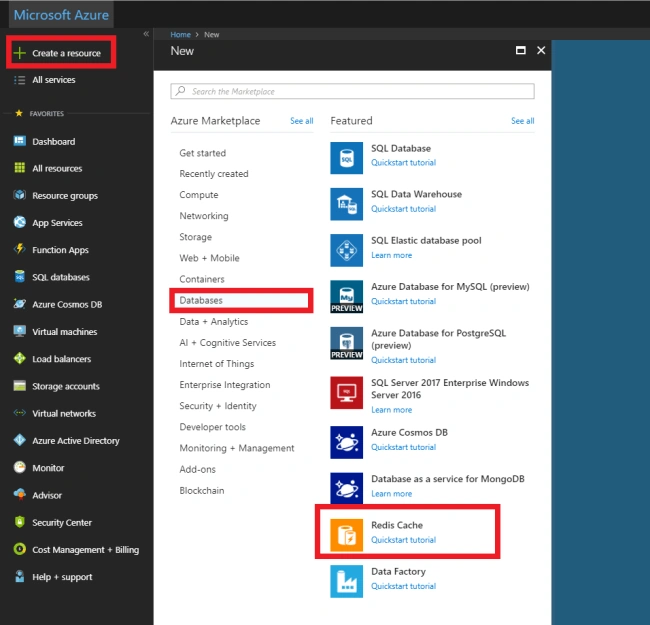
Wait until it finishes deploying (it takes some minutes, do not worry).
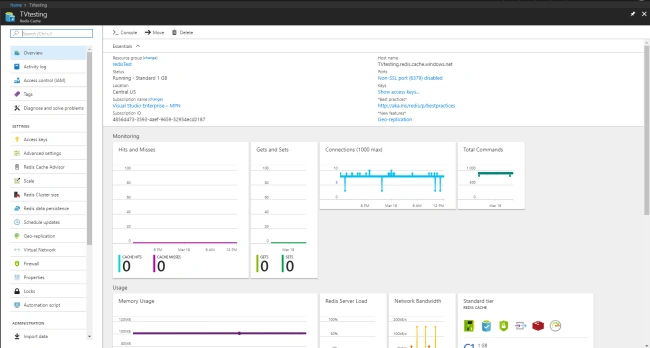
Now, create a new MVC ASP.NET Core project and install the NuGet package: Microsoft.Extensions.Caching.Redis.Core
- With your environment and the Redis cache ready, let's start configuring your project with the settings from the Redis cache in order to make them communicate. First, get the Redis cache connection string from the Redis Cache panel.
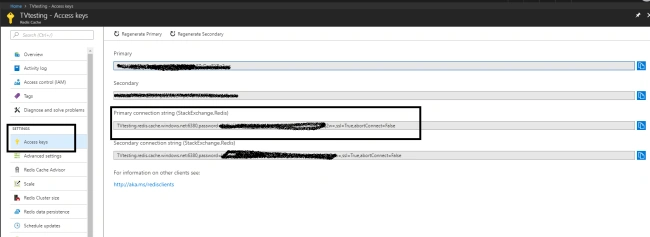
- Update your appsettings.json to add the connection string from your Redis Cache.
- "ConnectionStrings": {
- "RedisConnection": "TVtesting.redis.cache.windows.net:6380,password=XXXXXXXXXXXXXXXX,ssl=True,abortConnect=False" }
Priya DavePosted May 22, 2020, 8:10 AM
Hi, Very helpful article! I’ve tried to configure one Azure Redis cache instance and .NET Core application by following the steps given here. It works in Local & Dev, but fails on environment where Load Balancer is configured. Please suggest if I’ve missed something. Thanks in Advance! Priya
Tridip BhattacharjeePosted Mar 20, 2018, 6:55 AM
Also tell me how to store list of customer data to redis cache instead of storing only string?
Tridip BhattacharjeePosted Mar 20, 2018, 6:55 AM
Good article. i like to know how to invalidate the redis cache. suppose i store customer data in redis cache and if later customer data change then how could i invalidate the cache and reload customer data or how could i update changed customer in cache instead of invalidate cache. it will be very helpful if you guide me in details. thanks