
Introduction:
In this article, we will make use of the WCF service created in the previous part of this article and access data in the Silverlight application, DBDemo.
We begin with adding a service reference to MovieService. To do this, right click on the project, DBDemo and select Add Service Reference. Click Discover and then select MovieService.svc after it is shown in the Add Service Reference dialog box. Rename the service reference to MovieServiceReference. To generate a client class that can consume the service, use the SvcUtil tool as shown in Figure 5. This tool is typically found in the C:\Program Files\Microsoft SDKs\Windows version xx folder where xx may change based on your machine configuration. To use it in your current application directory, give the following:
path=%path%;C:\Program Files\Microsoft SDKs\Windows\v6.0\Bin;
Then type the command similar to the one in Figure 1 in your application directory, that is, SvcUtil *.wsdl *.xsd /language:C#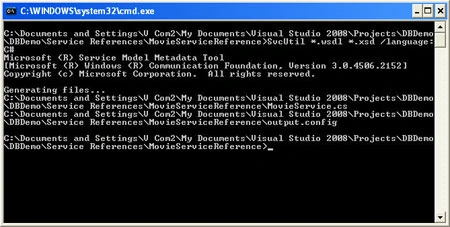
Figure 1: Using SvcUtil
This will generate client code from the local metadata service document.
You will see MovieService.cs now in the MovieServiceReference directory as a result of the above command.
Now, the final step. Edit Page.xaml.cs as follows:
using System;
using System.Collections.Generic;
using System.Linq;
using System.Net;
using System.Windows;
using System.Windows.Controls;
using System.Windows.Documents;
using System.Windows.Input;
using System.Windows.Media;
using System.Windows.Media.Animation;
using System.Windows.Shapes;
using DBDemo.MovieServiceReference;

Join the conversation! Your thoughts help the community grow.