

JQuery DataTable is easy to search with paging, sorting on HTML table.
Now I am going to create an HTML Page with some data using HTML Table.
HTML Code:
- <html>
- <head>
- <title>Using Jquery Datatabble</title>
- <head>
- <body>
- <table id="datatable">
- <thead>
- <tr>
- <th>
- Username
- </th>
- <th>
- Password
- </th>
- <th>
- Created by
- </th>
- </tr>
- </thead>
- <tbody>
- <tr>
- <td>
- Vinodh
- </td>
- <td>
- jquery@123
- </td>
- <td>
- Admin
- </td>
- </tr>
- <tr>
- <td>
- Santhakumar
- </td>
- <td>
- jquery@123
- </td>
- <td>
- Guest
- </td>
- </tr>
- </tbody>
- </table>
- </body>
- </html>
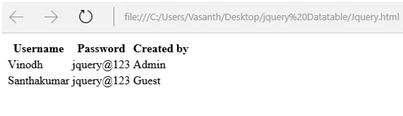
Output look like the following,
Now I will add a JQuery references for DataTtable:
- https://code.jquery.com/jquery-1.11.3.min.js
- https://cdn.datatables.net/1.10.9/js/jquery.dataTables.min.js
- https://cdn.datatables.net/1.10.9/css/jquery.dataTables.min.css
Download all these references and include it into your html page.
Add this simple script to call the JQuery DataTable.
- <script type="text/javascript">
- $(document).ready(function()
- {
- $('#datatable').dataTable
- ({
- /Get the ID of the table
- });
- });
- </script>
- <html>
- <head>
- <title>Using Jquery Datatable</title>
- <head>
- <script src="https://code.jquery.com/jquery-1.11.3.min.js" type="text/javascript"></script>
- <script src="https://cdn.datatables.net/1.10.9/js/jquery.dataTables.min.js" type="text/javascript"></script>
- <link rel="stylesheet" href="https://cdn.datatables.net/1.10.9/css/jquery.dataTables.min.css" />
- <script type="text/javascript">
- $(document).ready(function() {
- $('#datatable').dataTable({});
- });
- </script>
- </script>
- </head>
- <body>
- <table id="datatable">
- <thead>
- <tr>
- <th>
- Username
- </th>
- <th>
- Password
- </th>
- <th>
- Created by
- </th>
- </tr>
- </thead>
- <tbody>
- <tr>
- <td>
- Vinodh
- </td>
- <td>
- jquery@123
- </td>
- <td>
- Admin
- </td>
- </tr>
- <tr>
- <td>
- Santhakumar
- </td>
- <td>
- jquery@123
- </td>
- <td>
- Guest
- </td>
- </tr>
- </tbody>
- </table>
- </body>
- </html>
I will search for “Vinodh”.
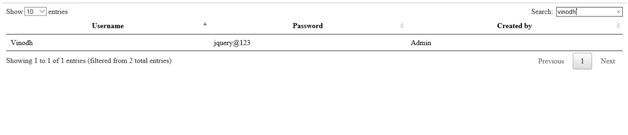
You can see the result above.
Zeeshan AzimPosted Feb 10, 2016, 5:30 AM
Very simple but excellent working
Vinodh NarayananPosted Dec 7, 2015, 11:28 AM
Thanks a lot sir
Santhakumar MunuswamyPosted Dec 7, 2015, 6:54 AM
Good One
Humayun Kabir MamunPosted Dec 7, 2015, 3:13 AM
Nice...
Vinodh NarayananPosted Dec 7, 2015, 1:26 AM
Ankit Bansal Thanks a lot
Ankit BansalPosted Dec 7, 2015, 12:49 AM
nice one..thanks