

Before moving to the JSON, AJAX, Jquery with ASP.NET MVC 4 example we need to set up visual studio environment.
Open new Project, under web category select ASP.NET MVC 4 web application. Set name and save location and after that click OK, another window is visible. Select Intranet Application and view engine is Razor, click OK.
Now we need to update existing script libraries and add new script libraries.
Open package manager console. Using the following command install one by one,
- Install-Package jQuery
- Install-Package bootstrap -Version 3.3.5
- Install-Package Newtonsoft.Json -Version 7.0.1
Note: If you want to learn more about the Nuget, Packager manager console and set up visual studio MVC developing environment follow this tutorial.
JSON: JavaScript Object Notation
JSON is a lightweight text-based data-interchange format. Also it is language independent. You can use it php, PERL, Python, Ruby, C#, ext.
The JSON filename extension is .json.
JSON uses JavaScript syntax,
Why JSON
Before JSON comes use XML. Using XML is hard because XML has to be parsed with an XML parser, so to do that developer need to define XML parser separately. But when JSON comes it is very much easy to deal because JSON can be parsed by a standard JavaScript function. No more need of data parses. It provide us a human-readable collection of data that we can access in a really logical manner.
Also JSON is quicker to read and write and we can use arrays in JSON.
JSON - DataTypes
- A number (integer or floating point)
- var jsonObj = {marks: 92}
- A string (in double quotes)
- var jsonObj = { firstName: 'kamal'}
- A Boolean (true or false)
- var jsonObj = { isHoliday : true }
- An array (in square brackets)
- var jsonObj = '{ "employees":[
- {"firstName":"kamal", "age":"21"},
- {"firstName":"Aruna", "age":"25"},
- {"firstName":"Peter","age":"18"} }';
- ]
- An object (in curly braces)
- var jsonObj = {"firstName":"Sunil", "age":"20"}
- null
Json commonly using to read data from a web server, and display the data in a web page.
The JavaScript function JSON.parse(text) can be used to convert a JSON text into a JavaScript object:Mostly JSON using with AJAX [Asynchronous JavaScript and XML].- var JavaScriptObj = JSON.parse(jsonObj);
Ajax: [Asynchronous JavaScript and XML.]
AJAX is a technique for creating fast and dynamic web pages.
Normally after reloading the webpage update their content. But AJAX allows web pages to be updated asynchronously by exchanging small amounts of data with the server behind the scenes.
In AJAX technology “XMLHttpRequest object” is the core part. Using XMLHttpRequest API exchange the data with a server behind the scenes without having to reload the web page.
Ajax requests are triggered by JavaScript code. Your code sends a request to a URL, and when it receives a response, a callback function can be triggered to handle the response. Because the request is asynchronous, the rest of your code continues to execute while the request is being processed, so it's imperative that a callback be used to handle the response.
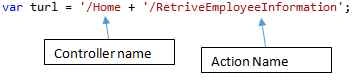
According to my example request URL like this [ASP.NET MVC].
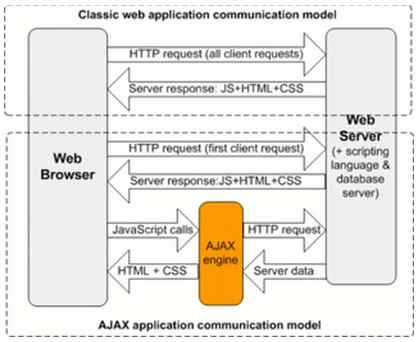
Google Maps, Gmail, YouTube and Facebook update the part of the web page without having to reload the entire page.
How AJAX Works
Ajax Events
There are two types of events:
- Local Event
These are events that you can subscribe within the Ajax request object. - Global Event
These events are triggered on the document, calling any handlers which may be listening.
ajaxStart() :: Global Event
Initially Ajax request before send out to the backend, jQuery checks currently if there are any Ajax requests progressing. if no request found only the ajaxStart() method will execute.
- $( document ).ajaxStart(function() {
- //do my global thing here
- });
ajaxSend () :: Global Event
Whenever an Ajax request is about to be sent, jQuery triggers the ajaxSend event. Any and all handlers that have been registered with the .ajaxSend() method are executed at this time.
- $( document ).ajaxSend(function() {
- //do my global thing here
- });
beforeSend ()
This is triggered before an Ajax request is started and allows user to modify the XMLHttpRequest object.
ajaxSuccess () :: Global Event
This event is also called if the request was successful (No errors from the server, no errors with the data).
This will fire for every ajax call success, not just the one.
- $.ajaxSuccess(function(){
- //do my global thing here
- });
Gowtham RajamanickamPosted Apr 9, 2016, 9:34 AM
awesome article
Prafulla SahuPosted Mar 17, 2016, 7:44 AM
awesome article
Asfend YarPosted Feb 21, 2016, 9:48 AM
keep it up
Asfend YarPosted Feb 21, 2016, 9:48 AM
nice article
Asfend YarPosted Feb 21, 2016, 9:48 AM
thanks
Ramchandra MagarPosted Feb 5, 2016, 11:03 AM
Thank you so much sir...
Jaco ZwartsPosted Jan 22, 2016, 11:57 AM
Thank you for the article!
Santhakumar MunuswamyPosted Dec 22, 2015, 10:49 AM
Thanks for good article
Sibeesh VenuPosted Dec 11, 2015, 7:05 AM
Nice Share
Raja TPosted Dec 11, 2015, 5:25 AM
Good, Thanks for sharing
Jaipal ReddyPosted Dec 11, 2015, 3:39 AM
good one .
Gowtham KPosted Dec 10, 2015, 8:13 PM
Good One