

Abstract
Assemblies are the core unit of deployment. At design time, we can examinethe CIL code in a set of reference assemblies with a couple of external tools such as Reflector and ildasm to peek into underlying metadata, MSIL code and the manifest.
But many times it is necessary to discover types at runtime, and this is the situation where .NET Reflection can be used. This article will also explain late binding that is very related to reflection.
What is Reflection?
Reflection typically is the process of runtime type discovery to inspect metadata, CIL code, late binding and self-generating code. At run time by using reflection, we can access the same "type" information as displayed by the ildasm utility at design time. The reflection is analogous to reverse engineering in which we can break an existing *.exe or *.dll assembly to explore defined significant contents information, including methods, fields, events and properties.
You can dynamically discover the set of interfaces supported by a given type using the System.Reflection namespace. This namespace contains numerous related types as follows:
| Types | Description |
| Assembly | This static class allows you to load, investigate and manipulate an assembly. |
| AssemblyName | Allows to exploration of abundant details behind an assembly. |
| EventInfo | Information about a given event. |
| PropertyInfo | Holds information of a specified property. |
| MethodInfo | Contains information about a specified method. |
Reflection typically is used to dump out the loaded assemblies list, their reference to inspect methods, properties etcetera. Reflection is also used in the external disassembling tools such Reflector, Fxcop and NUnit because .NET tools don't need to parse the source code similar to C++.
Metadata Investigation
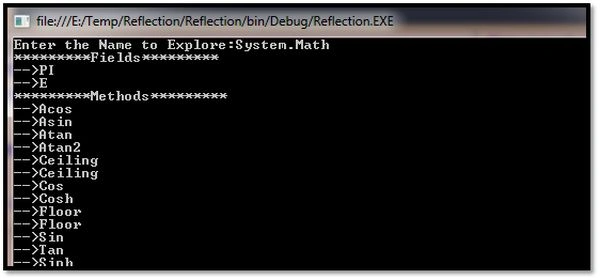
The following program depicts the process of reflection by creating a console based application. This program will display the details of the fields, methods, properties and interfaces for any type within the mscorlib.dll assembly. Before proceeeding, it is mandatory to import "System.Reflection".
Here, we are defining a number of static methods in the program class to enumerate fields, methods and interfaces in the specified type. The static method takes a single "System.Type" parameter and returns void.
- static void FieldInvestigation(Type t)
- {
- Console.WriteLine("*********Fields*********");
- FieldInfo [] fld= t.GetFields();
- foreach(FieldInfo f in fld)
- {
- Console.WriteLine("-->{0}", f.Name);
- }
- }
- static void MethodInvestigation(Type t)
- {
- Console.WriteLine("*********Methods*********");
- MethodInfo [] mth = t.GetMethods();
- foreach (MethodInfo m in mth)
- {
- Console.WriteLine("-->{0}", m.Name);
- }
- }
- static void Main(string[] args)
- {
- Console.Write("Enter the Name to Explore:");
- string typName = Console.ReadLine();
- Type t = Type.GetType(typName);
- FieldInvestigation(t);
- MethodInvestigation(t);
- Console.ReadKey();
- }
Dynamic Assembly Loading
Technically, the act of loading external assemblies on demand is known as Dynamic Loading. Using the Assembly class, we can dynamically load both private and shared assemblies from the local location to a remote location as well as, explore its properties.
To illustrate dynamic loading, we are creating a console based application that loads an external TestLib.dll assembly. During the execution, the application asks the user to specify the dynamic loading assembly name and that reference is passed to the helper method that is responsible for loading the assembly as:
- using System;
- using System.Reflection;
- namespace Reflection
- {
- class Program
- {
- static void Main(string[] args)
- {
- Console.Write("Enter External Assembly:");
- string typName = Console.ReadLine();
- try
- {
- Assembly asm = Assembly.Load(typName);
- DispalyAssembly(asm);
- }
- catch
- {
- Console.WriteLine("Can't Load Assembly");
- }
- Console.ReadKey();
- }
- static void DispalyAssembly(Assembly a)
- {
- Console.WriteLine("*******Contents in Assembly*********");
- Console.WriteLine("Information:{0}",a.FullName);
- Type[] asm = a.GetTypes();
- foreach (Type tp in asm)
- {
- Console.WriteLine("Type:{0}", tp);
- }
- }
- }
- }

If you wish to make this program more flexible then you can update your code to load the external assembly using the LoadFrom() method. In such a situation you don't need to place the external assembly in the Bin\Debug folder.
- static void Main(string[] args)
- {
- try
- {
- Assembly asm = Assembly.LoadFrom(@"E:\TestLib.dll");
- DispalyAssembly(asm);
- }
- catch
- {
- Console.WriteLine("Can't Load Assembly");
- }
- }
- class Program
- {
- static void Main(string[] args)
- {
- try
- {
- string info = @"System.Windows.Forms," + "Version=4.0.0.0," +
- "PublicKeyToken=B77A5C561934E089," +
- @"Culture=""";
- Assembly asm = Assembly.Load(info);
- DispalyAssembly(asm);
- }
- catch
- {
- Console.WriteLine("Can't Load Assembly");
- }
- Console.ReadKey();
- }
- static void DispalyAssembly(Assembly a)
- {
- Console.WriteLine("Name:{0}", a.GetName().Name);
- Console.WriteLine("Version:{0}", a.GetName().Version);
- Console.WriteLine("Culture:{0}", a.GetName().CultureInfo.DisplayName);
- Console.WriteLine("Loaded from GAC?:{0}", a.GlobalAssemblyCache);
- }
- }

Late Binding
The .NET framework can create an instance of a given type using early binding or late binding. In early binding, we typically set the external assembly reference in the project and allocate the type using the new operator. Early binding allows us to determine errors at compile time rather than at runtime.
Whereas in late binding, you can create an instance of a given type and invoke its methods at runtime without having knowledge at compile time. There is no provision to set an external assembly reference in this construct.
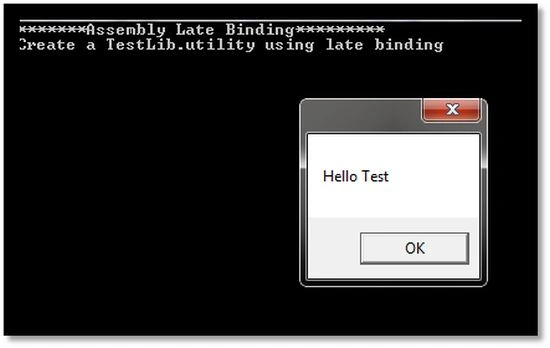
We can create a late binding instance of an external assembly using the CreateInstance() method of the System.Activator static class. Here, we are dynamically instantiating a utility class of the TestLib.dll; the code is refreshingly simple, as in the following:
- using System;
- using System.Reflection;
- namespace Reflection
- {
- class Program
- {
- static void Main(string[] args)
- {
- try
- {
- Console.WriteLine("*******Assembly Late Binding*********");
- Type t = Type.GetType("TestLib.utility,TestLib");
- object obj = Activator.CreateInstance(t);
- Console.WriteLine("Create a {0} using late binding", obj);
- MethodInfo mth = t.GetMethod("Test");
- mth.Invoke(obj, null);
- Console.WriteLine("Method Invoked");
- }
- catch
- {
- Console.WriteLine("Can't Create Assembly Instance");
- }
- Console.ReadKey();
- }
- }
- }
Arkadeep DePosted May 19, 2019, 11:20 AM
Well explained.
chipow lookPosted Nov 6, 2018, 12:39 PM
Very Nice. Thank you
kalu singh raoPosted Jul 9, 2016, 10:29 AM
Nice...
Sr KarthigaPosted May 6, 2016, 9:11 PM
good one sir
Sibeesh VenuPosted Jul 14, 2015, 12:59 PM
Nice Share. Thank you :)
Debasis SahaPosted Jul 14, 2015, 5:04 AM
Good One..
Jaipal ReddyPosted Jul 14, 2015, 12:14 AM
Thank you Sir
RakeshPosted Jul 14, 2015, 12:02 AM
Nice one sir
Nilesh JadavPosted Jul 14, 2015, 12:00 AM
Nice article sir
Gopi ChandPosted Jul 13, 2015, 9:14 PM
Great one sir
Pankaj Kumar ChoudharyPosted Jul 13, 2015, 7:22 PM
Thanks Sir for sharing really way of explanation is Great......
Vidya Vrat AgarwalPosted May 20, 2013, 2:43 PM
Hey Sam, thanks for pointing this out. I checked my source document and all look good there. It seems that during editor review these changes were introduced. I will followup with C# Corner editor team to have it updated.