

Introduction
Generating a PDF from your web applications is easy, simple and reliable. There are many tools/packages available in Nuget. Here, this article explains how to use Rotativa in an MVC application. Rotativa makes it very easy to generate a PDF from HTML. It is a derived version of wkHTMLtoPDF that converts HTML to PDF. According to the Wikipedia, WebKit is a layout engine software component for rendering webpages in web browsers. Making custom changes to the PDF document generated is quite simple. Using this we can directly download the PDF document for the user or else we can also prompt the document inside an iframe. Let's see how to implement this excellent tool.Implementation
We need to install the package before starting the implementation. To install the package from the package manager console, the command goes like the following:- Install-Package Rotativa
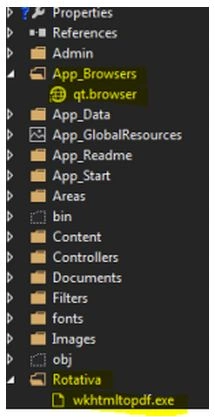
Now we are ready to implement the Rotativa using the code we are explaining below to generate PDF for directly downloading it as well as showing it in another window. Thus, let's have a look. To implement the PDF using Rotativa, we just need to specify the code below in a separate action method.
- public ActionResult Test()
- {
- var students = new List
- {
- new xx() {action = "ABC", email = "[email protected]", firstName = "test", lastName = "test"},
- new xx() {action = "ABC", email = "[email protected]", firstName = "test", lastName = "test"},
- new xx() {action = "ABC", email = "[email protected]", firstName = "test", lastName = "test"},
- new xx() {action = "ABC", email = "[email protected]", firstName = "test", lastName = "test"}
- };
- return new Rotativa.ViewAsPDF("TestView", students);
- }
- ViewAsPDF: This method just displays the view as a PDF in the same window and to display the same PDF in another window, we can manipulate it in the JavaScript as in the following:
- window.open(url)
- ViewAsPDF-To Download: This is not a property method of the Rotativa class, but can be used differently to download the PDF file directly. Let's see the following code:
Just use it to declare a new type as ViewAsPDF and return to the action. This will directly download the file for you.- public ActionResult Test()
- {
- var PDFResult = new ViewAsPDF("TestView")
- {
- FileName = "ExamReport.PDF",
- CustomSwitches =
- "--footer-center \"Name: " + "XYZ" + " DOS: " +
- DateTime.Now.Date.ToString("MM/dd/yyyy") + " Page: [page]/[toPage]\"" +
- " --footer-line --footer-font-size \"9\" --footer-spacing 6 --footer-font-name \"calibri light\""
- };
- return PDFResult;
- }
- ActionAsPDF: This would return the specified action that returns a view with a viewmodel as a PDF. The code would go as in the following:
- public ActionResult Test(int testID)
- {
- var students = new List
- {
- new xx() {action = "ABC", email = "[email protected]", firstName = "test", lastName = "test"},
- new xx() {action = "ABC", email = "[email protected]", firstName = "test", lastName = "test"},
- new xx() {action = "ABC", email = "[email protected]", firstName = "test", lastName = "test"},
- new xx() {action = "ABC", email = "[email protected]", firstName = "test", lastName = "test"}
- };
- // code to retrieve data from a database
- return View(students);
- }
These are the common methods being used. Now, there is another thing to consider here, the customization that can be done to the PDF files. The use of Custom Switches.
- var PDFResult = new ViewAsPDF("TestView")
- {
- FileName = "ExamReport.PDF",
- CustomSwitches =
- "--footer-center \"Name: " + "XYZ" + " DOS: " +
- DateTime.Now.Date.ToString("MM/dd/yyyy") + " Page: [page]/[toPage]\"" +
- " --footer-line --footer-font-size \"9\" --footer-spacing 6 --footer-font-name \"calibri light\""
- };
- footer-center: This aligns the footer at the center foot of the page.
- Page:[page]/[toPage]: The [page] to [toPage] marks the current page and the total number of pages in the file.
- footer-line: Displays line above the footer.
- footer-font-size: Sets the font size of the footer elements.
- footer-spacing: Sets the spacing between the footer-line and the text.
- footer-font-name: Sets the font family/style of text.
Conclusion & References
Thus, we saw how easy it is to implement the Rotativa in MVC applications and generate a PDF in minutes. Implement and enjoy.
ReferenceswkHTMLtoPDF
Nuget Rotativa
Github Rotativa
rajendra singhPosted Nov 9, 2017, 6:21 AM
Is there any way to not show header and footer on first page but show on other pages.
SubashPosted Oct 18, 2016, 7:24 AM
How we do without exe?
Afzaal Ahmad ZeeshanPosted Jul 3, 2015, 3:14 PM
A great come back Suraj, but your links are missing. The last three lines in your post are meant for URLs, aren't they? :)
Neeraj KumarPosted Jul 3, 2015, 2:52 PM
Good
Santhakumar MunuswamyPosted Jul 3, 2015, 2:27 PM
Thanks for nice article.:)