

Introduction
This article shows how to validate a file extension in ASP.NET using JavaScript. In this article, we create a JavaScript function to ensure that only the specified extension is valid. You only need to implement and hook it up to your code. First, you start Visual Studio .NET and make a new ASP.NET website using Visual Studio 2010.
So to make it work, use the following JavaScript function code on your page,
<script type="text/javascript">
        function validate() {

            debugger;
            var array = ['pdf', 'doc', 'docx', 'txt', 'xlsx', 'ppt', 'zip'];
           var xyz=  document.getElementById("FileUpload1");
            var Extension = xyz.value.substring(xyz.value.lastIndexOf('.') + 1).toLowerCase();

            if (array.indexOf(Extension) <= -1) {
                alert("Please Upload only pdf,doc,zip,txt.xlsx and ppt extension flle");
                return false;
            }

        }
    </script>
Now drag and drop a FileUpload and a Button Control onto the form such that you have,
<asp:FileUpload ID="FileUpload1" runat="server" />

        <br />
        <br />
    </div>
<asp:Button ID="Button1" runat="server" Text="Button" OnClientClick="return validate();" />
Now call the JavaScript function with the Button OnClientClick event as in the following,
<%@ Page Language="C#" AutoEventWireup="true" CodeBehind="CheckExtention.aspx.cs"
    Inherits="WebApplication2.CheckExtention" %>

<!DOCTYPE html PUBLIC "-//W3C//DTD XHTML 1.0 Transitional//EN" "http://www.w3.org/TR/xhtml1/DTD/xhtml1-transitional.dtd">
<html xmlns="http://www.w3.org/1999/xhtml">
<head runat="server">
    <title></title>

    <script type="text/javascript">
        function validate() {
            var array = ['pdf', 'doc', 'docx', 'txt', 'xlsx', 'ppt', 'zip'];
           var xyz=  document.getElementById("FileUpload1");

            var Extension = xyz.value.substring(xyz.value.lastIndexOf('.') + 1).toLowerCase();
            if (array.indexOf(Extension) <= -1) {
                alert("Please Upload only pdf,doc,zip,txt.xlsx and ppt extension flle");
                return false;

            }
        }
    </script>
</head>

<body>
    <form id="form1" runat="server">
    <div>
        <asp:FileUpload ID="FileUpload1" runat="server" />

        <br />
        <br />
    </div>
    <asp:Button ID="Button1" runat="server" Text="Button" OnClientClick="return validate();" />

    </form>
</body>
</html><%@ Page Language="C#" AutoEventWireup="true" CodeBehind="CheckExtention.aspx.cs"
    Inherits="WebApplication2.CheckExtention" %>

<!DOCTYPE html PUBLIC "-//W3C//DTD XHTML 1.0 Transitional//EN" "http://www.w3.org/TR/xhtml1/DTD/xhtml1-transitional.dtd">
<html xmlns="http://www.w3.org/1999/xhtml">
<head runat="server">
    <title></title>

    <script type="text/javascript">
        function validate() {
            var array = ['pdf', 'doc', 'docx', 'txt', 'xlsx', 'ppt', 'zip'];
           var xyz=  document.getElementById("FileUpload1");

            var Extension = xyz.value.substring(xyz.value.lastIndexOf('.') + 1).toLowerCase();
            if (array.indexOf(Extension) <= -1) {
                alert("Please Upload only pdf,doc,zip,txt.xlsx and ppt extension flle");
                return false;

            }
        }
    </script>
</head>

<body>
    <form id="form1" runat="server">
    <div>
        <asp:FileUpload ID="FileUpload1" runat="server" />

        <br />
        <br />
    </div>
    <asp:Button ID="Button1" runat="server" Text="Button" OnClientClick="return validate();" />

    </form>
</body>
</html>
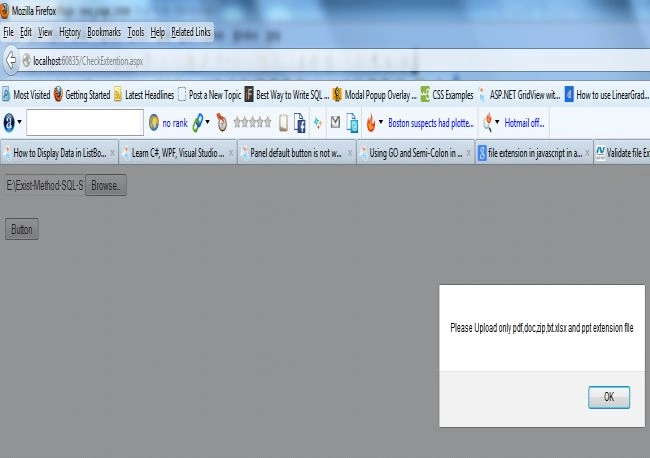
Now run it, upload a file with the Upload control, and click on the control to validate it.
John LjPosted Jul 11, 2020, 5:53 AM
This article help me a lot with my client side validation on javascript, practicing file upload control on ASP .NET. thank you!
JoePosted Jun 19, 2013, 6:52 AM
This is a great example of client side validation. Since the Javascript executing this is on the individuals computer it can be bypassed or modified. This is why you should also validate data on the server, C#/VB. I typically use Javascript to make validation appear faster and prevent a postback to the server. When everything finally gets posted to the sever though I re-validate to ensure I received the data I expected.