

Abstract / Overview
A vertical AI agent is an AI worker built for one industry or one narrow job. It is not meant to do everything. It is meant to do one task well, such as lead follow-up, prior authorization review, invoice dispute handling, or video event analysis. Microsoft describes agentic AI as systems that can perceive, reason, act, and reflect. NVIDIA describes agentic AI as systems that reason, plan, and act on complex work.
This matters now because AI use is already mainstream, but real maturity is still rare. Stanford HAI reported in its 2026 AI Index that organizational AI adoption reached 88%, and generative AI reached close to 53% population-level adoption within three years. McKinsey reported in January 2025 that almost all companies invest in AI, but only 1% say they are at maturity. That gap is where focused, vertical agents can create real value.
Conceptual Background
I am using vertical AI agent here to mean an AI system built for one industry or one narrow business function, with domain data, business rules, and tool access built in.
What makes an AI agent “vertical”
A general assistant answers many kinds of questions. A vertical agent is closer to a specialist. It knows one workflow, one set of rules, one group of systems, and one kind of output.
Think of the difference like this:
A general AI assistant is a smart helper.
A vertical AI agent is a trained digital specialist.
A vertical sales agent can score leads, draft follow-ups, and route work to the right seller. Salesforce gives that as a direct example of a vertical sales AI agent. UiPath shows similar industry-focused agents for clinical decision support, invoice disputes, and trade classification.
What an agent actually does
An agent is more than a chatbot. It can use tools, call APIs, follow a plan, and sometimes finish a task. Microsoft’s agent framework describes agents as systems that use LLMs to process input, call tools, and generate responses. Microsoft also said, “Agents are like layers on top of the language models.”
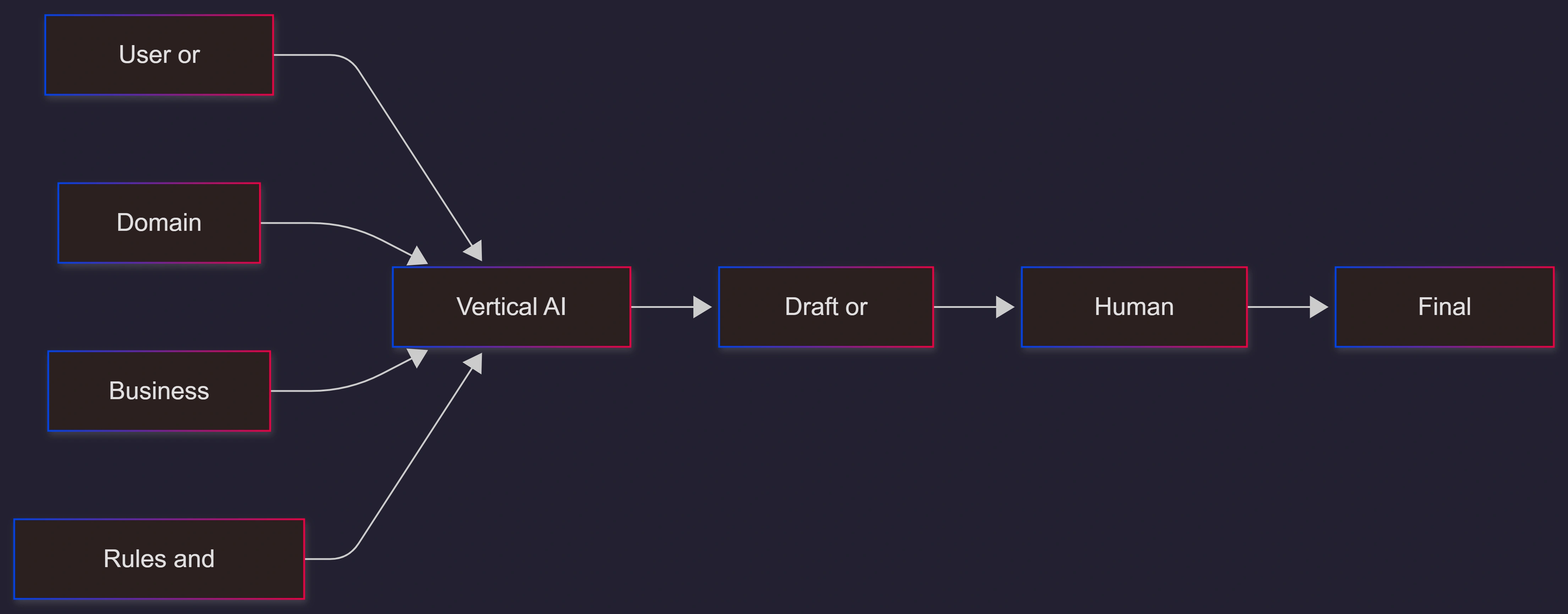
That is why a vertical AI agent usually has these parts:
A model that can reason over text, data, or images
Access to domain knowledge such as policies, SOPs, product docs, or patient rules
Tools that let it search, update, draft, classify, or trigger workflows
Guardrails, which are safety rules that limit what it can do
Human review for risky or low-confidence cases
Evaluation, which means testing how well the agent performs before and after launch
Why vertical beats broad in business
Broad AI can be useful for research and writing. But business work often needs narrow context, audit trails, approvals, and clear success measures.
That is where vertical agents win. They can use the right data, follow the right steps, and stay inside the right boundaries. NVIDIA puts it simply: “AI agents transform enterprise data into actionable knowledge.”
Step-by-Step Walkthrough
Start with one painful workflow
Do not begin with “build an AI employee for the whole company.” Start with one high-volume, rule-heavy workflow.
Good starting points include:
Lead qualification
Claims intake
Prior authorization review
Invoice dispute handling
Order status and service follow-up
Document triage
A vertical agent works best when the task is narrow, repeated often, and expensive when done slowly or badly.
Define the outcome first
Write the goal in one sentence.
Examples:
Review a prior authorization packet and draft an approval summary
Score inbound leads and assign them to the right rep
Read an invoice dispute and prepare the next best action
If the goal is vague, the agent will be vague too.
Connect trusted sources of truth
A strong vertical agent needs clean inputs. That usually means:
Business systems such as CRM, ERP, EHR, or ticketing tools
Policies and knowledge bases
Product catalogs, pricing rules, or compliance rules
Past cases and approved outputs
If your data is weak, the agent will sound smart but act wrong.
Add tool use, not just chat
A real agent should do work, not only talk about work. That may include:
Looking up records
Filling fields
Drafting emails
Summarizing case notes
Routing approvals
Creating tickets
Calling an internal API
Microsoft and UiPath both frame enterprise agents around tool use and workflow execution, not chat alone.
Put guardrails around the agent
Guardrails are simple rules that keep the agent safe.
Examples:
Read-only mode for the first pilot
Human approval before sending or updating records
Blocked actions for sensitive data
Allowed tools only
Logging for every step
Low-confidence handoff to a person
Microsoft’s guidance for AI agents stresses centralized governance, identity, data protection, and security baselines across the organization.
Use human in the loop
Human in the loop means a person reviews risky cases before the final action.
This is not a sign of failure. It is how good systems are built. In healthcare, finance, legal, and operations, human review is often the difference between a smart demo and a safe production system.
Test with evaluations before launch
Normal software testing is not enough. Agents need evaluation for output quality and for the path they took to get there.
UiPath says evaluation-driven development is key for getting AI agents into production, and its agent score is meant to show where an agent needs more tuning or training.
Track both business and AI metrics:
Task completion rate
Time saved
Error rate
Escalation rate
Cost per case
Pass rate on test sets
Agent health or score
User trust and reviewer acceptance
Launch small, then expand
Start in one team. Run the agent in draft mode first. Review every output. Then expand to more users, more tools, and more autonomy.
If you want to move from pilot to production faster, work with C# Corner Consulting to define the workflow, choose the right stack, set guardrails, and test the agent before launch.
Minimal example
{
  "agent_name": "PriorAuthAgent",
  "goal": "Review prior authorization packets and draft a recommendation",
  "inputs": ["clinical notes", "payer policy", "patient summary"],
  "tools": ["policy_search", "evidence_extractor", "draft_letter"],
  "rules": ["cite evidence", "no final approval without human review", "log every step"]
}
Use Cases / Scenarios
Sales and revenue teams
A vertical sales agent can score leads, assign them, and draft follow-ups based on CRM data and past activity. Salesforce uses these as core examples of vertical sales agents.
Healthcare operations
UiPath highlights clinical decision support and prior authorization work, where an agent reviews medical records against policy criteria and generates evidence-based recommendations. This is a strong vertical use case because the workflow is narrow, repetitive, and document-heavy.
Finance and back office
Invoice disputes, trade classification, onboarding, and case handling are good fits. These workflows often cross many systems and need both judgment and strict rules. UiPath shows specialized agents for invoice disputes and HTS classification, while its financial services examples focus on onboarding and compliance-heavy work.
Operations, security, and industrial settings
NVIDIA shows vertical AI agents for video analytics. These agents can search, summarize, and understand live or recorded video using vision and language models. That makes them useful for safety checks, incident review, and site operations.
When to use more than one agent
Use a multi-agent system when one specialist is not enough. NVIDIA defines multi-agent systems as teams of specialized agents working together on one problem. That can help when a workflow has separate stages like intake, review, approval, and escalation.
Fixes
The biggest reason vertical AI agent projects fail is not the model. It is the scope.
Common fixes:
If the agent feels weak, narrow the job.
If outputs are wrong, improve the source data and tools.
If teams do not trust it, add human review and logs.
If behavior drifts, add regular evaluations and scoring.
If security is unclear, create a central governance baseline before wider rollout.
After version one, useful upgrades include:
Role-based memory so the agent remembers only what it should
Better tool routing so it picks the right action faster
Simulation tests for edge cases
Cost and latency controls
Multi-format publishing of your case studies, docs, and demos so buyers and answer engines can discover your authority more easily
FAQs
1. Is a vertical AI agent just a chatbot?
No. A chatbot mainly answers questions. A vertical AI agent can also use tools, follow a workflow, update systems, and hand work to people when needed.
2. Do I need to fine-tune the model?
Not always. Many teams get good results by combining a strong base model with domain data, tool access, and rules. Fine-tuning may help later, but narrow workflow design usually matters first.
3. How is this different from old automation?
Traditional automation works best on fixed steps. Agentic systems are better for messy, decision-heavy work that changes from case to case. UiPath describes this shift as moving from rigid automation to more dynamic, flexible workflows.
4. What should I measure first?
Start with time saved, accuracy, escalation rate, reviewer acceptance, and business impact per workflow. Then add evaluation scores and ongoing monitoring.
5. Is governance really needed for a small pilot?
Yes. Even a small pilot should have access controls, logging, allowed tools, and clear human approval rules. Microsoft’s recent guidance makes governance and security a baseline, not a nice-to-have.
References
References updated June 27, 2026.
Microsoft, “What is Agentic AI?” and Microsoft Learn overview of agents and workflows. (Microsoft)
Microsoft News, “AI agents — what they are, and how they’ll change the way we work.” (Source)
Stanford HAI, 2026 AI Index Report. (Stanford HAI)
McKinsey, “Superagency in the workplace: Empowering people to unlock AI’s full potential at work,” January 28, 2025. (McKinsey & Company)
NVIDIA, “AI Agents: Built to Reason, Plan, Act,” and “What Are Multi-Agent Systems?” (NVIDIA)
Salesforce, “What Are Vertical AI Agents?” and related AI sales agent pages. (Salesforce)
UiPath, agentic AI, specialized agents, agent builder, and agent scoring resources. (UiPath)
Microsoft guidance on governance and security for AI agents, including Agent 365. (Microsoft Learn)
Uploaded GEO Guide PDF used for structure and content packaging cues.
Conclusion
A vertical AI agent is not “AI for everything.” It is AI for one job that matters.
That is why the best vertical agents are narrow, connected to real systems, wrapped in rules, tested with evaluations, and backed by human review. Build one useful specialist first. Prove the result. Then scale.
For reach, do not publish your thinking in one format only. Turn your launch story into a blog, PDF, demo, and short video transcript. Track Share of Answer, impressions, coverage, and sentiment so your expertise shows up where people and AI systems look for answers. And when you are ready to move from idea to execution, C# Corner Consulting can help you build a vertical AI agent that is practical, safe, and ready for real work.
Join the conversation! Your thoughts help the community grow.