

Introduction
This article explains the View and router in backbone. In this article we will create Route.js, view.js, Model.js and index.html files. We know that backbone is a Single Page Application. It is a lightweight framework that helps to create the structure of the JavaScript in Model View Controller.
View: The View is the user interface but in the backbone it is not only the View but it is also the controller for connecting the model to the data interaction. So the backbone is called the Model View (MV) framework.
Router: The Router manages the URL based navigation in backbone. Most of the web application gives the linkable, sharable URLs for the relevant locations in the application. There is a # 'hash' fragment for this URL. In backbonejs there are methods given by this for routing and connecting the client-side web pages to the events and actions.
Now let's see the example of the View and Router in Backbone.JS.
Step 1
First we create a web application using the following:
- Start Visual Studio 2013.
- From the Start window select "New Project".
- Select "Installed" -> "Template" -> "Visual Studio" -> "Web" -> "Visual Studio 2012" and select "Web Application".
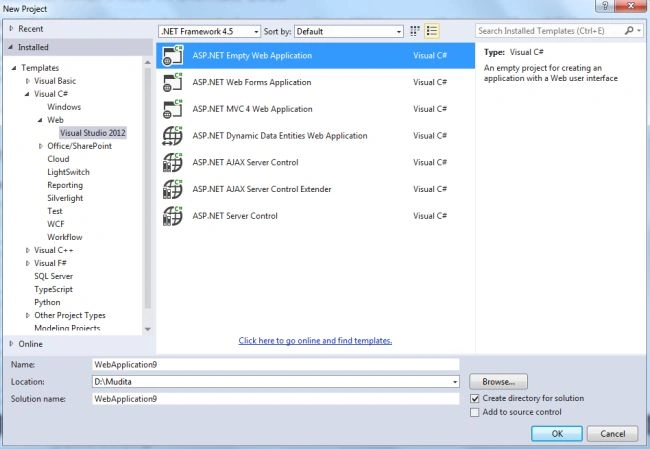
- Click on the "OK" button.
Step 2
Now we need to add a HTML Page in the Project:
- In the "Solution Explorer".
- Right-click on the project and select "Add" -> "HTML Page".
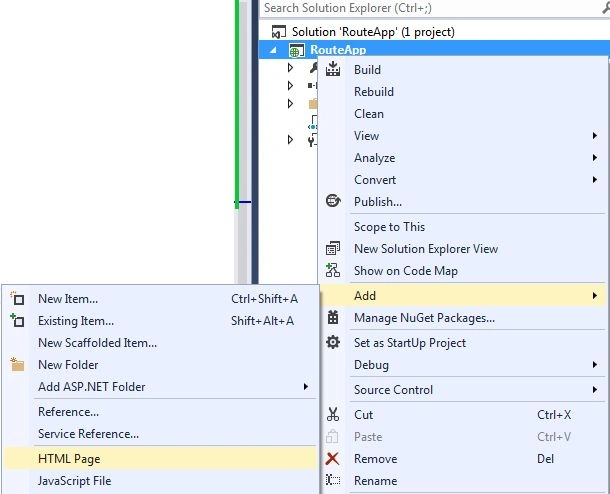
- Change the Name of the HTML page.
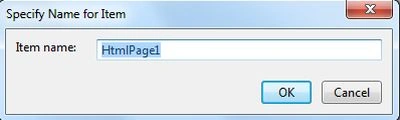
- Click on the "Add" button.
Add the following code:
<!doctype html>
<html>
<head>
<title></title>
<meta charset="utf-8">
<script src="scripts/backbone-min.js"></script>
<script src="scripts/jquey-1.6.4.min.js"></script>
<script src="scripts/underscore-min.js"></script>
</head>
<body>
<div data-role="page">
<header data-role="header" class="navbar nav navbar-inner">
<h1>Backbone JS router Example</h1>
</header>
<div id="container" data-role="content">
<button id="show_orders">
Display Orders
</button>
<div id="template-list">
<ul>
<li><a href="#"></a></li>
</ul>
</div>
</div>
</div>
<script src="scripts/backbone-min.js"></script>
<script src="scripts/jquey-1.6.4.min.js"></script>
<script src="scripts/underscore-min.js"></script>
<script src="scripts/Model.js" type="text/javascript"></script>
<script src="scripts/view.js" type="text/javascript"></script>
<script src="scripts/Route.js"></script>
</body>
</html>
Step 3
Now we need to add three JS files, View.js, Model.js and Route.js using the following:
- In the Solution Explorer.
- Right-click on the project then select "Add" -> "New Item" -> "JavaScript".
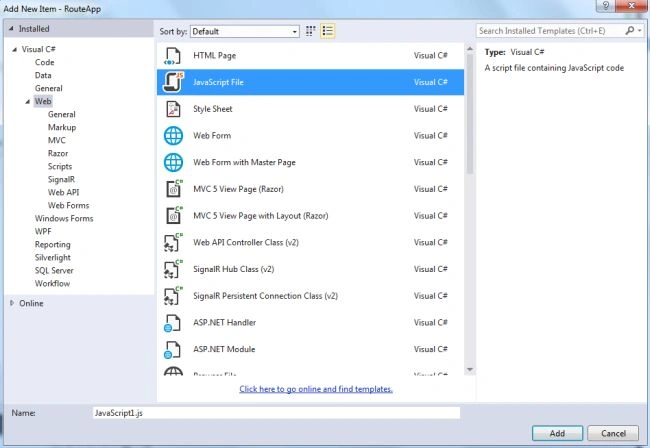
- Click on the "Add" button.
In View.js use the following code:
var View = Backbone.View.extend({
el: $('#container'),
initialize: function () {
console.log("This is View");
},
events: {
'click button': 'render'
},
render: function () {
var i;
$(this.el).find("#template-list ul").children().remove();
console.log(this.model.get("data"));
for (i = 0; i < this.model.get("data").length; i++) {
$(this.el).find("#template-list ul").append('<li><a href="#' + this.model.get("data")[i].name + '">' + this.model.get("data")[i].name + '</a></li>');
}
}
});
var view = new View({ model: model });
In the preceding code there is defined a render() function. When we click on the button then the render() function is called that will populate all the data from the Model.js file. It fetches the data from the model by creating a separate list item.
For the second Model.js file we write this code:
var Model = Backbone.Model.extend({
// Model Constructor
initialize: function () {
console.log("This ia Model");
},
//Order for dinner
defaults: {
data: [{ name: "Smith", address: "Delhi", Dinner:"Indian" },
{ name: "Jhon", address: "Chennai", Dinner:"Italian" },
{ name: "Joy", address: "Banaras", Dinner:"chinese" }]
}
});
var model = new Model(); // Instantitate the model
In the code above we have created an array of the dinner order that is called by the View.js.
The third is Route.js with this code:
var Router = Backbone.Router.extend({
initialize: function () {
console.log("This is Router");
},
routes: {
":name": "ShowOrder" // pass name as parameter value
},
ShowOrder: function (name) {
if (name === "Joy") {
alert("Order for Chinese food");
}
}
});
var router = new Router(); //instantiate the router
// Start Backbone history a necessary step for bookmarkable URL's
Backbone.history.start();
We need to add three other Js files in the project that are:
- backbone.js
- underscore.js
- jquery-1.6.4.min.js

Step 5
Now execute the application:

When we click on the "Show Order" button it displays all the names of the people.
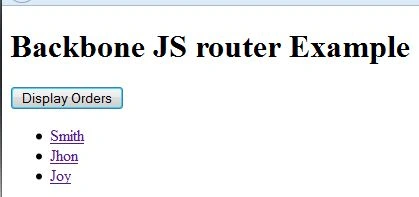
When we click on the Jhon then it shows the order type and then we check the URL.

Join the conversation! Your thoughts help the community grow.