

Introduction
In Windows 7 and Windows 8, we have the ability to view the word of the saved Wi-Fi profile from the Control Panel directly. But Microsoft has made the setting more secure in Windows 10. This situation usually exists when our administrator changes the word of the wireless network in our system but we need to get the word for another device.
Step 1
Open a command prompt using any of the following methods.
- CMD or Command in the Run Box.
- Type cmd or command in the Start menu search box.
- Tell Cortana to open “command prompt” for you.
- Press Windows + X to open the quick menu and press C or click on Command Prompt. You can also right-click on the Start button to get the quick menu.
Step 2
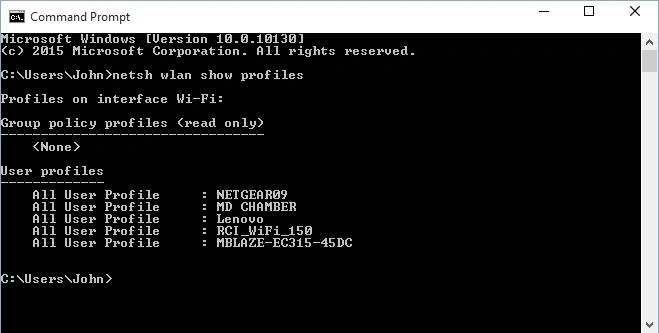
First, know the name of your Wi-Fi network's SSID (profile name) using the following command in the command prompt. This command will list all the profiles saved. When you press the Enter key after the code, you will get the profiles listed as in the following image. The names will be different based on what your admin has set.
- netsh wlan show profiles
Step 3
Now you have the list of Wireless Networks saved in your system and you can see that within the range profile in your device when you go to the Wi-Fi settings page. Now run the following command to get the word of your network profile.
Replace ProfileName from the list that is displayed by the code in Step 2. You will get results as shown in the following screen after replacing the profile name field.
- netsh wlan show profile name=“ProfileName” key=clear
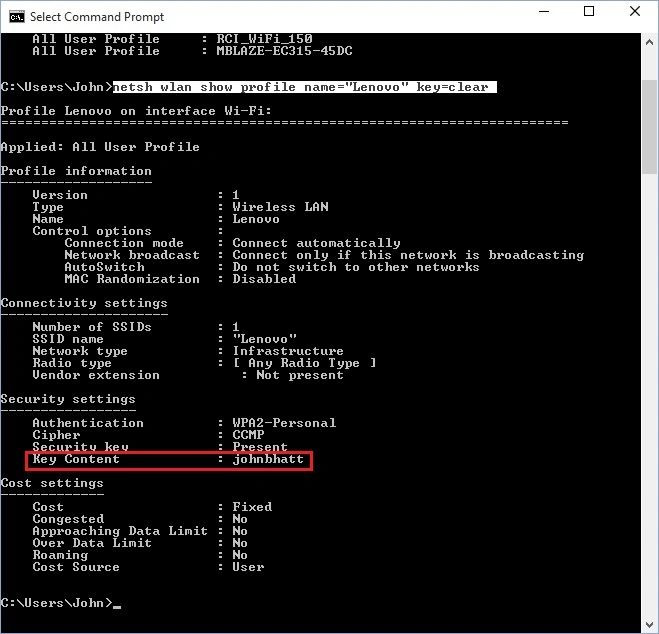
You will get the security key (word) listed as Key content in the Security settings sections as we have highlighted the result for our query.
Please share your views or any alternative methods of getting the preceding task done.
Summary
In this article, we learned about View Wi-Fi Password in Windows 10 Without External Application.
Vipul MalhotraPosted Jul 6, 2015, 3:31 AM
Nice..Thanks for sharing
Sibeesh VenuPosted Jul 6, 2015, 3:18 AM
Good One.Thanks for sharing :)
SharadPosted Jul 6, 2015, 3:06 AM
Nice Article...
Pooja BaraskarPosted Jul 6, 2015, 12:54 AM
That's really cool!!
Santhakumar MunuswamyPosted Jul 6, 2015, 12:16 AM
Good one
Afzaal Ahmad ZeeshanPosted Jul 5, 2015, 9:48 PM
A very quick hack!