
JavaScript is a language of the Web. This series of articles will talk about my observations learned during my decade of software development experience with JavaScript.
A Promise is an asynchronous operation that has not completed now but will complete in the future. ES6 has adopted promises implementation as native APIs. The promise gives us a guarantee to return the value in the future. Promises are not like events where you need to bind the event with a particular method.
The way to create a Promise is by using "new Promise" constructor, which accepts two callback functions as parameters. The first typically named resolve is a function to call with the future value when promise is ready. The second typically named reject is a function to reject the Promise if it cannot resolve the future value. Syntax
As per MDN, below is the syntax:
new Promise( /* executor */ function(resolve, reject) { ... } );
Executor: A function that will be passed to other functions via the arguments resolve and reject.
Sample code
Introduction
Creating a promise
- var p1 = new Promise(function(resolve, reject)
- {
- if ( /* condition */ )
- {
- resolve( /* value */ ); // promise fulfilled
- }
- else
- {
- reject( /* reason */ ); // mention reason for rejection
- }
- });
- When code executes “new Promise”, it starts from below state
 The first state of Promise is “pending”.
 - After Promise is fulfilled then it changes to:
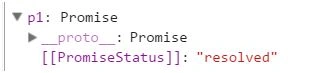 The second state of Promise is “fulfilled” or a promise is “rejected” if it’s not fulfilled.
Summary of Promise states
- pending: Initial state, not fulfilled or rejected.
- fulfilled: Meaning that the operation completed successfully.
- rejected: Meaning that the operation failed.
Prototype promise methods
then() method
- onFulfilled: a callback function called when the promise is fulfilled.
- onRejected: a callback function is called when the promise is rejected.
Example- it will print “Fulfilled!” because we’ve set flag = true,
- var flag = true;
- var p1 = new Promise(function(resolve, reject)
- {
- if (flag)
- {
- resolve("Fulfilled!");
- }
- else
- {
- reject("Rejected!");
- }
- });
- p1.then(function(value)
- {
- console.log(value); // Fulfilled!
- }, function(reason)
- {
- console.log(reason); // Rejected!
- });
catch() method
- var flag = false;
- var p1 = new Promise(function(resolve, reject)
- {
- if (flag)
- {
- resolve("Fulfilled!");
- }
- else
- {
- reject("Rejected!");
- }
- });
- p1.then(function(value)
- {
- console.log(value); // Fulfilled!
- }).catch(function(reason)
- {
- console.log(reason); // Rejected!
- });
Example- chaining of .then() method and incrementing counter.
- var counter = 0;
- var p1 = new Promise(function(resolve, reject)
- {
- resolve(counter);
- });
- p1.then((value) =>
- {
- console.log('Counter: ' + ++counter); // 1
- }).then((value) =>
- {
- console.log('Counter: ' + ++counter); // 2
- }).then((value) =>
- {
- console.log('Counter: ' + ++counter); // 3
- }).catch(function(reason)
- {
- console.log(reason);
- });

Promise methods
Promise.all()- When you are working with multiple promises, this function is really helpful. Once all Promises are resolved or rejected, it returns Promises.
- var p1 = new Promise(function(resolve, reject) {
- var counter = 0;
- resolve(++counter);
- });
- var p2 = new Promise(function(resolve, reject) {
- resolve("counter 2");
- });
- var p3 = new Promise(function(resolve, reject) {
- setTimeout(resolve("Promise 3"), 5000); //5000 milisecond = 5 sec
- });
- Promise.all([p1, p2, p3]).then(function(values) {
- console.log(values); // Output: [1, "counter 2", "Promise 3"]
- }).catch((val) => {
- console.log(val); // return “rejected”, if any promise fails
- });
Promise.race()- It returns a Promise which resolves or reject first. It accepts an iterable of Promises and works like OR condition.
- var p1 = new Promise(function(resolve, reject)
- {
- setTimeout(resolve, 1500, "resolved - will not get printed");
- });
- var p2 = new Promise(function(resolve, reject)
- {
- setTimeout(reject, 100, "rejected - printed");
- });
- Promise.race([p1, p2]).then(function(value)
- {
- console.log(value); // not get printed
- }, function(reason)
- {
- console.log(reason); // rejected - printed
- // p6 is faster, so it rejects
- });
Load XMLHttpRequestfiles
automobile.json
- {
- "automobile": [
- {
- "vehicle": "car",
- "engine": "1200cc"
- },
- {
- "vehicle": "bike",
- "engine": "200cc"
- },
- {
- "vehicle": "jeep",
- "engine": "2000cc"
- }]
- }
employee.json
- {
- "employees": [
- {
- "firstName": "John",
- "lastName": "Doe"
- },
- {
- "firstName": "Anna",
- "lastName": "Smith"
- },
- {
- "firstName": "Peter",
- "lastName": "Jones"
- }]
- }
Script.js
- varary = ['http://localhost/automobile.json', 'http://localhost/employee.json']
- var p1 = new Promise(function(resolve, reject)
- {
- letsrcurl = getJSON(ary[0], resolve);
- });
- var p2 = new Promise(function(resolve, reject)
- {
- letjson = getJSON(ary[1], resolve);
- });
- functiongetJSON(json, resolve)
- {
- varxmlhttp = new XMLHttpRequest(json);
- xmlhttp.open("GET", json);
- xmlhttp.send();
- xmlhttp.onload = function()
- {
- if (xmlhttp.status === 200)
- {
- resolve(xmlhttp.responseText);
- }
- }
- };
- Promise.all([p1, p2]).then((val) =>
- {
- document.getElementById('div2').innerHTML = val;
- });

Promises Advantages
- It gives us the ability to write async code synchronously.
- You can handle via handler whether it's resolved or rejected
- Solve the problem of code pyramids, ex-
- step1(function(value1)
- {
- step2(value1, function(value2)
- {
- step3(value2, function(value3)
- {
- step4(value3, function(value4)
- {
- // Do something with value4
- });
- });
- });
- });
- var p1 = new Promise().resolve('resolve');
- p1.then((value) =>
- {
- console.log(value);
- }).then((value) =>
- {
- console.log(value);
- }).then((value) =>
- {
- console.log(value);
- }).then((value) =>
- {
- console.log(value);
- });
Libraries providing Promises
Q.js
- var functionA = function()
- {
- return "ret A";
- };
- var functionB = function()
- {
- return "ret B";
- };
- var promise = Q.all([Q.fcall(functionA), Q.fcall(functionB)]);
- promise.spread(finalStep);
AngularJS
- // Simple GET request example:
- $http(
- {
- method: 'GET',
- url: '/someUrl'
- }).then(function successCallback(response)
- {
- // this callback will be called asynchronously
- // when the response is available
- }, function errorCallback(response)
- {
- // called asynchronously if an error occurs
- // or server returns response with an error status.
- });
Bhuvanesh MohankumarPosted May 23, 2016, 5:36 AM
Nice one
Guest UserPosted May 23, 2016, 1:12 AM
Hello eveyone, thnx for reading & sharing article
Neeraj KumarPosted May 22, 2016, 11:12 PM
NIce article
Vignesh ManiPosted May 22, 2016, 4:12 PM
Nice
vinayak ghantiPosted May 22, 2016, 3:11 PM
nice one sir