

Windows Communication Foundation (WCF)
Windows Communication Foundation (WCF) is a dedicated communication framework provided by Microsoft. WCF is a part of .NET 3.0. The runtime environment provided by the WCF enables us to expose our CLR types as services and to consume other existing services as CLR types.
Background
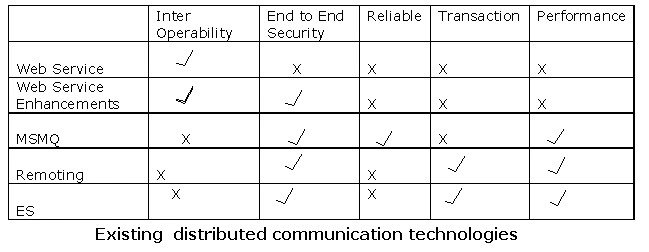
In the world, there are a lot of distributed communication technologies that exist. Some of them are:
- ASP.NET Web Services (ASMX)
- Web Services Enhancements (WSE)
- Messaging (MSMQ)
- .NET Enterprise Services (ES)
- .NET Remoting
Creating and Consuming a Sample WCF Service
Three major steps are involved in the creation and consumption of WCF services. Those are:
- Create the Service. (Creating)
- Binding an address to the service and host the Service. (Hosting)
- Consuming the Service. (Consuming)
Step 1: Creating the Service
In WCF, all services are exposed as contracts. A contract is a neutral way of describing what the service does. Mainly we have four types of contracts:
- Service Contract
This contract describes all the available operations that a client can perform on the service.
.Net uses "System.ServiceModel" Namespace to work with WCF services.
ServiceContract attribute is used to define the service contract. We can apply this attribute on class or interface. ServiceContract attribute exposes a CLR interface (or a class) as a WCF contract.
OperationContract attribute is used to indicate explicitly which method is used to expose as part of WCF contract. We can apply OperationContract attribute only on methods, not on properties or indexers.
[ServiceContract] applies at the class or interface level.
[OperatiContract] applies at the method level.
- Data Contract
This contract defines the data types that are passed into and out of the service.
[DataContract] attribute is used at the custom data type definition level, i.e. at class or structure level.
[DataMember] attribute is used for fields, properties, and events.
- Fault Contract
This contract describes the error raised by the services.
[FaultContract(<<type of Exception/Fault>>)] attribute is used for defining the fault contracts.
- Message Contracts
This contract provides direct control over the SOAP message structure. This is useful in interoperability cases and when there is an existing message format you have to comply with.
[MessageContract] attribute is used to define a type as a Message type.
[MessageHeader] attribute is used for those members of the type we want to make into SOAP headers
[MessageBodyMember] attribute is used for those members we want to make into parts of the SOAP body of the message.
Sample Service Creation
- [ServiceContract]
- public interface IFirstWCFService
- {
- [OperationContract]
- int Add(int x, int y);
- [OperationContract]
- string Hello(string strName);
- int Multiplication(int x, int y);
- }
- public class FrtWCFService: IFirstWCFService
- {
- public int Add(int x, int y)
- {
- return x + y;
- }
- public string Hello(string strName)
- {
- return "WCF program : " + strName;
- }
- public int Multiplication(int x, int y)
- {
- return x * y;
- }
- }
STEP 2: Binding and Hosting
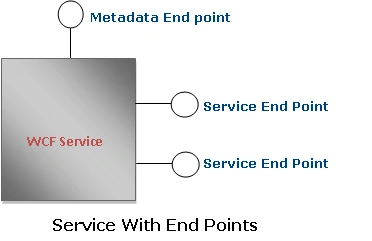
Each service has an endpoint. Clients communicate with this endpoints only. Endpoint describes 3 things :
- Address
- Binding type
- Contract Name (which was defined in STEP 1)
Address
Every service must be associated with a unique address. Address mainly contains the following two key factors :
- Transport protocol used to communicate between the client proxy and service.
WCF supports the following transport machinisams:
- HTTP (ex : http:// or https:// )
- TCP (ex : net.tcp :// )
- Peer network (ex: net.p2p://)
- IPC (Inter-Process Communication over named pipes) (ex: net.pipe://)
- MSMQ (ex: net.msmq://)
- Location of the service.
Location of the service describes the targeted machine (where service is hosted) complete name (or) path and optionally port/pipe/queue name.
Example : localhost:8081
Here localhost is the target machine name.
8081 is the optional port number.
Example 2: localhost
This is without optional parameter.
Here are a few sample addresses:
http://localhost:8001
http://localhost:8001/MyFirstService
net.tcp://localhost:8002/MyFirstService
net.pipe://localhost/MyFirstPipe
net.msmq://localhost/MyFirstService
net.msmq://localhost/MyFirstService
Binding is nothing but a set of choices regarding the transport protocol (which transport protocol we have to use: http /tcp /pipe etc.) ,message encoding (tells about the message encoding / decoding technique) ,communication pattern (whether communication is asynchronous, synchronous, message queued etc.) , reliability, security, transaction propagation, and interoperability.
WCF defines the nine basic bindings:
| Binding Type | .Net Class implements this binding | Transport | Encoding | Interoperable | Comments |
| Basic Binding | BasicHttpBinding | Http / Https | Text / MTOM | Yes | Used to expose a WCF service as a legacy ASMX web service. |
| TCP binding | NetTcpBinding | TCP | Binary | NO | TCP is used for cross-machine communication on the intranet. |
| Peer network binding | NetPeerTcpBinding | P2P | Binary | NO | In this peer network transport schema is used to communicate. |
| IPC binding | NetNamedPipeBinding | IPC | Binary | NO | This uses named pipes as a transport for same-machine communication. It is the most secure binding since it cannot accept calls from outside the machine. |
| WSbinding | WSHttpBinding | Http / Https | Text / MTOM | Yes | This uses Http / Https as a communication schema. |
| Federated WS binding | WSFederationHttpBinding | Http / Https | Text / MTOM | Yes | This is a specialization of the WS binding. This offers the support for federated security |
| Duplex WS binding | WSDualHttpBinding | Http | Text / MTOM | Yes | This is a WS binding with bidirectional communication support from the service to the client. |
| MSMQ binding | NetMsmqBinding | MSMQ | Binary | NO | This supports for disconnected queued calls |
| MSMQ integration binding | MsmqIntegrationBinding | MSMQ | Binary | Yes | This is designed to interoperate with legacy MSMQ clients. |
Hosting
Every service must be hosted in a host process. Hosting can be done by using the
- IIS
- Windows Activation Service (WAS)
- Self hosting
| Hosting Type | Advantages | Limitations |
| IIS Hosting | IIS manages the life cycle of host process. ( like application pooling, recycling, idle time management, identity management, and isolation) | Only HTTP transport schemas WCF service are hosted in IIS. |
| WAS Hosting |
|
Some adv of self hosted processing is missing. |
| Self Hosting |
|
Missing the host process life cycle management. |
IIS Hosting
IIS hosting is the same as hosting traditional web service hosting. Create a virtual directory and supply a .svc file.
In Vs2008 select a project type: "WCF Service Application".
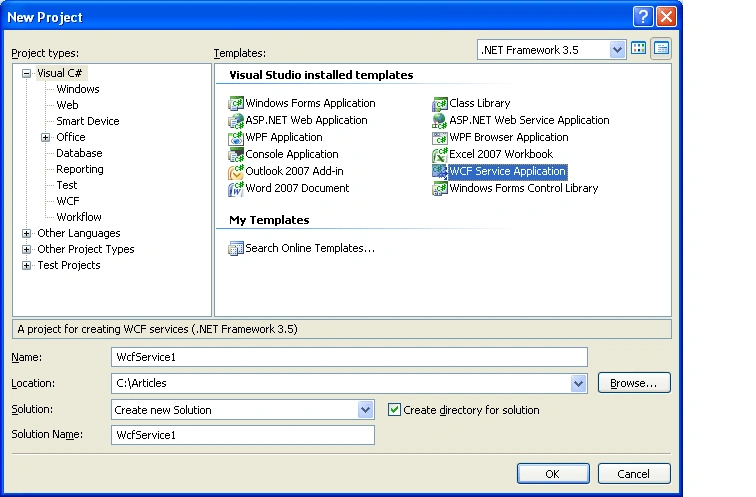
In the solution explorer, under the App_code folder you can find the two files: "IService.cs" and "Service.cs".
"IService.cs" class file defines the contracts. "Service.cs" implements the contracts defined in the "IService.cs". Contracts defined in the "IService.cs" are exposed in the service.
Check in the Web.Config file, under <system.serviceModel> section:
- <services>
- <service name="Service" behaviorConfiguration="ServiceBehavior">
- <!-- Service Endpoints -->
- <endpoint address="" binding="wsHttpBinding" contract="IService">
- <!--
- Upon deployment, the following identity element should be removed or replaced to reflect the
- identity under which the deployed service runs. If removed, WCF will infer an appropriate identity
- automatically.
- -->
- <identity>
- <dns value="localhost"/>
- </identity>
- </endpoint>
- <endpoint address="mex" binding="mexHttpBinding" contract="IMetadataExchange"/>
- </service>
- </services>
Another end point node endpoint address="mex" specify about the Metadata end point for the service.
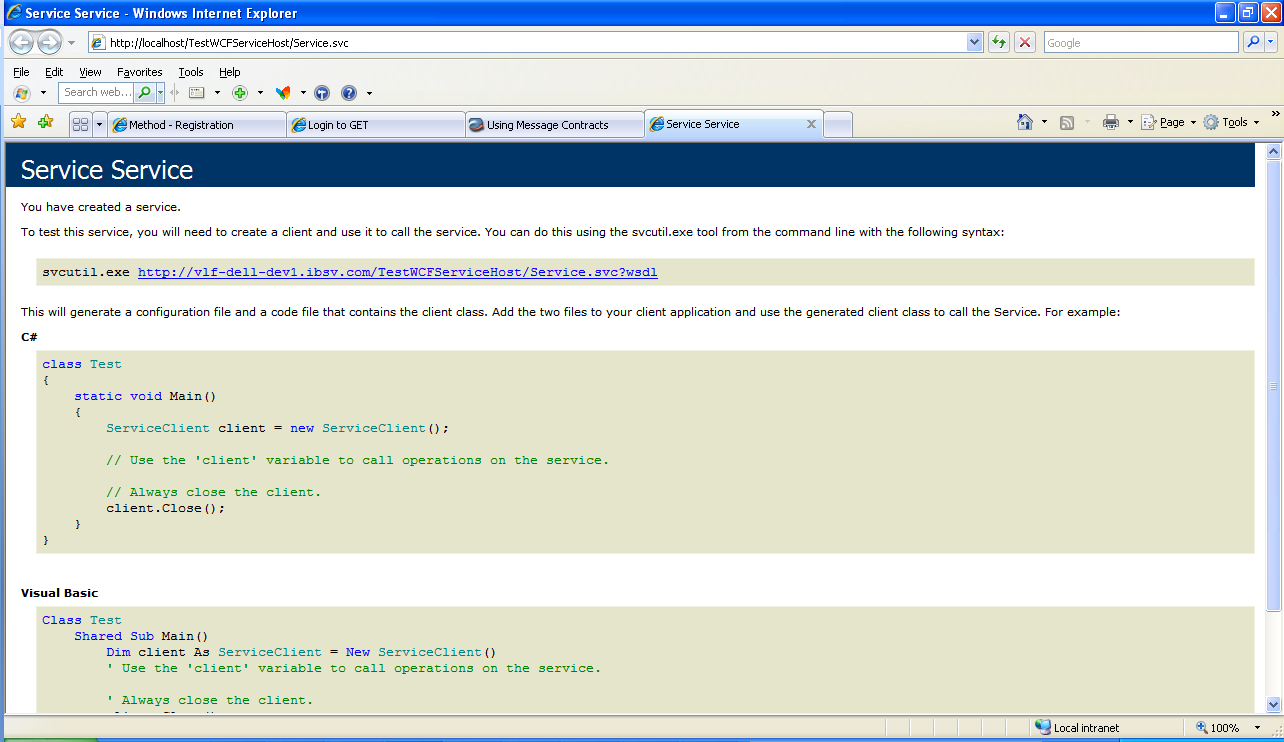
Now host this service by creating the virtual directory and browse the *.SVC file:
Hosting with Windows Activation Service (WAS)
WAS is a part of IIS 7.0. It comes with VISTA OS. The hosting with the Windows Activation Service is same as hosting with IIS. The only difference between these two is, IIS supports for HTTP binding only. Whereas WAS supports for all transport schemas.
Self Hosting
In this technique, the developer is only responsible for providing and managing the life cycle of the host process. In this one host service must be running before the client calls the service. To host the service we use the .NET class ServiceHost. We have to create an instance of the "ServiceHost". Constructor of this class takes two parameters: service type, base address. (Base address can be empty set.)
- Uri baseaddress = new Uri("http://localhost:8080");
- ServiceHost srvHost = new
- ServiceHost(typeof(WCFService.FrtWCFService),baseaddress);
We will use the AddServiceEndpoint() to add an endpoint to the host. As we are that end point contains three things: type of service, type of binding, service Name.
So, AddServiceEndpoint() method accepts these three as the required parameters.
- srvHost.AddServiceEndpoint(typeof(WCFService.IFirstWCFService), new BasicHttpBinding(), "FirstWCFService");
For the Meta data, service type will be: typeof(IMetadataExchange)
- srvHost.AddServiceEndpoint(typeof(IMetadataExchange), httpBinding, "MEX");
- srvHost.Open();
With WCF, the client always communicates with the proxy only. Client never directly communicates with the services, even though the service is located on the same machine. Client communicates with the proxy; proxy forwards the call to the service. Proxy exposes the same functionalities as Service exposed.

Consuming WCF Service Hosted by IIS/WAS
Consuming WCF service is a very similar way of consuming a web service by using the proxy. To consume the service, in the solution explorer click on "Add service Reference" and add the service created in the STEP1.
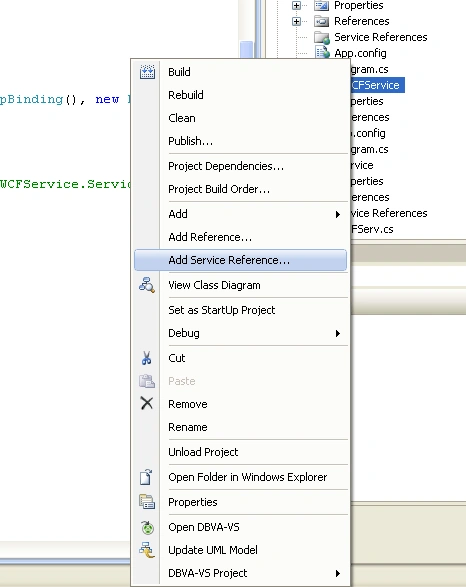
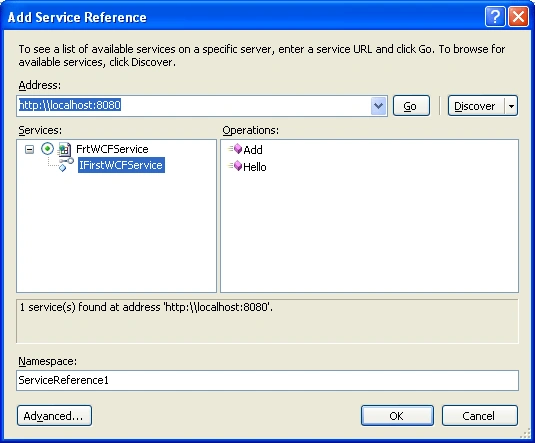
A service reference is created under the service reference folder. Use this proxy class to consume the WCF service as we are doing with web services.
- ServiceReference1.FirstWCFServiceClient obj = new
- UsingWCFService.ServiceReference1.FirstWCFServiceClient();
- Console.WriteLine(obj.Add(2, 3).ToString());
- obj.Close();
svcutil.exe [WCFService Address]
This generates a service proxy class, just include this class into the solution and consume the service.
Consuming by creating the channel factory
We can consume the service by creating the channel factory manually. While creating the channel, we have to provide the same binding type and endpoint address where the service is hosted.
- IFirstWCFService chnl = new ChannelFactory<IFirstWCFService>
- (new BasicHttpBinding(), new EndpointAddress("http://localhost:8080/MYFirstWCFService")).CreateChannel();
Sudheshwer RaiPosted Jun 9, 2017, 1:02 PM
Well done Sunil. Keep it up.
kalu singh raoPosted Jul 4, 2016, 2:07 AM
Nice...
sandip shimpiPosted Dec 10, 2012, 8:13 AM
Excellant for beginners..........
MageshwaranPosted Oct 15, 2012, 1:26 AM
nice one
Ravi MakhijaeditedPosted Aug 28, 2012, 2:44 AMEdited Aug 28, 2012, 2:46 AM
it'zz gr8 for beginning... Good Work
ShantanuPosted Jun 7, 2012, 3:31 PM
I know I'm reading this article late...but I get the following error when I try to run the self hosting solution: (Could not connect to http://localhost:8080/MYFirstWCFService. TCP error code 10061: No connection could be made because the target machine actively refused it 127.0.0.1:8080.). Can please someone help me?...Im using vs2010. I've tried running VS as administrator and it dint help, I also tried constructing the base address using System.Net.Dns.GetHostName() which did not work either. Thanks!
Vikas SaxenaPosted Jun 5, 2012, 7:35 AM
Thanks Buddy I so Glad
rozy singhaniPosted May 29, 2012, 7:34 AM
Great Work Done .It is easy to understand who r new in wcf
Syed ShakeerPosted Nov 3, 2011, 2:13 PM
Easy to understand.In one shot your explained WCF.Good Work
Rahul ChowdhuryPosted Oct 31, 2011, 4:16 AM
Great article for kick off....
kalikrishna maddulaPosted Jun 10, 2011, 12:54 AM
It is awesome article for who r starting wcf..
Mayur GosaviPosted May 18, 2011, 7:32 AM
This was really a good understandable article.
hari kishorePosted Jan 20, 2011, 12:04 AM
Hey Sunil, Really nice article for a newbie like me. Thanks a lot !!
Vamshi BollaPosted Nov 20, 2010, 1:46 AM
Hi sunil, It was really a nice article for the beginner. Thanks for the stuff.
KiranPosted Oct 27, 2010, 3:51 PM
Good job man, its very helpful :-)
Shameer KunjumohamedPosted Oct 17, 2010, 1:03 PM
Sharing a post on building a web service client with WCF, at http://justcompiled.blogspot.com/2010/10/building-web-service-client-with-wcf.html
AbhiPosted Oct 10, 2010, 4:06 PM
Hi Sunil, It's nice article and very easy to understand even for begginers in simple language, which actually tends to learn even more. Thanks
sri kanthPosted Aug 28, 2010, 1:27 PM
Hi Sunil.. great yar good article..
saif rizviPosted Jul 15, 2010, 8:26 AM
Nice article .. giving some useful information.. please give the detail and deep information which use in industry level... you can send mail [email protected]
Yuri BondarenkoPosted Jul 5, 2010, 7:20 AM
Perfectly explained!
Akash varshneyPosted Jun 28, 2010, 4:25 AM
Nice job Dude !!!!!!!
Pratap ThakurPosted Jun 11, 2010, 6:34 AM
Greate job sir, just only because of grts like you, beginner like us need not frustrate
aanish kPosted Jun 10, 2010, 1:14 AM
Hi Sunil, very good and useful article, thank you for precious time for writing this article. if u write another article, pls mail me the link to " [email protected] " that too if u don't mind. Thank you, Anish
surya pradeepPosted Jun 4, 2010, 12:19 PM
I was finding a hard time in collaborating all the pieces of WCF but this was really simple and easy. Hope you provide more about WCF with a sophisticated approach similar to this
PrincePosted May 1, 2010, 8:14 AM
Really Nice Article Sunil.Good job!!!!!
suda gopiPosted Apr 13, 2010, 8:30 PM
Great job.. sunil
Bhavani Shankar PPosted Mar 26, 2010, 7:46 AM
No Words.......... Nice of ur Notes.........
pavaniPosted Feb 15, 2010, 5:46 AM
Nice Article
rajesharraPosted Feb 7, 2010, 9:39 AM
Hi, Thank you for this article...i am very new to WCF servicess and it's given me a complete picture in one shot. thanks once again.. regards rajesh A
selva rajPosted Dec 20, 2009, 12:40 PM
Hi Sunil, Super article . will help more . 247
rupaliPosted Sep 21, 2009, 7:18 AM
Very Clear and informative
prem panigrahiPosted Sep 2, 2009, 1:34 PM
Thanks sunil..it's really helpfull.
shashiPosted Jun 25, 2009, 12:56 PM
for dummies:) good job!
sudhaPosted Jun 25, 2009, 12:01 AM
Excellent Article
sudhaPosted Jun 25, 2009, 12:00 AM
Excellent, crisp and informative article
phani bhushanPosted Mar 18, 2009, 7:03 PM
Hey Sunil, I spent more than an hour on MSDN and I was lost. Your artical is crisp and clear. Thanks again.
KYAW MYINT AUNGPosted Mar 11, 2009, 10:37 AM
Hi Sunil, Short to the points for beginner. Thanks for your time.
samir puradupadhyePosted Feb 18, 2009, 5:13 PM
really really good article.....
Shalu DavidPosted Dec 18, 2008, 7:56 AM
I definitely like the article and was successful with IIS hosting, Self hosting. I only had an issue with ChannelFactory where i could not figure out the endpointaddress. Anyway a must read for beginners! Thanks Sunil for taking the time to write it.
Dharni DwivediPosted Dec 17, 2008, 8:32 AM
Lots of mistakes.
Satyanand KommojuPosted Dec 11, 2008, 11:12 PM
A very good article to start off with WCF. Good writeup. Thanks
Debasmit SamalPosted Nov 17, 2008, 6:14 AM
Hey Sunil... What a article you have been described here. really it is superb. Thanks.
Mamta MPosted Nov 4, 2008, 4:22 AM
This article was well-written and is quite deep.
AdnanPosted Sep 15, 2008, 5:32 PM
Hey Sunil, Great write dude, to the point and completely informative.
AdnanPosted Sep 15, 2008, 5:32 PM
Hey Sunil, Great write dude, to the point and completely informative.