

Introduction
WCF is a replacement for all earlier web service technologies from Microsoft. It also does a lot more than what is traditionally considered as "web services". Web Services can be accessed only over HTTP and works in a stateless environment where WCF is flexible because its services can be hosted in different types of applications. Common scenarios for hosting WCF Services are IIS, WAS, Self-hosting, and Managed Windows Service.
WCF Services are easy to create for those who know .NET Framework. Here, I am giving an example for beginners to create a simple Web Service, using Visual Studio IDE.
Step 1
Create New-> project-> WCF Service application, as shown below.
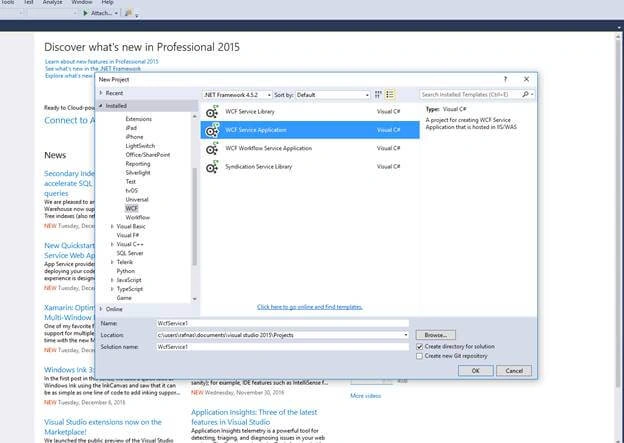
Give some name (For my example, let’s take default name i.e., WcfService) and press OK button.
Step 2
Now, you can see that the Service.svc.cs window opens or you can see it on the right side solution panel. Open that file.
Give some name (For my example, let’s take default name i.e., WcfService) and press OK button.
Step 2
Now, you can see that the Service.svc.cs window opens or you can see it on the right side solution panel. Open that file.
If you want to create a new Service, then go to Solution Explorer, right click->Add-> New item-> select WCF Service template and give name for that and press OK
Step 3
After opening Service.svc.cs file, add namespace,
Step 3
After opening Service.svc.cs file, add namespace,
- using System.ServiceModel.Activation;
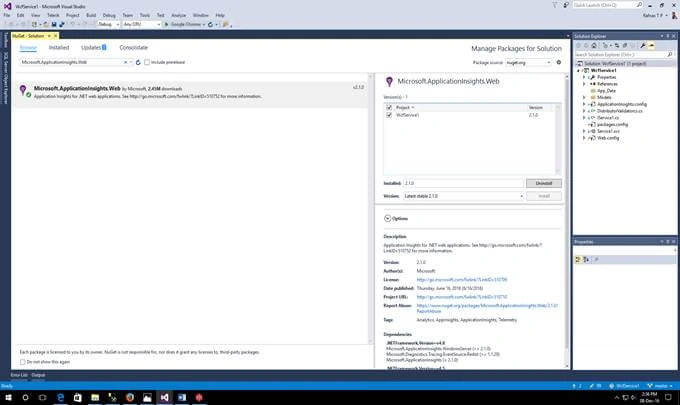
Add the below lines after WcfService1 namespace open brace.
- [ServiceContract]
- [AspNetCompatibilityRequirements(RequirementsMode = AspNetCompatibilityRequirementsMode.Allowed)]
- [ServiceBehavior(InstanceContextMode = InstanceContextMode.Single)]
- public class Service
- {
- }
Inside this class, we can start writing remaining service parts, as in the following example.
- private string secureToken;
- [OperationContract] //service contract
- [WebInvoke(Method = "POST", RequestFormat = WebMessageFormat.Json, ResponseFormat = WebMessageFormat.Json, BodyStyle = WebMessageBodyStyle.Bare)] //Post Method for gtting data according to the parameter
- public ResponseData Login(RequestData data) //Response class for retriving data
- {
- using (SqlConnection _con = new SqlConnection(System.Configuration.ConfigurationManager.ConnectionStrings["conString"].ToString()))
- {
- SqlCommand cmd = new SqlCommand("sp_LogIn", _con);
- cmd.CommandType = CommandType.StoredProcedure;
- cmd.Parameters.AddWithValue("@UserName", data.usname);
- cmd.Parameters.AddWithValue("@Password", data.pwd);
- SqlDataAdapter da = new SqlDataAdapter(cmd);
- DataSet dt_Login = new DataSet();
- da.Fill(dt_Login, "table");
- DataRow dr = dt_Login.Tables[0].Rows[0];
- secureToken = GetJwt(data.usname, data.pwd, data.org);
- var response = new ResponseData
- {
- token =secureToken ,
- authenticated = true,
- employeeId = dr["EmpId"].ToString(),
- firstname = dr["emp_firstname"].ToString(),
- timestamp = DateTime.Now,
- userName = data.usname
- };
- return response;
- }
- }
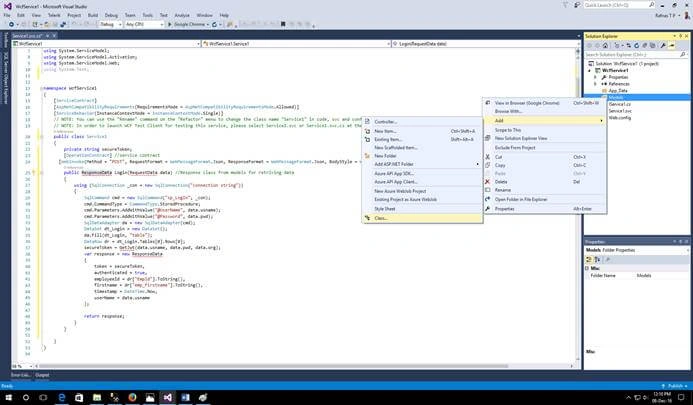
Create one folder for Models and create a model as RequestData.cs for Login request.
- namespace WcfService.Models
- {
- public class RequestData
- {
- public string usname { get; set; }
- public string pwd { get; set; }
- }
- }
Step 6
Create ResponseData.cs for storing response from Login Operation Contract.
- using System;
- using System.Runtime.Serialization;
- namespace WcfService.Models
- {
- [DataContract]
- public class ResponseData
- {
- [DataMember(Order = 0)]
- public string token { get; set; }
- [DataMember(Order = 1)]
- public bool authenticated { get; set; }
- [DataMember(Order = 2)]
- public string employeeId { get; set; }
- [DataMember(Order = 3)]
- public string firstname { get; set; }
- [DataMember(Order = 8)]
- public DateTime timestamp { get; set; }
- [DataMember(Order = 9)]
- public string userName { get; set; }
- }
- }
Now, let’s create function for JWT Token as follows in Service.svc.cs. For JWT encoder, we need to download and add "Jose-jwt" reference, as shown below.
Install jose-jwt from NuGet package by right clicking the Solution.
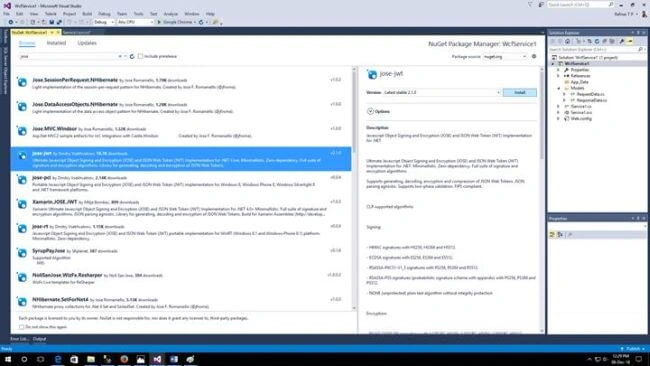
After installing this, now add functions to the same class.
- private byte[] Base64UrlDecode(string arg) // This function is for decoding string to
- {
- string s = arg;
- s = s.Replace('-', '+'); // 62nd char of encoding
- s = s.Replace('_', '/'); // 63rd char of encoding
- switch (s.Length % 4) // Pad with trailing '='s
- {
- case 0: break; // No pad chars in this case
- case 2: s += "=="; break; // Two pad chars
- case 3: s += "="; break; // One pad char
- default:
- throw new System.Exception(
- "Illegal base64url string!");
- }
- return Convert.FromBase64String(s); // Standard base64 decoder
- }
- private long ToUnixTime(DateTime dateTime)
- {
- return (int)(dateTime.ToUniversalTime().Subtract(new DateTime(1970, 1, 1))).TotalSeconds;
- }
- public string GetJwt(string user, string pass) //function for JWT Token
- {
- byte[] secretKey = Base64UrlDecode("Hi");//pass key to secure and decode it
- DateTime issued = DateTime.Now;
- var User = new Dictionary<string, object>()
- {
- {"user", user},
- {"pass", pass},
- {"iat", ToUnixTime(issued).ToString()}
- };
- string token = JWT.Encode(User, secretKey, JwsAlgorithm.HS256);
- return token;
- }
- <?xml version="1.0" encoding="utf-8"?>
- <configuration>
- <connectionStrings>
- <add name="conString" connectionString="server= ;database=db_Name;User ID=sa;Password=123" providerName="System.Data.SqlClient"/>
- </connectionStrings>
- <system.web>
- <compilation debug="true" targetFramework="4.0" />
- </system.web>
- <system.serviceModel>
- <services>
- <service name="WcfService.Service" behaviorConfiguration="serviceBehavior">
- <endpoint binding="webHttpBinding" contract="WcfService.Service" behaviorConfiguration="httpBehavior"></endpoint>
- <endpoint name="mexHttpBinding" address="mex" binding="mexHttpBinding" contract="IMetadataExchange" />
- </service>
- </services>
- <behaviors>
- <serviceBehaviors>
- <behavior name="serviceBehavior">
- <!-- To avoid disclosing metadata information, set the value below to false before deployment -->
- <serviceMetadata httpGetEnabled="true" />
- <!-- To receive exception details in faults for debugging purposes, set the value below to true. Set to false before deployment to avoid disclosing exception information -->
- <serviceDebug includeExceptionDetailInFaults="true" />
- </behavior>
- </serviceBehaviors>
- <endpointBehaviors>
- <behavior name="httpBehavior">
- <webHttp />
- </behavior>
- </endpointBehaviors>
- </behaviors>
- <serviceHostingEnvironment multipleSiteBindingsEnabled="false" />
- </system.serviceModel>
- <system.webServer>
- <modules runAllManagedModulesForAllRequests="true">
- <remove name="ApplicationInsightsWebTracking" />
- <add name="ApplicationInsightsWebTracking" type="Microsoft.ApplicationInsights.Web.ApplicationInsightsHttpModule, Microsoft.AI.Web" preCondition="managedHandler" />
- </modules>
- <directoryBrowse enabled="true" />
- <validation validateIntegratedModeConfiguration="false" />
- </system.webServer>
- <runtime>
- <assemblyBinding xmlns="urn:schemas-microsoft-com:asm.v1">
- <dependentAssembly>
- <assemblyIdentity name="System.Runtime" publicKeyToken="b03f5f7f11d50a3a" culture="neutral" />
- <bindingRedirect oldVersion="0.0.0.0-2.6.10.0" newVersion="2.6.10.0" />
- </dependentAssembly>
- <dependentAssembly>
- <assemblyIdentity name="System.Threading.Tasks" publicKeyToken="b03f5f7f11d50a3a" culture="neutral" />
- <bindingRedirect oldVersion="0.0.0.0-2.6.10.0" newVersion="2.6.10.0" />
- </dependentAssembly>
- <dependentAssembly>
- <assemblyIdentity name="Microsoft.Diagnostics.Tracing.EventSource" publicKeyToken="b03f5f7f11d50a3a" culture="neutral" />
- <bindingRedirect oldVersion="0.0.0.0-1.1.28.0" newVersion="1.1.28.0" />
- </dependentAssembly>
- </assemblyBinding>
- </runtime>
- </configuration>
For security, create one class as below and add it into Web.Config file. It is used to provide security using custom username and password. For that, create DistributorValidator.cs class.
DistributorValidator.cs is shown below.
- using System;
- using System.Net;
- using System.ServiceModel;
- using System.ServiceModel.Web;
- namespace WcfService
- {
- public class DistributorValidator : ServiceAuthorizationManager
- {
- protected override bool CheckAccessCore(OperationContext operationContext)
- {
- //Extract the Authorization header, and parse out the credentials converting the Base64 string:
- var authHeader = WebOperationContext.Current.IncomingRequest.Headers["Authorization"];
- if ((authHeader != null) && (authHeader != string.Empty))
- {
- var svcCredentials = System.Text.ASCIIEncoding.ASCII
- .GetString(Convert.FromBase64String(authHeader.Substring(6)))
- .Split(':');
- var user = new { Name = svcCredentials[0], Password = svcCredentials[1] };
- if ((user.Name == "smart" && user.Password == "andr0id"))
- {
- //User is authrized and originating call will proceed
- return true;
- }
- else
- {
- //not authorized
- return false;
- }
- }
- else
- {
- //No authorization header was provided, so challenge the client to provide before proceeding:
- WebOperationContext.Current.OutgoingResponse.Headers.Add("WWW-Authenticate: Basic realm=\"MyWCFService\"");
- //Throw an exception with the associated HTTP status code equivalent to HTTP status 401
- throw new WebFaultException(HttpStatusCode.Unauthorized);
- }
- }
- }
- }
- <serviceAuthorization serviceAuthorizationManagerType="WcfService1.DistributorValidator, WcfService"/>
Step 10
Now, run the service by right clicking Service.svc View in browser. If there is no error messages, then you will get the following window.
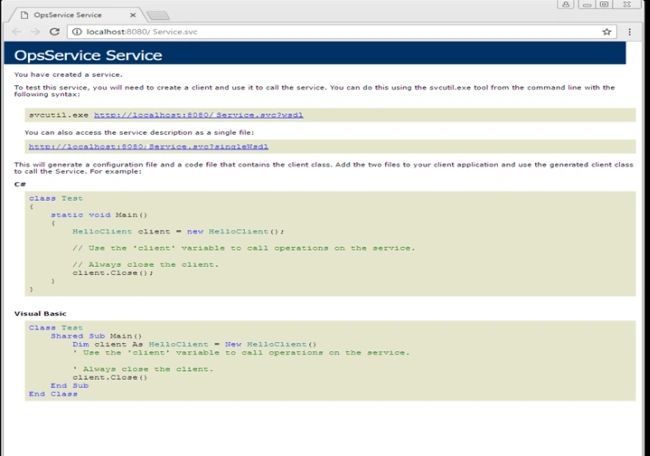
Here you will get a service link as in figure above: localhost:8080/Service.svc
To check this web service download Advanced REST client for chrome web browser as below,

Now, open the Advanced REST client from Chrome, give inputs to that, and send . You will get notification 200; i.e., OK. If you get an error, fix those errors explained in the message and try sending again.
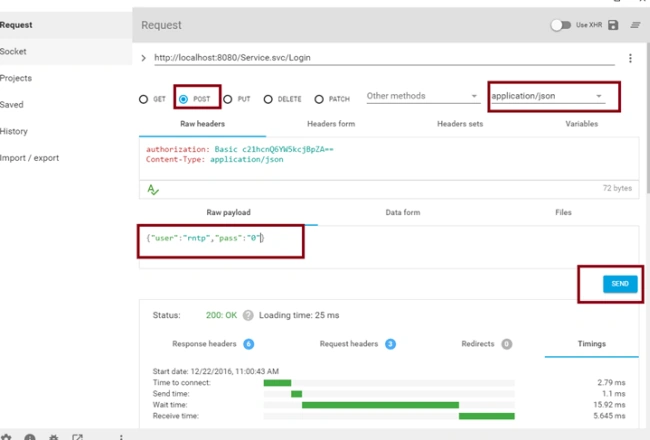
When you send it the first time, you will get one popup asking for username and password. Enter those from DistributorValidator.cs class. In my example, I gave username - "smart" and password - "andr0id".
Swapnil FandPosted Oct 9, 2020, 12:55 AM
How to use generate token to client side for Authorization
Anthony PuitizaPosted Oct 26, 2018, 12:04 PM
Well, I've followed step by step this tutorial but I had to modify some class without rewrite all the whole project. This is my repository https://github.com/puitiza/WCF_Services_JWT , if anybody wants it. I could test it on postman with basic authentication ("user": smart) and (password andr0id). I just lack implement in a BD.
tzvi kaidanovPosted Oct 3, 2017, 8:23 AM
Do you have a git or source code for this?
RajPosted Jul 29, 2017, 11:03 AM
Hi Rafnas, Thanks for the above article. I would like to implement this in SP2013 by consuming REST API's. REST API will return a JWT token. I need to decode the token at my end and validate the token. Any technical advice would be greatly helpful. I am planning to use SP2013 designer by calling REST API. However , not sure how to handle the validation of token part. Looking forward for your assistance please. Thanks
H KPosted Jul 16, 2017, 1:23 PM
No project files available?
Raja APosted Mar 2, 2017, 3:48 AM
Can you provide download source code..
Suseenthira KumarPosted Dec 22, 2016, 10:54 PM
Very helpfull, thanks..................................................