

First, add one blank solution.
Add a new project to this
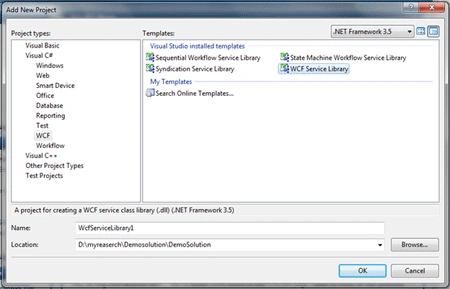
Select "WCF Service Library" as shown in above figure.
Delete the two files IService1.cs and Service1.cs
Now add two classes with the names IMyClass.cs and MyClass.cs
Now your solution should look like:
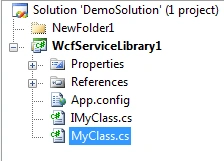
Now define the service contract and operation contract in iMyclass
The sample code is as given,
- using System;
- using System.Collections.Generic;
- using System.Linq;
- using System.Text;
- using System.ServiceModel;
- using System.Runtime.Serialization;
- namespace WcfServiceLibrary1
- {
- [ServiceContract]
- public interface IMyClass
- {
- [OperationContract]
- string[] Answers(int a, int b);
- }
- }
The sample code is as given,
- using System;
- using System.Collections.Generic;
- using System.Linq;
- using System.Text;
- namespace WcfServiceLibrary1
- {
- public class MyClass : IMyClass
- {
- #region IMyClass Members
- public string[] Answers(int a, int b)
- {
- string[] result = new string[5];
- if (a > b)
- result[0] = a.ToString() + " is greater than " + b.ToString();
- else if (a == b)
- result[0] = a.ToString() + " is Equal to " + b.ToString();
- else
- result[0] = a.ToString() + " is Smaller than " + b.ToString();
- result[1] = "Addition is " + (a + b).ToString();
- result[2] = "Multiplication is " + (a * b).ToString();
- if (a > b)
- {
- if (b != 0)
- {
- result[3] = "Division is " + (a / b).ToString();
- }
- else
- {
- result[3] = "Division is " + "infinite";
- }
- }
- else if (a < b)
- {
- if (a != 0)
- {
- result[3] = "Division is " + (b / a).ToString();
- }
- else
- {
- result[3] = "Division is " + "infinite";
- }
- }
- else
- {
- if (a != 0 && b != 0)
- {
- result[3] = "Division is " + "1";
- }
- else
- {
- result[3] = "Division is " + "infinite";
- }
- }
- if (a > b)
- result[4] = "Substraction is " + (a - b).ToString();
- else if (a < b)
- result[4] = "Substraction is " + (b - a).ToString();
- else
- result[4] = "Substraction is " + "0";
- return result;
- }
- #endregion
- }
- }
Now add one more project to the solution as given below:
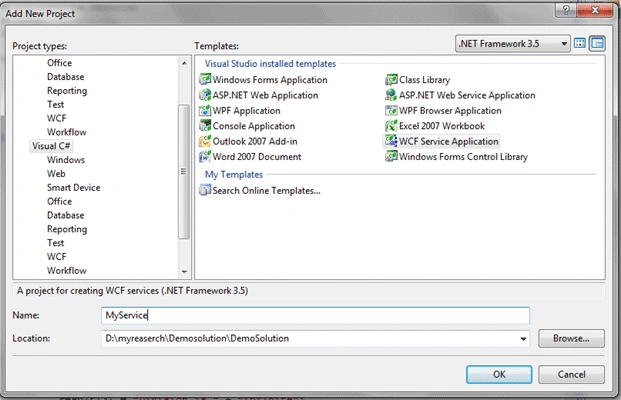
Again delete the two files Service1.svc.cs and IService1.cs
Add the reference of the DLL which we have generated by building.
Open the service1.svc file and make the changes to make similar to the following line
<%@ ServiceHost Language="C#" Debug="true" Service="WcfServiceLibrary1.MyClass" CodeBehind="MyClass.cs %>
Save it.
Now right click and select View in browser. It will show an error. No problem just take the URL.
For me, it gave the URL: http://localhost:54640/Service1.svc
Now right click on web.config and select "Edit WCF Configuration"
Delete the Endpoints (whatever you have) then also delete the service.
Now, click on the "Create a new Service".
Click on the browse button --> Go to bin folder. You will find two Dlls over there.
Double click both one by one so you can be given this screen,
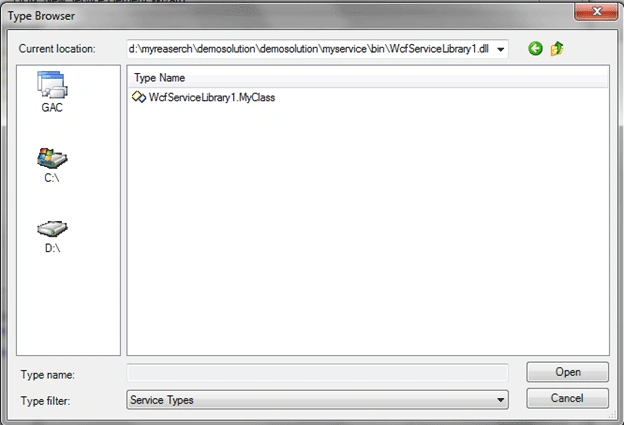
Select That. And click on next.
Select the contract by repeating above step generally, it has been given. Click next button.
Select HTTP and click next. Again next.
Now It will ask for the address give the address which we have got I am giving this address http://localhost:54640/Service1.svc
Proceed ahead and click finish.
In the endpoint section, Give Name Basic
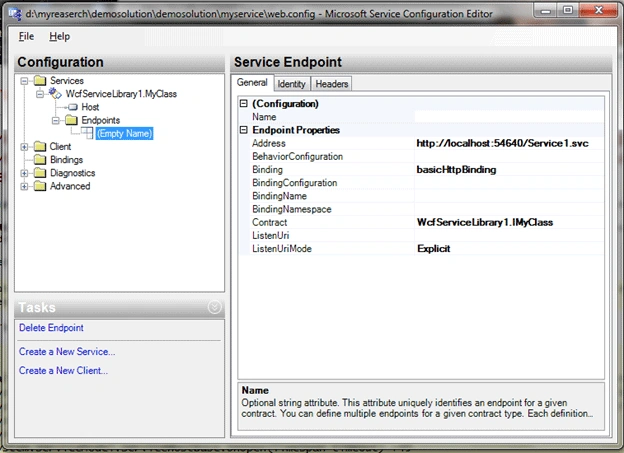
Now Click on the Services it will give you following screen,
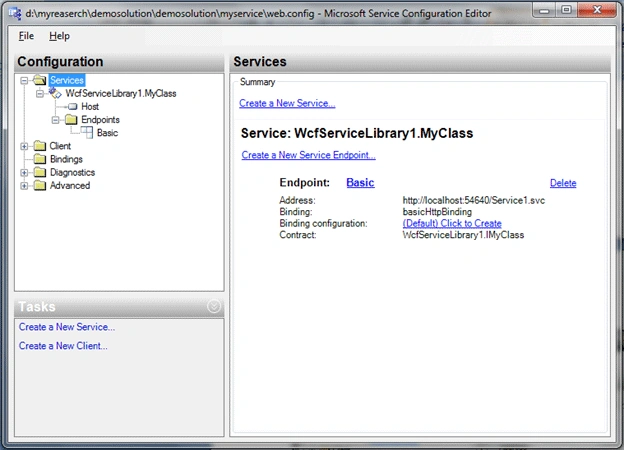
Click on link says "click to create"
Again give the name "Basic"
Now go to advanced => Service Behaviour.
Which Gives you following screen
Right click on service behavior and add new.
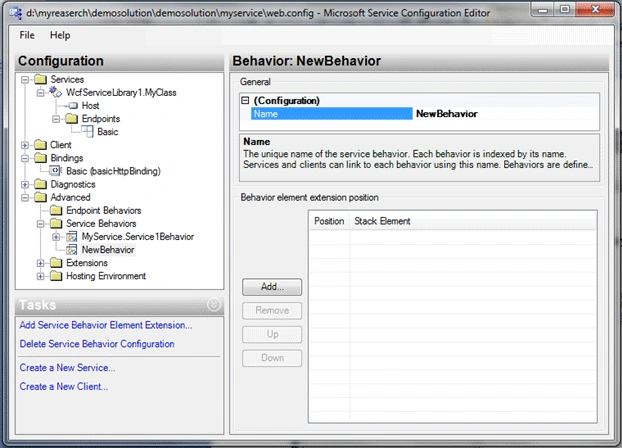
Click on add button,
Select ServiceMetadata.
Go to top and do like the following screen.
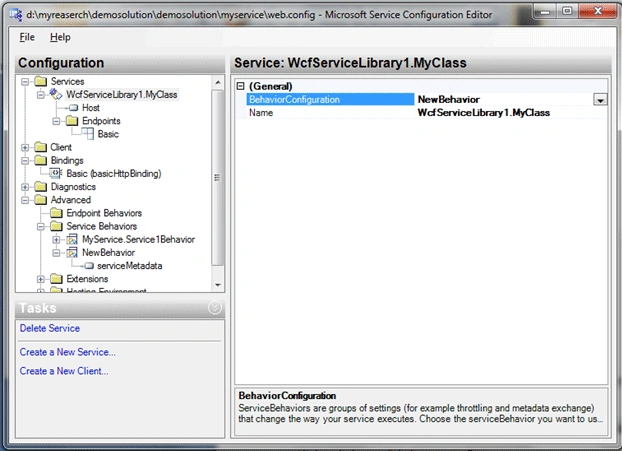
Just save now and exit.
Refresh the url now it will gives you something instead of error.
Actually I have forgotten one setting no problem we will do that now
Again edit web.config by right clicking as done previously.
Try to reach following screen
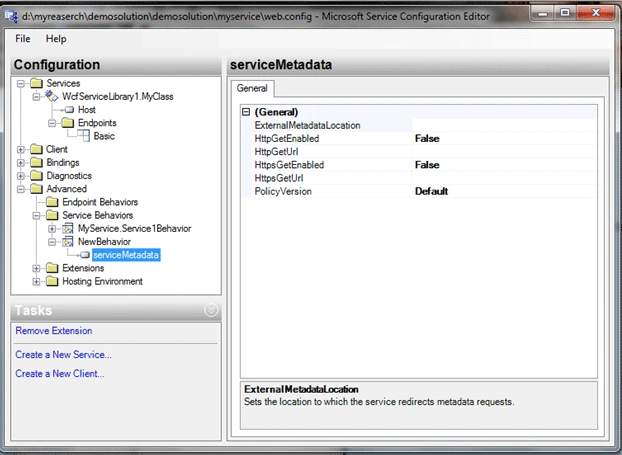
Just enable httpgetenabled so it will look like,
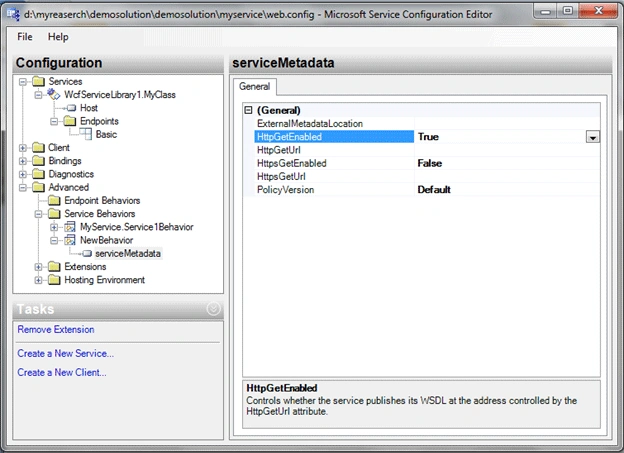
Again save and exit.
Now refresh the page again it is ready to work.
Your refreshed page now look like this,
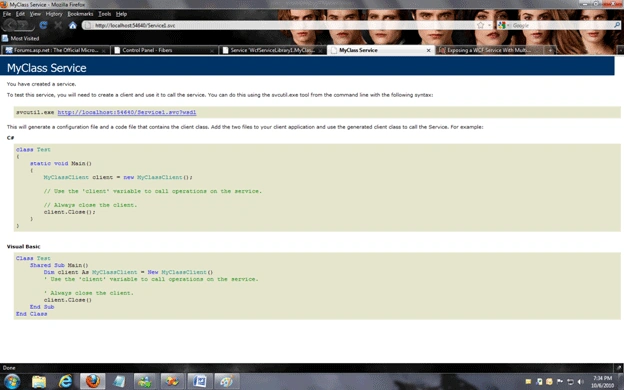
You can test the wcf from visual studio command prompt by writing
Wcftestclient http://localhost:54640/Service1.svc
Please provide your own url over here.
Now add website to our solution,
Add service reference give namespace that you want to give rest of the thing is simple as we do in the webservice.
Sample code to use this
- using System;
- using System.Configuration;
- using System.Data;
- using System.Linq;
- using System.Web;
- using System.Web.Security;
- using System.Web.UI;
- using System.Web.UI.HtmlControls;
- using System.Web.UI.WebControls;
- using System.Web.UI.WebControls.WebParts;
- using System.Xml.Linq;
- using ServiceReference1;
- public partial class _Default : System.Web.UI.Page
- {
- protected void Page_Load(object sender, EventArgs e)
- {
- MyClassClient obj = new MyClassClient("Basic");
- string[] datas = obj.Answers(5, 10);
- foreach (string data in datas)
- {
- Response.Write(data);
- }
- }
- }
Cheers!
SubashPosted Sep 10, 2016, 10:13 AM
Very nice
kalu singh raoPosted Jul 4, 2016, 2:07 AM
Nice...
Eric ToribioPosted Jul 17, 2013, 10:26 AM
"Open the service1.svc file and make the changes to make similar to the following line" How do I do this if I deleted it?
Anas EbrahimPosted Jun 13, 2013, 8:23 AM
Good and helpful..
don doPosted Mar 27, 2013, 7:51 PM
Add the reference of the dll which we have generated by building. I got confused at line above.Please add some pictures.
govind pantPosted Mar 5, 2013, 2:03 AM
Good and helpful for beginner
sunit kumareditedPosted Dec 13, 2012, 3:10 AMEdited Dec 13, 2012, 3:11 AM
.
dharmendra guptaPosted Sep 24, 2012, 9:48 AM
Not bad
Arumuga Nainar PPosted Sep 21, 2012, 6:42 AM
its helpful
Anil Kumar YadavPosted Jul 30, 2012, 4:43 AM
nice n helpful
sunit kumarPosted Jul 25, 2012, 2:12 AM
very helpful
sanjay kkPosted Jun 17, 2012, 6:19 AM
Nice article, thanks..!!
Anil pandeyPosted Jun 6, 2012, 5:00 AM
Nice Article...
Anil Kumar YadaveditedPosted Jun 4, 2012, 12:46 AMEdited Jul 30, 2012, 4:46 AM
Good and Easy to understand... thanks
arunkumarPosted Apr 16, 2012, 5:55 AM
I have understaned WCF and learned. Thanks very much BY Arun
RYan RodriguezPosted Mar 26, 2012, 10:42 AM
Article is all and good but I'd like to see the next step on how to create an installer or host the service in IIS? since deleting Service1.svc.cs I can no longer view the service in design mode where I can right click and select Add Installer. Thanks!
Chafik AouanetPosted Aug 11, 2011, 10:47 AM
is it necessary to do this configuration or is there another way less difficult ?
S SPosted Jul 20, 2011, 1:47 AM
I am getting an error: The type or namespace name 'MyClassClient' could not be found (are you missing a using directive or an assembly reference?) Please help me out
gomathi prakashPosted Jul 15, 2011, 8:45 AM
wcf service host cannot find any service metadata error is coming when running the client application. how to solve this
gomathi prakashPosted Jul 15, 2011, 8:33 AM
why we need to add wcf service library. we can do everthing in wcf service application. then why we add wcf service library also.i am getting confusion.
TomaszPosted Mar 21, 2011, 5:54 AM
this is great and helpful article, btw. you're missing " in line (here CodeBehind="MyClass.cs %>): <%@ ServiceHost Language="C#" Debug="true" Service="WcfServiceLibrary1.MyClass" CodeBehind="MyClass.cs %>
Ghanshyam TomarPosted Mar 17, 2011, 2:39 AM
Thanks! Good article. It will be more sound if you will describe terms like endpoint, behavoir at the time you using them. Ghanshyam Singh Tomar
Ghanshyam TomarPosted Mar 17, 2011, 2:37 AM
Thanks! Good article. It will be more sound if you will describe terms like endpoint, behavoir at the time you using them. Ghanshyam Tomar
Anup GhosheditedPosted Feb 17, 2011, 4:28 AMEdited Feb 17, 2011, 4:31 AM
inyour MyProject.zip example : under service library you create a class where you declare all Datamember under DataContract. second you create a another class where you declare a interface with some Operation Contract under service Contract. Finally you crate a class where you implement the interface and also use the first class's Datamember. I want to know that if i declare all these things in a single class under service library,then is there create any problem?&also if you kindly explain this architecture it will very helpfull for me.
Anup GhoshPosted Feb 17, 2011, 4:19 AM
in your MyProject.zip website 3 is not available so what have to do?
Anup GhosheditedPosted Feb 17, 2011, 2:13 AMEdited Feb 17, 2011, 2:14 AM
MyClassClient obj = new MyClassClient("Basic"); where this MyClassClient belongs 'coz we have a clas name MyClass.cs in service library but don't have any such of class...
Muhammd UsmanPosted Feb 8, 2011, 11:48 AM
you have done a great job man. i really appreciate your efforts and work. And a special thanks for providing such helpful and great material.
Kishore PinnamaneniPosted Jan 29, 2011, 11:41 AM
I am wrking on WCF for the first time. I created one in .net 2010. I created that directly as web service application. It is simple, direct but slower when compared with traditional web service. I wonder now by looking at your article, why you created as library first and then as service. Will this improve the speed? Also how do we use the generated files on client side. I am talking about the files generated by svcutil.exe. Please help me understand.
Mukesh KumarPosted Jan 25, 2011, 1:05 AM
Hi Thanx for ur code. i have downloaded ur code but one project is missing that is website3. and i m not able to run the program, can u upload it again or mail me to [email protected] Thanking You
Kiran MahalePosted Jan 13, 2011, 11:10 PM
Again delete the two files Service1.svc.cs and IService1.cs Add the reference of the dll which we have generated by building. Open the service1.svc file and make the changes to make similar to the following line <%@ ServiceHost Language="C#" Debug="true" Service="WcfServiceLibrary1.MyClass" CodeBehind="MyClass.cs %> It says delete the file Service1.svc.cs and then open service1.svc. Where is that file? I do not know where to add the servicehost line. I am not seeing MyClass in Create new service but I see 2 dlls. Please help me. note: I am using VS 2010
Praveen MulukutlaPosted Dec 1, 2010, 1:36 AM
Hi, I have a question, If I want to modify any code in MyClass.cs then what are the steps to be done to effect in the website. I have tried by building the solution and update the service in website, but no use.
Marty TPosted Nov 28, 2010, 5:37 PM
Thank you, this article was very useful and well presented.
manchi srikanthPosted Nov 20, 2010, 12:35 AM
very nice artical thank u. <!--Session data-->