

On March 7 and 8, 2017, Microsoft celebrated 20 years of Visual Studio and announced the release of Visual Studio 2017.

In this article, I will concentrate on answering the following questions:
- What's new in Visual Studio 2017?
- What are the system requirement for Visual Studio 2017?
- What platforms is Visual Studio 2017 targeting?
- Which are the SharePoint versions supported by Visual Studio 2017?
- Which edition of Visual Studio 2017 should I download?
 What's new in Visual Studio 2017
- New Installation Experience.
- When you first install Visual Studio 2017, you'll have a brand new experience.
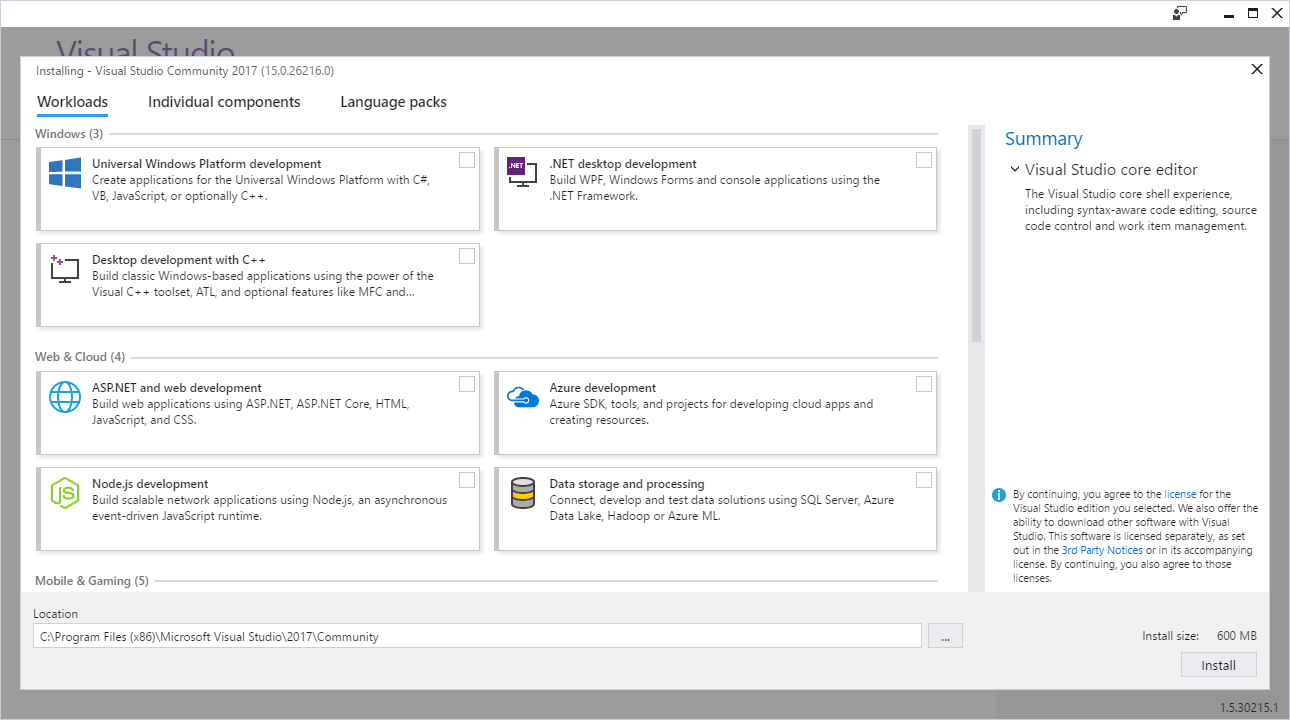
- When you first install Visual Studio 2017, you'll have a brand new experience.
- Install multiple editions on the same computer.
- Visual Studio Enterprise and Community (among other products) can now be installed side-by-side on the same computer, and you can identify these installations by specifying a short name or "nickname".
For example, if you were to install Visual Studio Enterprise, and then install Community, both would appear the same on the Start menu. You can give the second one a nickname like "community", and the Start menu items will appear with names such as "Visual Studio 2017".
- Small Installation package.
- The smallest install is just a few hundred megabytes (VS Community is 600 MB).
- The smallest install is just a few hundred megabytes (VS Community is 600 MB).
- Fast Startup and solution load
- Visual Studio has been optimized to reduce startup time and solution load time. The very first launch of Visual Studio is at least 50% faster.
- Visual Studio has been optimized to reduce startup time and solution load time. The very first launch of Visual Studio is at least 50% faster.
- A new Performance Center. (Help > Manage Visual Studio Performance)
- Visual Studio will now monitor extension and tool windows performance that impacts startup, solution load, or editing.
- You will receive alerts about poorly performing extensions via the Notification bar in the IDE.
- New Reload Solution.
- Reload All Projects has been replaced with Reload Solution to support better performance when switching branches external to VS.
- Reload All Projects has been replaced with Reload Solution to support better performance when switching branches external to VS.
- The GitHub extension for Visual Studio.
- The GitHub extension can be selected in the new Visual Studio installer.
- The GitHub extension can be selected in the new Visual Studio installer.
- Offline help.
- It is now available by installing the Help Viewer component from the Visual Studio installer.
- It is now available by installing the Help Viewer component from the Visual Studio installer.
- New Solution selection list in the Solution Explorer.
- You are now automatically taken to the folder view of your repository after cloning.
- You are now automatically taken to the folder view of your repository after cloning.
- New version control status bar.
- to keep track of uncommitted and un-pushed work.

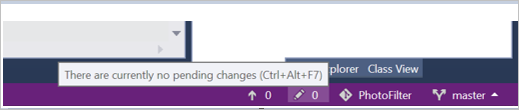
- to keep track of uncommitted and un-pushed work.
- Multiple users interface languages.
- You can now add and remove multiple user interface languages at any time using the Visual Studio installer on the Language Packs tab. You can select the current user interface language among those installed using Tools > Options > International Settings.
- You can now add and remove multiple user interface languages at any time using the Visual Studio installer on the Language Packs tab. You can select the current user interface language among those installed using Tools > Options > International Settings.
- Redesigned Start Page.
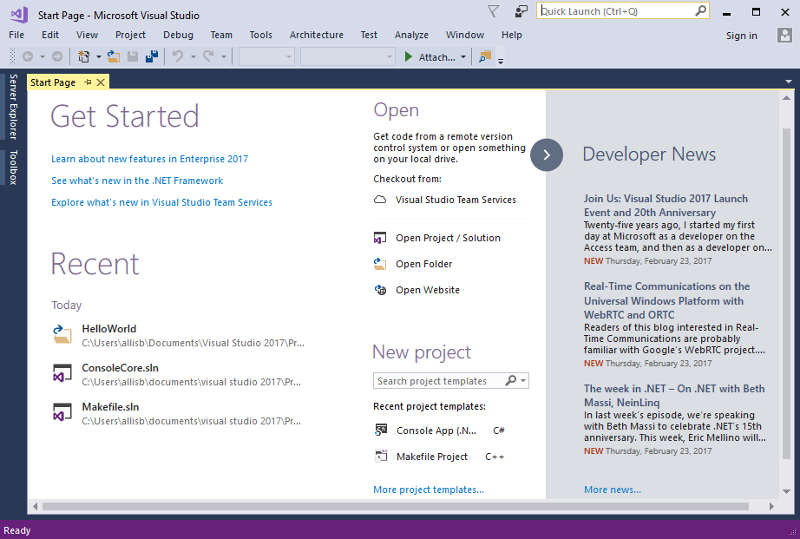
Code Navigation Improvements.
- Go To All.
- (Ctrl +, or Ctrl + T) lets you quickly find and go to files, types, methods, and other elements in your code.
- (Ctrl +, or Ctrl + T) lets you quickly find and go to files, types, methods, and other elements in your code.
- Go To Line.
- (Ctrl + G) experience.
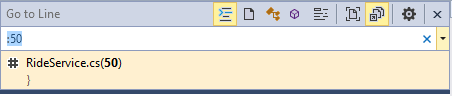
- (Ctrl + G) experience.
You can find the "Go To" family of commands at the top of the Edit Menu.
- Find All References (Shift+F12)
- providing advanced grouping, filtering, sorting, searching within reference results, and colorization for results (for C# and VB).
- providing advanced grouping, filtering, sorting, searching within reference results, and colorization for results (for C# and VB).
- Structure Guide Lines.
- This feature may be disabled in the Tools > Options dialog by unchecking the Show structure guide lines checkbox under the Text Editor > General category.
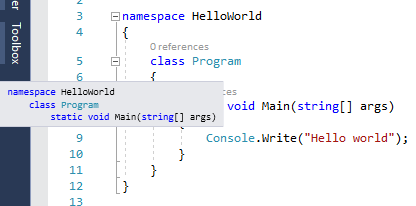
- This feature may be disabled in the Tools > Options dialog by unchecking the Show structure guide lines checkbox under the Text Editor > General category.
- Open Folder.
- to work with code bases without projects and solutions.
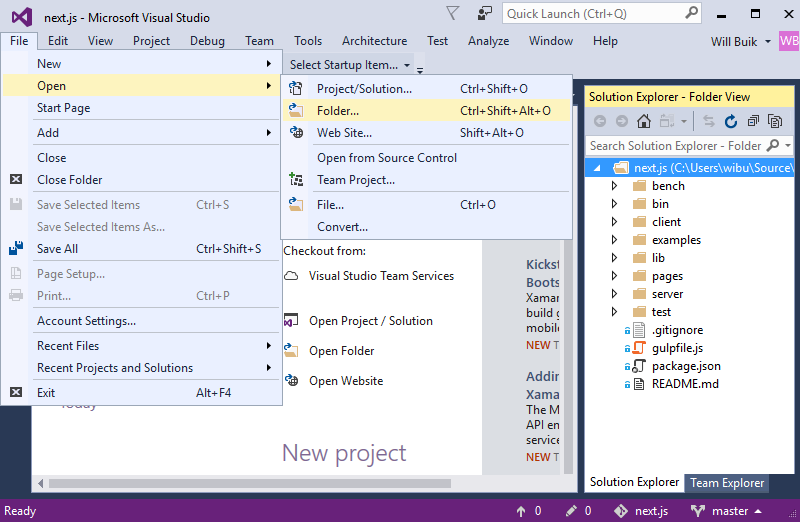
- to work with code bases without projects and solutions.
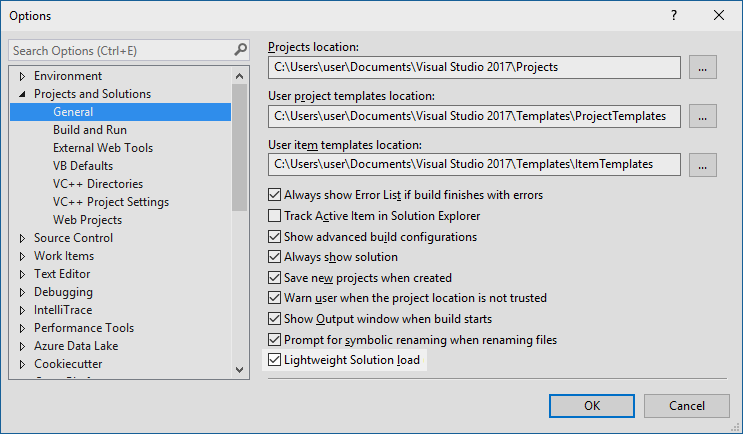
- Lightweight Solution Load.
- enables faster loading of large Solutions.
To enable globally, navigate to Tools > Options, select "General" under "Projects and Solutions" or by searching for "Lightweight Solution load" with Quick Launch. The feature can be turned ON and OFF for individual Solutions in the Solution properties pane.
- New Getting Started with Project Overview Pages.
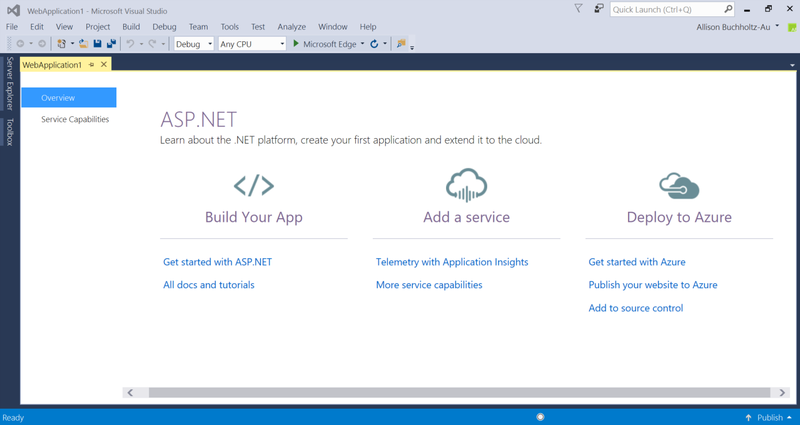
- Service Capabilities changed to Connected Service.
- Connected Services is the modern "Add Connected Service" or "Add Service Reference" feature of Visual Studio 2017.
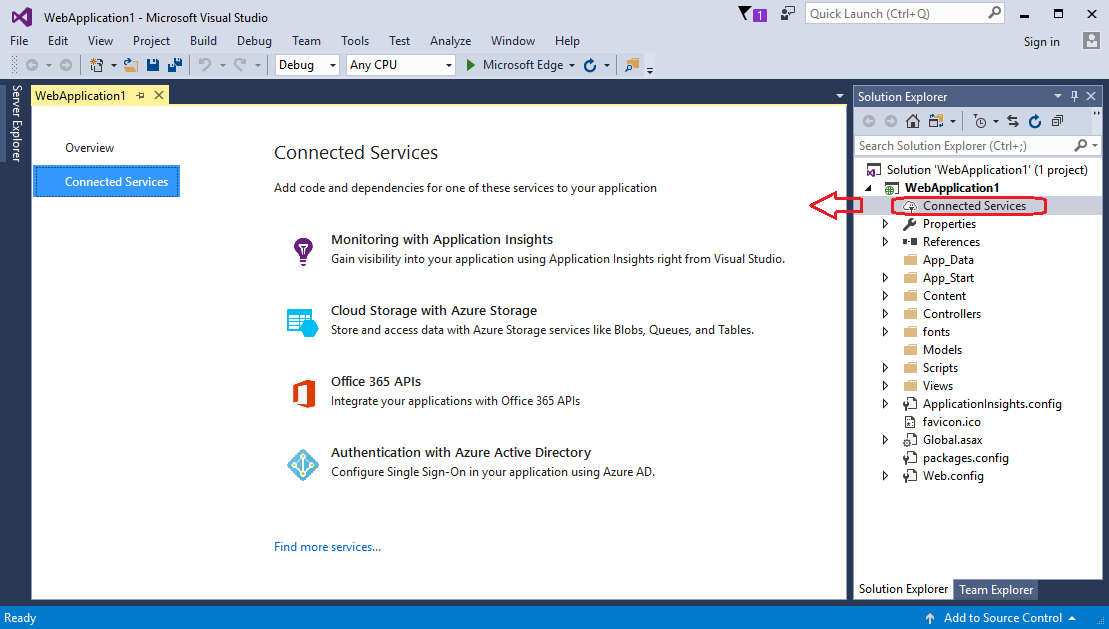
- Connected Services is the modern "Add Connected Service" or "Add Service Reference" feature of Visual Studio 2017.
- Visual Studio Installer.
- If you can't find the templates you’re looking for, the Visual Studio Installer can also be opened from within the New Project dialog.
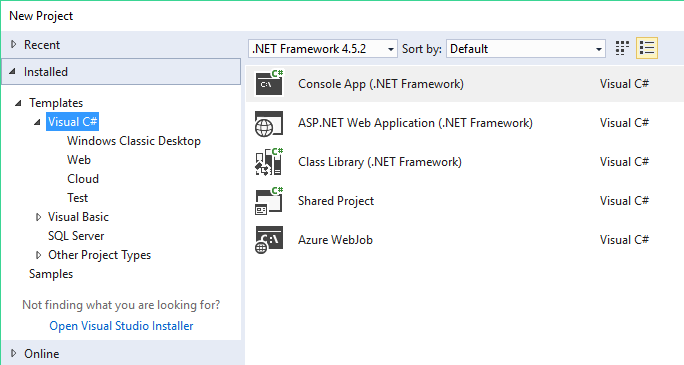
- If you can't find the templates you’re looking for, the Visual Studio Installer can also be opened from within the New Project dialog.
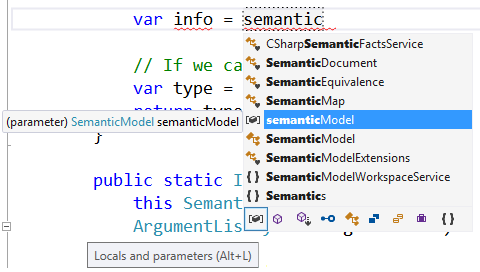
- New icon tray to IntelliSense.
- enables you to filter the member list by type (e.g., methods, properties, classes, etc.).
To enable this feature, go to Tools > Options > Text Editor > [C# / Basic] > IntelliSense and check the options for filtering and highlighting.
- A new JavaScript language service.
- enabled by default.and provides richer IntelliSense and adds IntelliSense support.
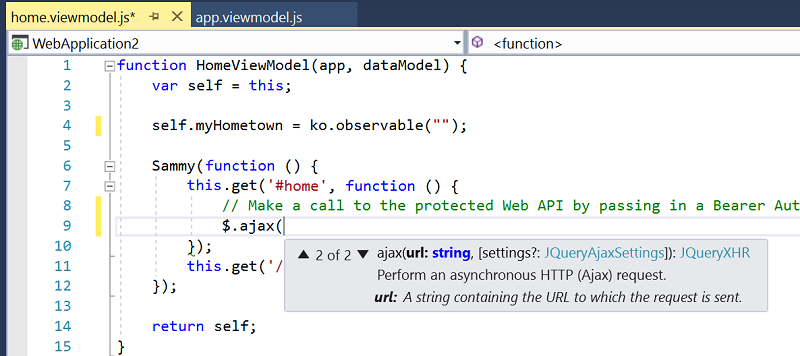
- enabled by default.and provides richer IntelliSense and adds IntelliSense support.
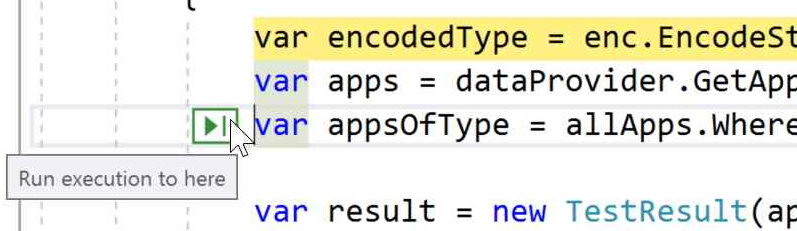
- A new Run to click.
- Simply click the icon next to a line of code while debugging to run to that line.
- No longer set temporary breakpoints or perform several steps to execute your code and stop on the line you want.
- Attach to Process Filter.
- Easily search in the Attach to Process dialog to quickly find the process you want to attach the debugger to.
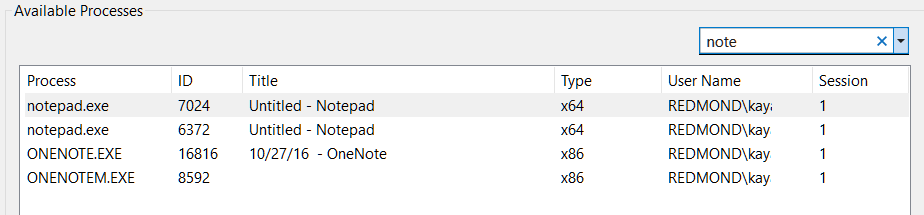
- Easily search in the Attach to Process dialog to quickly find the process you want to attach the debugger to.
- Reattach to Process.
- You can now quickly (Shift+Alt+P) reattach to processes you were previously debugging. In my opinion, it's a great feature for SharePoint Solution Debugging.
- You can now quickly (Shift+Alt+P) reattach to processes you were previously debugging. In my opinion, it's a great feature for SharePoint Solution Debugging.
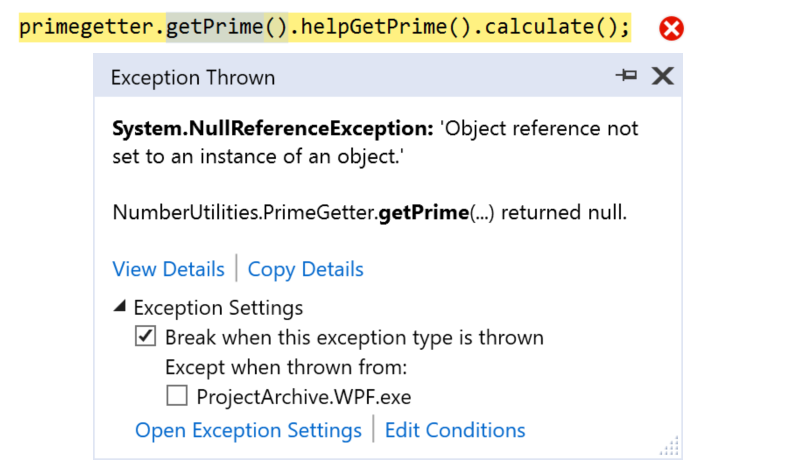
- The New Exception Helper.
- Add Conditions to Exception Settings.
- When you configure the debugger to break on thrown exceptions, you can add conditions so that the debugger will only break when exceptions are thrown in specified modules.
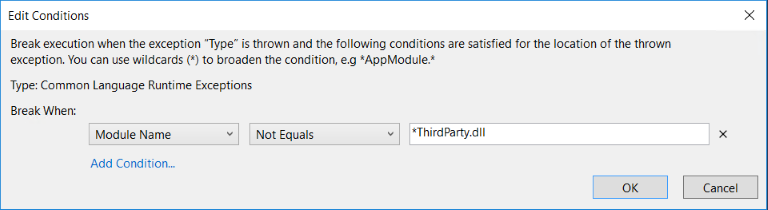
- When you configure the debugger to break on thrown exceptions, you can add conditions so that the debugger will only break when exceptions are thrown in specified modules.
- Diagnostic Tools Window Updates.
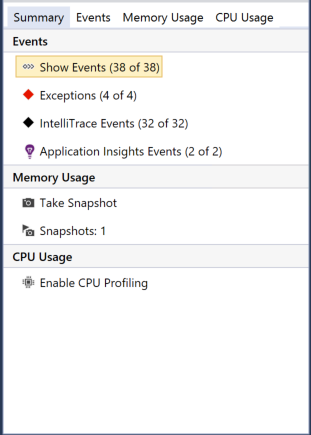
More and more new features and improvements can be read at Visual Studio 2017 Release Notes.
| Supported Operating Systems | Visual Studio 2017 can install and run on the following operating systems:
|
| Hardware |
|
| Supported Languages | Visual Studio is available in the following languages:
You can select the language of Visual Studio during installation. |
| Additional Requirements |
|
For more details, check Visual Studio 2017 Product Family System Requirements.
Platforms targeting Visual Studio 2017
- Compatibility on Windows.
- Windows 10.
- Windows 8.1 & 8.
- Windows 7.
- Windows Vista.
- Windows XP.
- Windows Server 2016.
- Windows Server 2012 R2.
- Windows Server 2012.
- Windows Server 2008 R2.
- Windows Server 2008.
- Windows Server 2003.
- Compatibility with previous Visual Studio.
- Visual Studio 2015.
- Visual Studio 2013.
- and Visual Studio 2012.
- Compatibility for .NET Framework.
- .NET 4.6.1 is a highly compatible in-place update of .NET 4, .NET 4.5, .NET 4.5.1,.NET 4.5.2, and 4.6. .NET 4.6.2 is included with Windows 10 Anniversary Edition, and is a highly compatible in-place update of .NET 4.6.1.
- .NET 4.6.1 is a highly compatible in-place update of .NET 4, .NET 4.5, .NET 4.5.1,.NET 4.5.2, and 4.6. .NET 4.6.2 is included with Windows 10 Anniversary Edition, and is a highly compatible in-place update of .NET 4.6.1.
- Compatibility for Team Explorer and Team Foundation Server.
- Team Foundation Server 2017.
- Team Foundation Server 2015.
- Team Foundation Server 2013.
- Team Foundation Server 2012.
- and Team Foundation Server 2010 SP1.
- Support for
- Android Development.
- iOS Development.
- Linux Development.
- OS X Development.
For more details, check Visual Studio 2017 Platform Targeting and Compatibility.
SharePoint versions supported in Visual Studio 2017
Visual Studio 2017 supports SharePoint 2016, SharePoint 2013 and Office 365.

To install Office Developer Tools for Visual Studio 2017 -
- Open the Visual Studio Installer > Click on Modify Button.
- Click on Workloads.
- Select Office/SharePoint development.
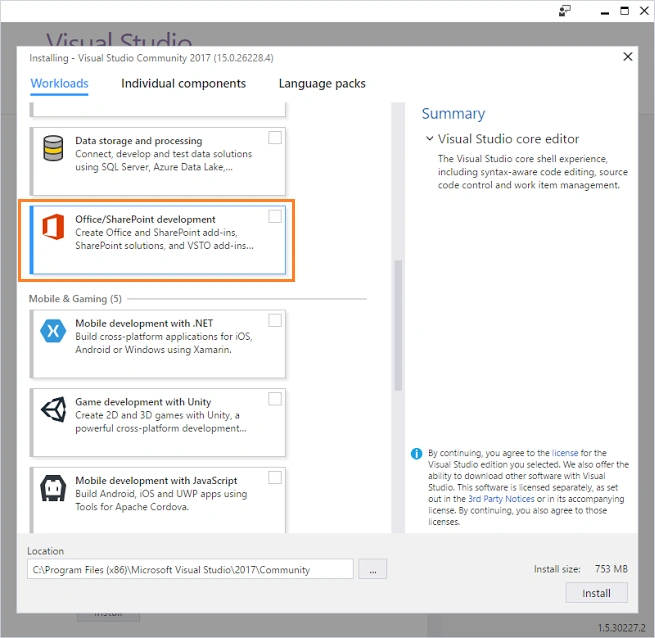
For more details, check Missing Office / SharePoint template in Visual Studio 2017.
Edition that I should download
There are three Visual Studio 2017 editions.
- Visual Studio 2017 Community:
- Free, fully-featured IDE for students, open-source and individual developers. Free download.
- Free, fully-featured IDE for students, open-source and individual developers. Free download.
- Visual Studio 2017 Professional:
- Professional developer tools, services, and subscription benefits for small teams. Free trial.
- Professional developer tools, services, and subscription benefits for small teams. Free trial.
- Visual Studio 2017 Enterprise:
- An end-to-end solution to meet demanding quality and scale needs of teams of all sizes. Free trial.
Dean ErlingPosted Aug 2, 2017, 4:53 PM
I'm using Visual Studio 2017 on my laptop running Windows 7 and on a Windows 2012 R2 VM. On my laptop, everything works fine. On the 2012 R2 VM, however, Visual Studio 2017 performs so poorly as to be unusable. Has anyone else had the same problem?
Prasham SabadraPosted May 28, 2017, 12:13 PM
Great new features. Thanks for Sharing!
Rehman ShahidPosted May 12, 2017, 8:42 AM
Nice Article....................(y)
Guest UserPosted May 9, 2017, 12:09 PM
rih de la I lpmweujygu njkipot z