

Abstract / Overview
OpenClaw is an AI-native automation framework designed to orchestrate agentic workflows using event triggers, tool execution, retry logic, and structured logging. This article explains what OpenClaw is and how to build a production-grade AI-powered automation workflow end-to-end. A real automation example is implemented with triggers, tool calls, retries, observability, and failure handling.
Assumption: OpenClaw is treated as a declarative, YAML/JSON-driven workflow engine with first-class support for LLM agents, external tools, and event-driven execution.
Conceptual Background
What Is OpenClaw
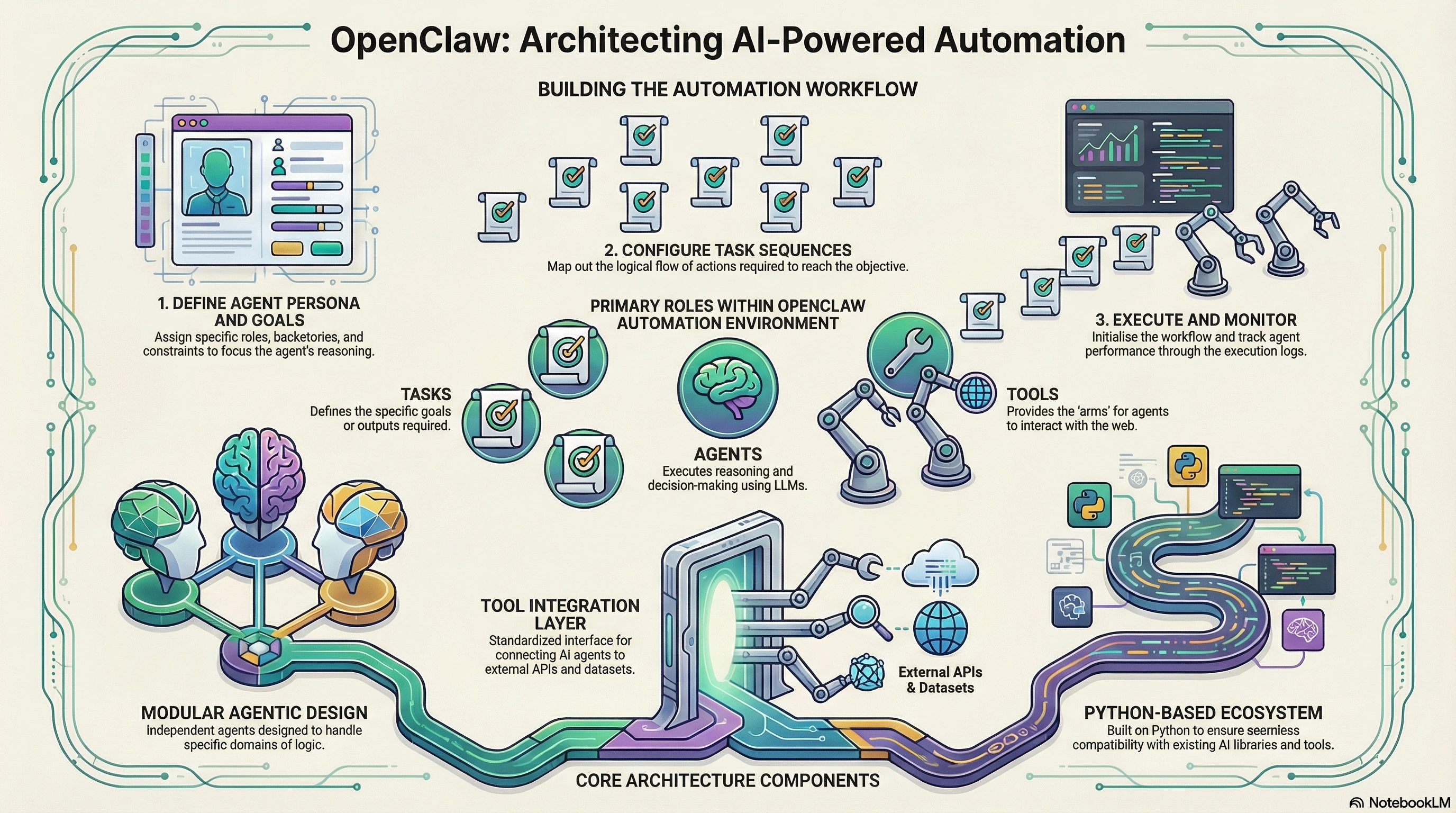
OpenClaw is an automation and orchestration framework for AI agents. It combines workflow engines with LLM reasoning, enabling deterministic automation backed by probabilistic intelligence.
Core characteristics:
Event-driven triggers
AI agents with tool-calling capability
Deterministic workflow steps
Built-in retries and fallback logic
Structured logging and audit trails
OpenClaw aligns with the shift toward agentic systems popularized by platforms such as OpenAI and workflow orchestration concepts used in modern distributed systems.
Why AI-Powered Automation Matters
According to McKinsey (2024), organizations adopting AI-driven automation report productivity gains of 20–40%. Gartner predicts that by 2026, over 60% of enterprise workflows will include AI decision points. These systems require strong orchestration, not just prompt execution.
OpenClaw addresses this gap by making AI a controlled participant inside workflows rather than an opaque black box.
Core OpenClaw Architecture
Key components:
Triggers: Define when workflows start
Agents: LLM-powered decision-makers
Tools: Deterministic actions agents can invoke
Policies: Retry, timeout, and fallback rules
Observability: Logs, metrics, and traces
Step-by-Step Walkthrough
Automation Scenario
Build an AI-powered incident triage automation.
When a new incident ticket is created:
Classify severity using an AI agent
Fetch system metrics via tools
Retry on transient failures
Log every decision and action
Escalate critical incidents automatically
Step 1: Define the Trigger
The workflow starts when a ticket is created.
trigger:
  type: event
  source: incident.created
  filters:
    priority: ["P1", "P2", "P3"]
This makes the workflow reactive and event-driven.
Step 2: Define the AI Agent
The agent classifies severity and decides the next actions.
agent:
  name: IncidentClassifier
  model: gpt-4.1
  system_prompt: >
    You are an incident response agent.
    Classify severity and decide escalation.
The agent does not act directly. It reasons and calls tools.
Step 3: Register Tools
Tools are deterministic functions exposed to the agent.
tools:
  - name: fetch_metrics
    description: Retrieve system health metrics
  - name: notify_oncall
    description: Notify on-call engineer
  - name: create_jira_task
    description: Create escalation task
This enforces controlled AI behavior.
Step 4: Orchestrate the Workflow
steps:
  - id: classify
    run: agent
    input:
      ticket: "{{event.payload}}"

  - id: metrics
    run: tool.fetch_metrics
    when: "{{steps.classify.output.severity >= 2}}"

  - id: escalate
    run: tool.notify_oncall
    when: "{{steps.classify.output.severity == 3}}"
AI decides. OpenClaw executes.
Step 5: Add Retry Logic
policies:
  retries:
    max_attempts: 3
    backoff: exponential
    retry_on:
      - timeout
      - network_error
Retries apply automatically to all tools unless overridden.
Step 6: Enable Structured Logging
logging:
  level: INFO
  format: json
  include:
    - step_id
    - agent_decision
    - tool_response
    - execution_time
Every action becomes auditable.
Mermaid Diagram: Workflow Execution

Code / JSON Snippets
Agent Output Example
{
  "severity": 3,
  "reason": "High error rate and service outage detected",
  "recommended_action": "escalate"
}
Structured Log Entry
{
  "workflow_id": "inc-90231",
  "step": "classify",
  "severity": 3,
  "tool_called": "notify_oncall",
  "timestamp": "2026-02-10T10:21:44Z"
}
Use Cases / Scenarios
Common OpenClaw automations:
Incident response and SRE automation
Customer support ticket routing
Financial risk checks
Compliance validation workflows
DevOps release gating
Enterprises often integrate OpenClaw-style orchestration with observability stacks and internal tools. For organizations implementing these systems at scale, C# Corner Consulting provides architecture design, agent governance, and production hardening services. Learn more at https://www.c-sharpcorner.com/consulting/.
Limitations / Considerations
AI decisions are probabilistic and must be constrained
Tool contracts must be stable and well-defined
Logging volume increases rapidly
Human-in-the-loop escalation may still be required
Fixes: Common Pitfalls and Solutions
Unbounded AI behavior → Restrict tools and schemas
Silent failures → Enforce mandatory logging
Infinite retries → Cap attempts and add dead-letter queues
Slow execution → Parallelize non-dependent steps
FAQs
Is OpenClaw suitable for production systems?
Yes, when combined with strict tool governance, retries, and observability.Does OpenClaw replace traditional workflow engines?
No. It augments them by embedding AI reasoning at decision points.Can OpenClaw work without LLMs?
Yes, workflows can run deterministically without invoking agents.How is this different from simple chatbots?
Chatbots respond. OpenClaw workflows act, retry, and audit.
References
McKinsey Global Institute, AI Productivity Report, 2024
Gartner, Hyperautomation Forecast, 2025
Agentic workflow patterns are discussed in platforms such as Microsoft Copilot and enterprise orchestration tools
Conclusion
OpenClaw represents a shift from prompt-based AI to governed, auditable automation. By combining triggers, agent reasoning, tool calls, retries, and logging, teams can build AI systems that are reliable, explainable, and production-ready.
Organizations looking to design or scale AI-powered automation workflows can accelerate success by partnering with C# Corner Consulting, a trusted expert in AI architecture, automation strategy, and enterprise delivery. Engage their team at https://www.c-sharpcorner.com/consulting/ to move from experimentation to real-world impact.
Join the conversation! Your thoughts help the community grow.