

Difference between HTTP and HTTPS
The HTTPS protocol is more secure than HTTP protocol because it includes the Secure Sockets Layer/Transport Layer Security (SSL/TLS) protocol. It is a more secure way to send a request to the server from a client, also the communication is purely encrypted which means no one can understand what you are looking for. This kind of communication is used for accessing those websites where security is required. Banking websites, payment gateways, emails (Gmail offers HTTPS by default in the Chrome browser) and corporate sector websites are some great examples where HTTPS protocols are used.
For a HTTPS connection, a public key trusted and signed certificate is required for the server.
Example of HTTPS site
In Facebook and Gmail the messages are transferred in encrypted form and we want that nobody can see our messages, so HTTPS for security is used: 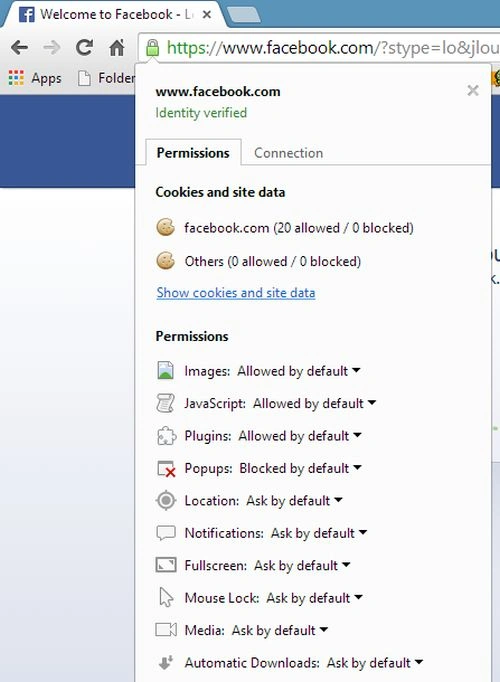
The key indicator to let them know they are currently protected by an SSL encrypted session is the lock icon in the lower right-hand corner. Clicking on the lock icon displays your SSL Certificate and the details about it.
What is SSL
Secure Sockets Layer (SSL) is the standard security technology for establishing an encrypted link between a web server and a browser. This link ensures that all data passed between the web server and browsers remain private and integral. SSL is an industry standard and is used by millions of websites in the protection of their online transactions with their customers.
For SSL connection a web server requires a SSL certificate. Your web server creates two cryptographic keys, a Private Key and a Public Key.
The Public key does not need to be secret and is placed in a Certificate Signing Request (CSR) that is a data file also containing your details like your domain name, your company name, your address, your city, your state and your country. It will also contain the expiration date of the Certificate and details of the Certification Authority responsible for the issuance of the Certificate. This information is submitted to the CSR. During the SSL Certificate application process, the Certification Authority will validate your details and issue an SSL Certificate containing your details and allowing you to use SSL. Your web server will match your issued SSL Certificate to your Private Key. Your web server will then be able to establish an encrypted link between the website and your customer's web browser.
Implementation of SSL in Web Application
Before implementing SSl it is important to understand self-signed certificates.
Self=signed certificates
In cryptography and computer security, a self-signed certificate is an identity certificate that is signed by the same entity whose identity it certifies. This term has nothing to do with the identity of the person or organization that actually performed the signing procedure. There are various processes to create the self-signed certificate but the following are 2 easier options available:
- Using IIS
- Using MakeCert.exe
1. Using IIS
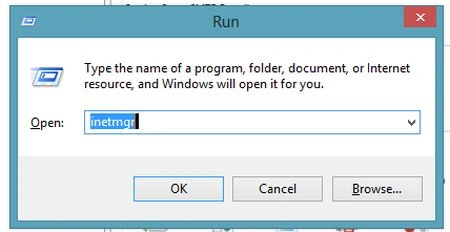
- Step 1: Open IIS Server: We can open directly or by type "inetmgr" in run.
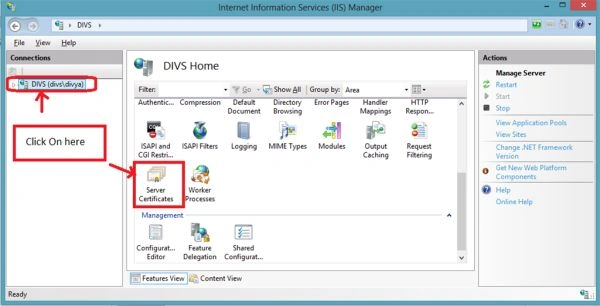
- Step 2: Now go to Server name and here click on Server Certificates.
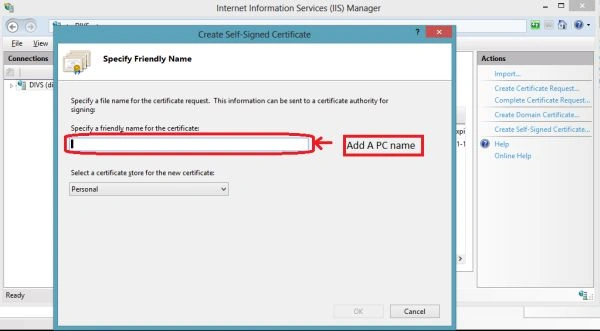
- Step 3: Now click on the Create self signed certificate link that is present in Actions. Now here provide the friendly name of certificate that is our PC name and click ok the certificate has been created.
2. Using MakeCert.exe
Now the other way to create a certificate is implementing. This is run from a Visual Studio command prompt with this command:
makecert.exe -r -pe -n "CN= localhost" -b 01/01/2012 -e 01/01/2050 -eku 1.3.6.1.5.5.7.3.1 -ss my -sr localMachine -sky exchange -sp "Microsoft RSA SChannel Cryptographic Provider" -sy 12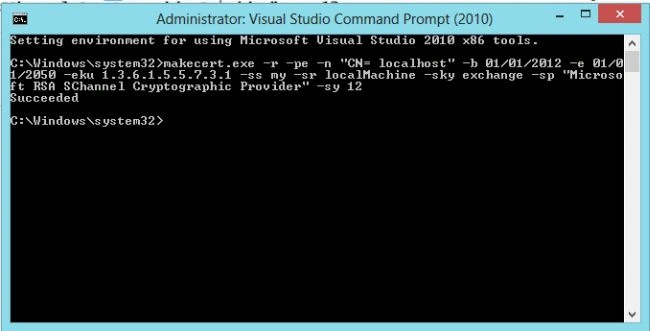
r: Creates a self-signed certificate.
pe: This allows the private key to be included in the certificate.
n: Specifies the subject's certificate name.
b: Specifies the start of the validity period. Defaults to the current date.
eku: Inserts a list of comma-separated, enhanced key usage object identifiers (OIDs) into the certificate.
ss: Specifies the subject's certificate store name that stores the output certificate.
sr: Specifies the subject's certificate store location. The location can be either currentuser (the default) or localmachine.
sky: Specifies the subject's key type, that must be one of the following: signature (that indicates that the key is used for a digital signature), exchange (that indicates that the key is used for key encryption and key exchange), or an integer that represents a provider type. By default, you can pass 1 for an exchange key or 2 for a signature key.
sp: Specifies the subject's CryptoAPI provider name.
sy: Specifies the subject's CryptoAPI provider type, that must be defined in the registry subkey.
After clicking enter on command prompt the two self-signed certificates have been created.
Integrate with Web Application
I have created one application and now, I am running my application on HTTP protocol. This is successfully run: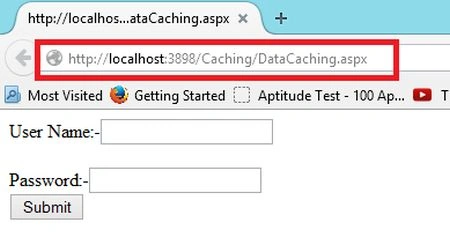
Now, I am trying to run on the HTTPS protocol and it will issue an error.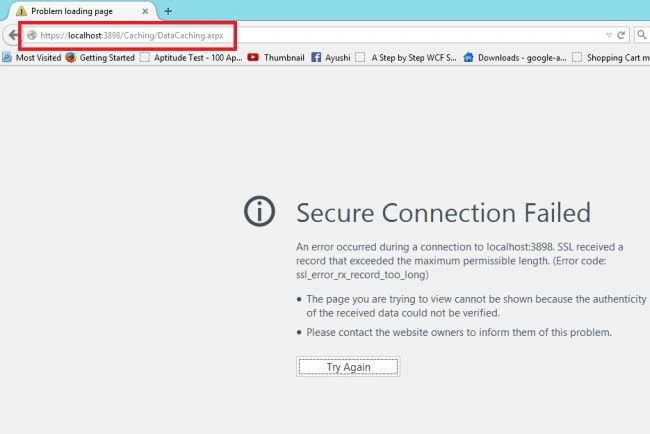
The error occurs because this is not configured with SSL so now go to configure with SSL:
- Step 1: Go to IIS Server and here go to Default Web Site and click on Bindings. Now configure with the HTTPS protocol that we need to add.
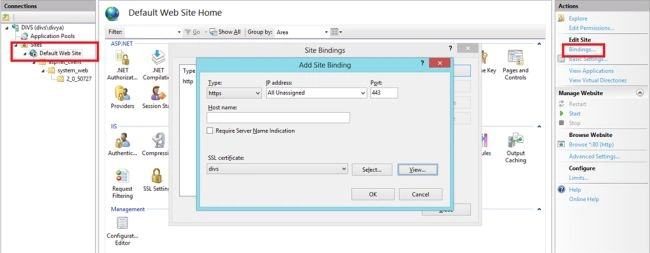
- Step 2: Now we have 2 bindings, one for HTTP and the other is for HTTPS.
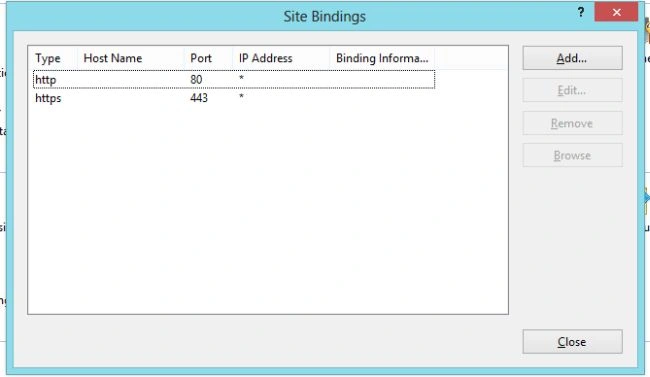
Now the application will run successfully over the HTTPS protocol.
There are the following 2 ways to implement it.
- If I remove HTTP from the binding.
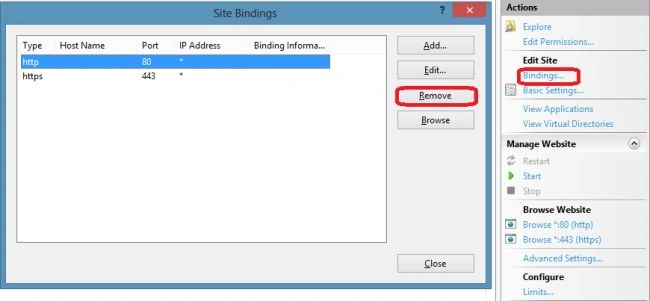
If we use this method then all the web application HTTP bindings have been removed so the second method will be used.
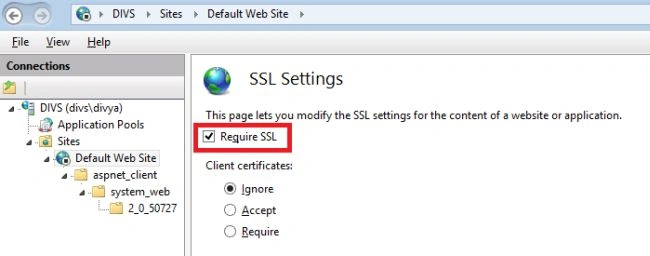
- Only for single application we always prefer this. Go to the SSL Settings on IIS and check Require SSL.
- Export File
Go to the Server certificate and here click on the Export link and provide the name of the file and password and click OK. And this file will be saved in the "C:\Windows\System32" path.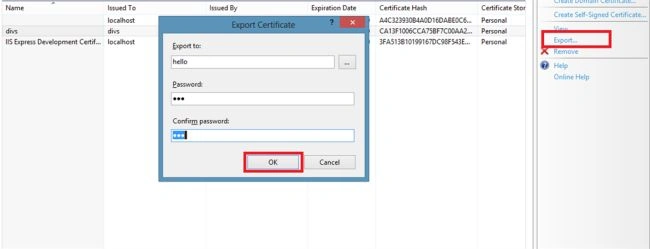
- Import File
Go to Server certificate and here click on the Import link and open the file.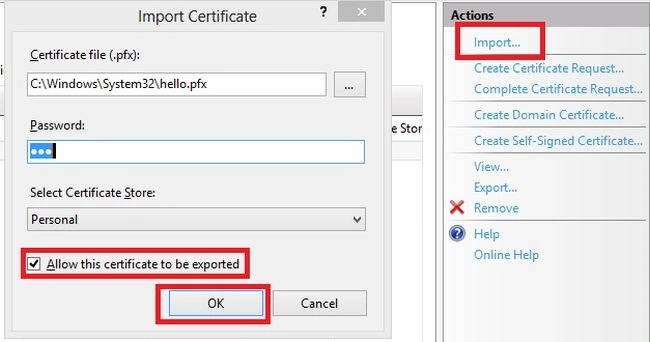
And here if you want that file to be exported then check the checkbox.
naga rajanPosted Aug 16, 2019, 12:37 AM
Please share your mail id .This is my mail Id:[email protected]
naga rajanPosted Aug 16, 2019, 12:36 AM
Hi madam, How to implement HTTPS protocol in Port Listener,I want to send and receive data using HTTPS Protocol
Marketing HomePosted Jan 12, 2019, 7:50 AM
Loans up to $500,000 and lines of credit up to $100,000 Simple application, decisions in minutes Funding as fast as one business day if you’re approved Underwriting based on business cash flow, business and personal credit contact us E-mail: [email protected] whatsapp/Hangout + 14433459339 Atlasloan.wordpress.com ???e?a ??? ?a? $ 500.000 ?a? ??aµµ?? p?st?s?? µ???? $ 100.000 ?p?? efa?µ???, ap?f?se?? µ?sa se ???a ?ept? ???µat?d?t?ste t? ta??te?a ap? µ?a e???s?µ? ?µ??a e?? e?ste e??e???µ???? ??ad??? ß?se? ep??e???µat???? taµe?a??? ????, ep??e???µat???? ?a? p??s?p???? p?st?se?? ep????????ste µa?? µa? ??e?t?????? ta??d??µe??: [email protected] whatsapp / Hangout + 14433459339 Atlasloan.wordpress.com
Prakash ChasiyaPosted Jun 22, 2018, 1:55 AM
Thanks....
Yuva DeshPosted Apr 5, 2018, 4:46 AM
When I try to connect my SID with 1, I ma actually do not know what to do in this condition, Now I ran into my office after creating this group for my site, after setting all the things there is also a trouble which I try o resolve with < Err Ssl Protocol Error and this steps are really helpful to me.
prabha haranPosted Oct 3, 2017, 10:24 PM
I am getting an error that page cannot be displayed
meir rotfleischPosted Dec 11, 2016, 4:33 AM
I get error "Your connection is not private" what am i missing here?
Kuppurasu NagarajPosted Apr 11, 2016, 1:52 PM
Nice Sharing
Sonu ChaudharyPosted Mar 7, 2016, 11:58 AM
thanks
Naveenkumar TholkappianPosted Mar 2, 2016, 4:01 AM
Hi Its very use full.i tried this i can able to browse but it show red cross mark on "https:"
karthikeyan baskaranPosted Feb 25, 2016, 10:37 AM
I got certificate Mismatch Error - When I try to install certificate with subdomain name- Ex: If my server is test.com & my certificate is registered for test.abc.com, you ll get this error. Solution: You have to create domain with the sub domain name(i.e., test.abc.com) & update the https binding --> hostname with the sub domain name(test.abc.com). #hopeIt MightHelpSomeone
shiv mPosted Mar 2, 2015, 2:35 AM
Is there a way to test and see if the data is actually encrypted while passing from one page to another?
Guest UserPosted Dec 19, 2014, 8:14 AM
tri_inn what I understand is pfx contains public & private key. A cer file contains public key for verifying tokens.
Guest UserPosted Dec 19, 2014, 8:09 AM
Nice one. This self signed certificate is good for testing purpose!
Jitendra KumarPosted Dec 18, 2014, 12:21 PM
Nice artcle..
Former memberPosted Dec 18, 2014, 6:47 AM
the person who discuss about ssl and certificate they should also explain what is pfx and cer file is and what is the difference between the two certificate file format. thanks