Introduction
A web application is stateless. That means that a new instance of a page is created every time we make a request to the server to get the page, and after the round trip, our page is lost immediately. It only happens because of one server, all the controls of the Web Page are created, and after the round trip, the server destroys all the instances. So to retain the values of the controls we use state management techniques.
State Management Techniques
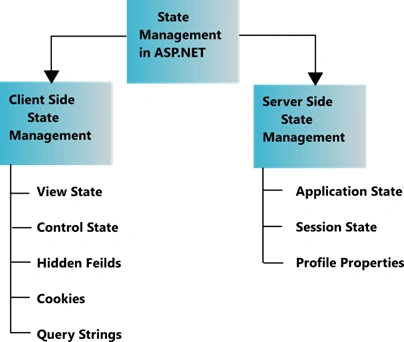
They are classified into the following 2 categories.
What is View State?
View State is the method to preserve the Value of the Page and Controls between round trips. It is a Page-Level State Management technique. View State is turned on by default and normally serializes the data in every control on the page regardless of whether it is actually used during a post-back.
Now I am showing you an example of what the problem is when we don't use view state.
Step 1. Open Visual Studio 2010.
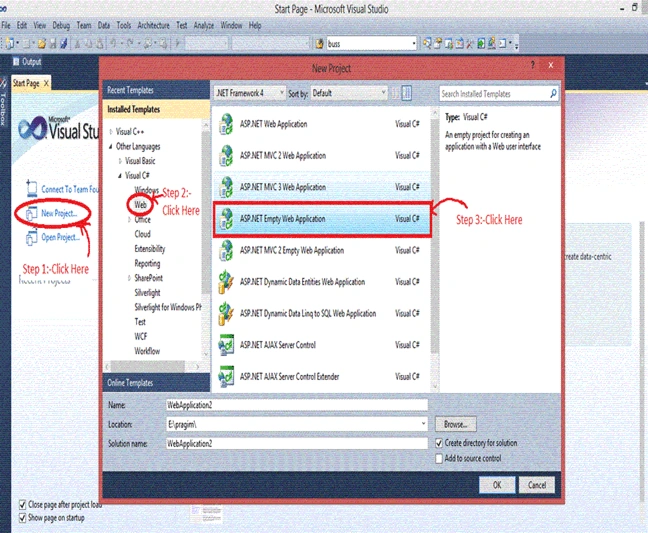
Step 2. Then click on "New Project" > "Web" >"ASP.NET Empty Web Application."
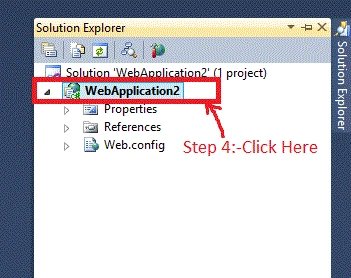
Step 3. Now click on Solution Explorer.
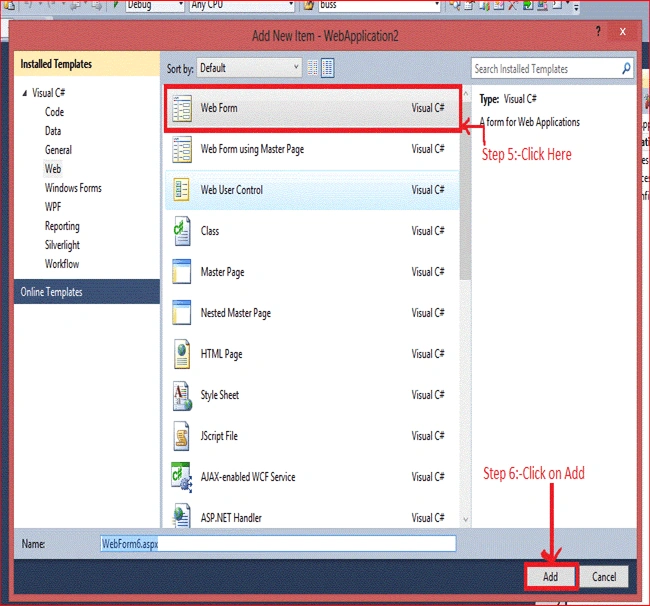
Step 4. Now right-click on the "ADD" > "New Item" > "Web Form" and add the name of the Web Form just like I did in WebForm6.aspx.
Step 5. After adding the WebForm6.aspx you will see the following code.
<%@ Page Language="C#" AutoEventWireup="true" CodeBehind="WebForm6.aspx.cs" Inherits="view_state.WebForm6" %>

<!DOCTYPE html PUBLIC "-//W3C//DTD XHTML 1.0 Transitional//EN" "http://www.w3.org/TR/xhtml1/DTD/xhtml1-transitional.dtd">
<html xmlns="http://www.w3.org/1999/xhtml">
<head runat="server">
    <title></title>
</head>
<body>
    <form id="form1" runat="server">
        <p>
            UserName: <asp:TextBox ID="TextBox1" runat="server"></asp:TextBox>
            <br />
            Password: <asp:TextBox ID="TextBox2" runat="server"></asp:TextBox>
            <br />
            <asp:Button ID="Button1" runat="server" onclick="Button1_Click" Text="Submit" />
            <asp:Button ID="Button3" runat="server" onclick="Button3_Click" Text="Restore" />
        </p>
    </form>
</body>
</html>
Now write the code as in the following.
// Declaration of 'a' and 'b'
public string a, b;

protected void Button1_Click(object sender, EventArgs e)
{
    // TextBox1 and TextBox2 values are assigned to the variables 'a' and 'b'
    a = TextBox1.Text;
    b = TextBox2.Text;

    // After clicking on Button, TextBox values will be cleared
    TextBox1.Text = TextBox2.Text = string.Empty;
}

protected void Button3_Click(object sender, EventArgs e)
{
    // Values of variables 'a' and 'b' are assigned to TextBox1 and TextBox2
    TextBox1.Text = a;
    TextBox2.Text = b;
}
Output
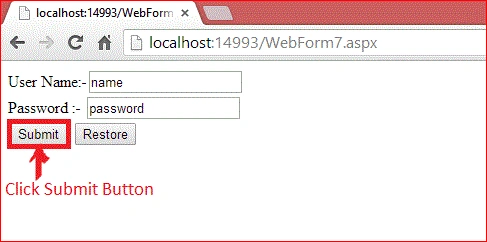
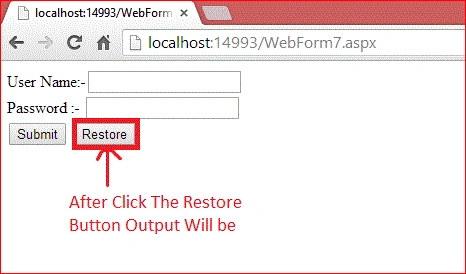
It only happens because all the controls are classes and on the server, all the Control Objects are created and then after the round trip, the Page is returned to the client's browser in HTML format, and the objects are destroyed at the server.
After the Submit button is clicked, the value of the user name and password is submitted to the server. We cannot restore the value again because after the postback, the instance of the control is destroyed, and on clicking the Restore Button, the server takes a new request, and the server cannot restore the value of the TextBox.
Features Of View State
These are the main features of the view state.
- Retains the value of the Control after post-back without using a session.
- Stores the value of Pages and Control Properties defined in the page.
- Creates a custom View State Provider that lets you store View State Information in a SQL Server Database or in another data store.
Now, I am explaining the stored value in the View State, and the remaining steps are the same as the previous ones.
Now write this code.
protected void Button1_Click(object sender, EventArgs e)
{
    // Value of TextBox1 and TextBox2 is assigned to the ViewState
    ViewState["name"] = TextBox1.Text;
    ViewState["password"] = TextBox2.Text;

    // After clicking on Button, TextBox value will be cleared
    TextBox1.Text = TextBox2.Text = string.Empty;
}

protected void Button3_Click(object sender, EventArgs e)
{
    // If ViewState values are not null, assign them to TextBoxes
    if (ViewState["name"] != null)
    {
        TextBox1.Text = ViewState["name"].ToString();
    }

    if (ViewState["password"] != null)
    {
        TextBox2.Text = ViewState["password"].ToString();
    }
}
Output
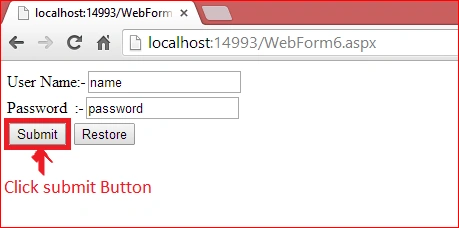
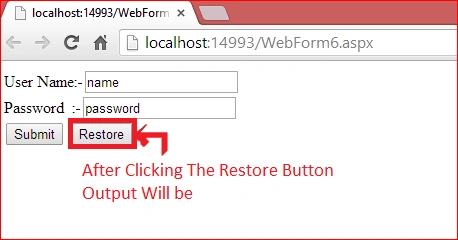
After clicking on the Submit Button, the value of the user name and password is submitted in View State, and the View State stores the value of the user name and password during post-back.
After clicking on the Restore Button, we can get the value again. The Value must be retained during post-back, and the values are stored into a base 64 encoded string, and this information is then put into the View State Hidden Field.
Data Objects That Can be Stored in View state
- String
- Boolean Value
- Array Object
- Array List Object
- Hash Table
- Custom type Converters
Advantages of View State
- Easy to Implement.
- No server resources are required: The View State is contained in a structure within the page load.
- Enhanced security features: It can be encoded and compressed or Unicode implementation.
Disadvantages of View State
- Security Risk: The Information of View State can be seen in the page output source directly. You can manually encrypt and decrypt the contents of a Hidden Field, but It requires extra coding. If security is a concern then consider using a Server-Based state Mechanism so that no sensitive information is sent to the client.
- Performance: Performance is not good if we use a large amount of data because View State is stored in the page itself and storing a large value can cause the page to be slow.
- Device limitation: Mobile Devices might not have the memory capacity to store a large amount of View State data.
- It can store values for the same page only.
When We Should Use View State
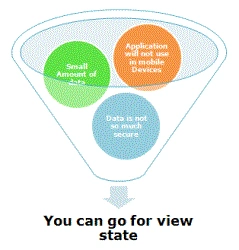
- When the data to be stored is small.
- Try to avoid secure data.
How to Enable and Disable View State
You can enable and disable View State for a single control as well as at the page level. To turn off View State for a single control, set the EnableViewState property of that control to false.
TextBox1.EnableViewState=false;
To turn off the View State for an entire page, we need to setEnableViewState to false of the page directive, as shown below.
<%PageLanguage="C#"EnableViewState="false";
To enable the same, you need to use the same property just set it to "True".
View State Security
View State Data is stored in the form of Base 64 encoding, but it is not very secure. Anyone can easily break it. So there are the following 2 options,
- Using the MAC for Computing the View State Hash Value
Generally, the larger MAC key is used to generate a Hash Key. When the key is auto-generated, then ASP.NET uses SHA-1 encoding to create a larger key. Those keys must be the same for all the servers. If the key is not the same and the page is posted back to a different server than the one that created the page, then the ASP.NET Page Framework raises an exception. We can enable it by using.
<%PageLanguage="C#"EnableViewState="true"EnableViewStateMac="true";
- Encryption
By using MAC Encoding, we cannot prevent the viewing of the data, so to prevent the viewing, we transmit the page over SSL and encrypt the View State Data. To encrypt the data, we have the ViewStateEncryptionMode Property, and it has the following 3 options.
- Always: Encrypt the data Always.
- Never: Encrypt the data Never.
- Auto: Encrypt any Control request, especially for Encryption
We can enable it by using.
- <%PageLanguage="C#"EnableViewState="trueViewStateEncryptionMode="Always"


CESAR MARTINEZPosted Jun 15, 2022, 7:03 PM
Excelente!
mikepowertech mikepowertechPosted Dec 23, 2021, 2:34 AM
Thank you, very good. There was a question like: Which of the following is a method for web applications to store client data? 1) ViewState and Cookie 2) Application and Cookie 3) Session and ViewState 4) Application and Session And I guess the answer is 4) Application and Session, right?
Vikas GuptaPosted Sep 12, 2020, 11:05 AM
This article in explained very well.Thanks
kalai romiPosted Nov 28, 2019, 3:37 AM
Nice article...
kalyani ganjiPosted Jun 18, 2019, 6:15 AM
More useful information......explanation is good....
Hussain ShaikPosted Apr 24, 2019, 6:35 AM
Good Explanation
Shyam Prasad Babu MekalaPosted Mar 25, 2019, 2:43 AM
Very helpful..nice go ahead
Ramzanali MominPosted Sep 6, 2018, 5:36 AM
Nice article for fresher
Sushil CPosted May 16, 2018, 1:11 AM
Good explanation ..
RaHuL KawadePosted Apr 10, 2018, 1:00 AM
An explanation is very easier for a beginner.
Bhavesh JadavPosted Mar 19, 2018, 1:27 AM
Very well explained with example, thanks to share.
Tahir RehmanPosted Sep 17, 2017, 7:33 AM
Why we use View State and the values of controls that when click show that are also view state.
Ganesh JamdurkarPosted May 26, 2017, 5:43 AM
Good Explanation, thank you
Kirti VaghelaPosted May 26, 2017, 3:20 AM
Good article..Thank you
Manav PandyaPosted May 2, 2017, 12:36 AM
Nice share ...................
Abhay MundraPosted Feb 21, 2017, 1:01 PM
Nice Explained.......
vinod kumar kosanaPosted Nov 17, 2016, 10:00 AM
Nice Explained...Thank you
kalu singh raoPosted Jul 28, 2016, 3:13 AM
Nice
srikameswara pulagamPosted May 3, 2016, 3:39 AM
Good try, but it looks like copy from below link,http://www.codeproject.com/Articles/31344/Beginner-s-Guide-To-View-State
Sijo VincentPosted Feb 26, 2016, 3:37 AM
Nice Explanation
Munesh SharmaPosted Feb 17, 2016, 11:10 AM
good one Divya
Raja TPosted Oct 8, 2015, 9:24 PM
Very nice.... Thanks for sharing
Sujeet SumanPosted Sep 26, 2015, 4:14 AM
Nice Article.............
anil maskePosted Sep 18, 2015, 2:03 AM
Explanation is good, for beginer. Thanks for explaination
Sahil AroraPosted Aug 26, 2015, 1:58 PM
Very nicely explained.....Big thanks to you for this...Now I understand how View State actually works....Thanks once again...:)
Navneeth KrishnaPosted Jul 22, 2015, 7:37 AM
nice Divya Sharma
Upendra Pratap ShahiPosted Jul 7, 2015, 1:14 AM
Very nice Divya Sharma
Prasenjit DeyPosted Jun 1, 2015, 4:04 AM
Hi Divya, very nice article u have written here. But I need an another information, that is, please tell me, the flow or mechanism of view state and http request.
tanuj omarPosted May 28, 2015, 10:40 AM
watch this video about view statement https://www.youtube.com/watch?v=TYVAGNiD8e8
Harshil RathiPosted May 25, 2015, 1:31 AM
How can we change the value of view state before page load??
Kapil GuptaPosted Jan 25, 2015, 1:38 AM
Thank you so much divya....Very helpful and seamlessly written..Thanks a lot friend. :-)
Anoop Kumar SharmaPosted Jan 20, 2015, 11:20 PM
Nice Article
Jaitheradevi NadarPosted Nov 6, 2014, 5:37 AM
Good work........!
VEERENDRA kUMARPosted Oct 19, 2014, 11:00 AM
Way of explanation is good,at the time of learning stage learner fell very comfortable . please give one more article, it contains in depth knowledge of the view state.
Vasanth KrishnanPosted Jun 11, 2014, 3:18 AM
Nice article. Can you please tell me what is the life cycle for view state.
Gopi ChandPosted Apr 30, 2014, 5:02 PM
Content of the article is very good and well elaborated for better understanding.
Divya SharmaPosted Apr 18, 2014, 9:37 AM
thanku to all....
Shweta LodhaPosted Apr 14, 2014, 11:36 AM
Very well explained
Sandeep SharmaPosted Apr 13, 2014, 8:51 AM
Nice and Brief Article !! View State should be first choice for storing the information with the bounds of a single page because it allows us to retain their properties between postbacks. we can ad dour own data the view state collection using a built-in page property which called ViewState and the type of information that we are going to store can includes simple data types or our own custom objects.<p> State Management is an art of retaining the information between requests. usually this information is user-specific such as a list of items in a shopping cart, a user name or an access level but sometimes it's global to the entire application such as usage statistics that track site activity, because ASP.NET uses a disconnected architecture, so you need to explicitly store and retrieve state information with each individual request., the approach we choose for storing this data can have a dramatic effect on the performance, scalability and security of your application too.
Lakshmanan Sethu SankaranarayanPosted Apr 12, 2014, 3:35 AM
Welcome to csharp corner :)