

If you’ve worked with Azure Databricks for a while, you’ve probably noticed one small but persistent friction point: the URLs.
They’re long, system-generated, and not exactly memorable.
Something like:

Now imagine sharing that with business users, analysts, or even new engineers. Not ideal.
This is exactly where Custom URL in Azure Databricks account settings comes in and honestly, it’s one of those features that feels small at first but becomes incredibly powerful at scale.
What Is a Custom URL in Azure Databricks?
A custom URL gives your Databricks account a single, branded entry point, replacing multiple workspace-specific URLs.
Instead of juggling different links for different workspaces, you get something clean and consistent like:
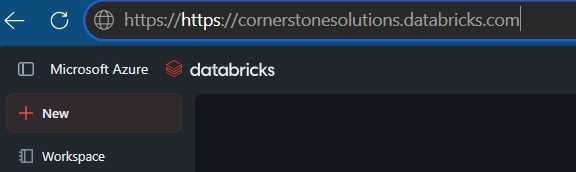
From a user experience perspective, this is a massive improvement.
But it’s not just about aesthetics it fundamentally changes how users interact with Databricks.
The Real Value: One Entry Point, Seamless Experience
Once enabled, a custom URL allows users to:
Log in once
Navigate across multiple workspaces
Access Databricks assets without repeated authentication
In other words, it creates a unified access layer across your entire Databricks environment.
This is especially useful in enterprise setups where:
Multiple teams use different workspaces
Data engineers, analysts, and data scientists collaborate
Governance and identity are centrally managed
Think of it as moving from fragmented access → platform-level experience.
Why This Matters for Data Engineers and Platform Teams
Let’s bring this closer to your real-world architecture.
If you’re building a Medallion Architecture (Bronze, Silver, Gold) across multiple workspaces, or managing:
Dev / Test / Prod environments
Department-specific workspaces (Sales, Finance, HR)
Unity Catalog governance
Then users constantly switching URLs becomes a problem.
With a custom URL:
You simplify onboarding
You reduce login friction
You standardize access patterns
This aligns perfectly with modern data platform thinking where usability matters just as much as scalability.
Prerequisites You Should Know
Before you rush to enable it, there are a few important conditions:
1. Pre-assigned Custom URL
You don’t just create one yourself you need a pre-assigned URL from Databricks.
If it’s not visible in your account settings, you’ll need to contact your Databricks account team.
2. No Private Link (Inbound) Dependency
If your workspace uses Private Link inbound, the custom URL won’t fully apply.
Those workspaces will still fall back to their original URLs.
3. Unified Login Setup (Important in Modern Environments)
Most newer Databricks accounts already support unified login, which is required for smooth navigation across workspaces
How to Enable Custom URL (Step-by-Step)
The process is refreshingly simple:
Go to Account Console
Navigate to: Settings → Account Settings
Toggle Custom URL ON
That’s it.
Once enabled:
All traffic routes through your custom domain
Legacy workspace URLs can automatically redirect
Real-World Use Case
Let’s say you work at a company like:
“Contoso Data Platform”
Before:
Analysts use one workspace URL
Engineers use another
Data scientists use a third
After enabling custom URL: contoso.databricks.com
Everyone logs in through one place.
From there, access is governed by permissions not URLs.
Join the conversation! Your thoughts help the community grow.