

Introduction
In this article you'll see how to create a Windows Forms form at run time and how to navigate from one Windows Forms form to form. I have used the Show() and Hide() methods to show how to use these methods in the application.
Show Method
The Show method is a very essential method in Windows Forms. When we call the Show method it shows the form modeless and returns true to the application. The Show method is an overloaded function of the Form class. After calling the Show method the visible property of the Form is true until the Hide method is called in the application.
Hide Method
This is the Form hiding method that hides the form when we navigate from one form to another form. The Hide method hides the selected form in the application until we do not show the form. When we call the Hide method the window is not closed, it just hides the form. The Hide Method is also an overloaded function of the Form class.
Now let's use the following procedure.
Step 1:
Open Visual Studio then select "Create New Project" --> "F# Console Application".
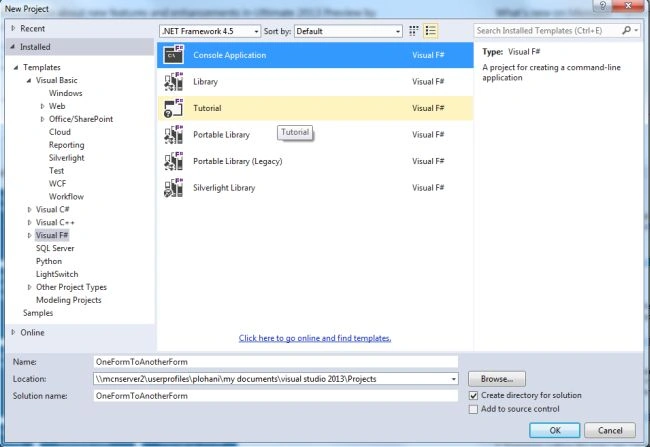
Step 2:
Now go the Solution Explorer on the right side of the application. Select the references and right-click on it and select "Add references".

Right-click on References:
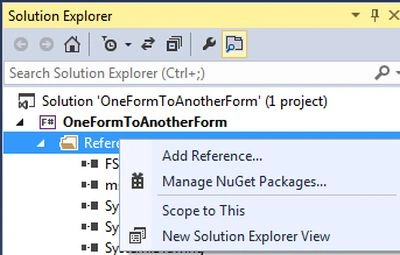
Step 3:
After selecting "Add References", in the framework template you need to select "System.Windows.Forms" and "System.Drawing" while holding down the "Ctrl" key and click on "Ok."
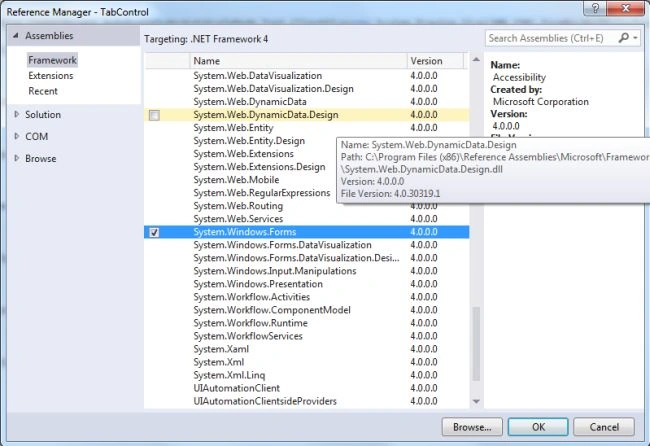
Step 4:
Write the following code for the F# application:
//use the F# standard library
open System
//use the drawing class
open System.Drawing
//Specifies the memory location of the form class
open System.Windows.Forms
//create a font object
let ffont=new Font("Times New Roman",12.0f,FontStyle.Bold, GraphicsUnit.Point)
//creates a form named "firstform"
let firstform=new Form(Text="Display First Form",StartPosition=FormStartPosition.CenterScreen,AutoScaleMode=AutoScaleMode.Font,ClientSize=new System.Drawing.Size(350,350),FormBorderStyle=FormBorderStyle.FixedSingle)
//creates a label,sets its caption to "This is the first form"
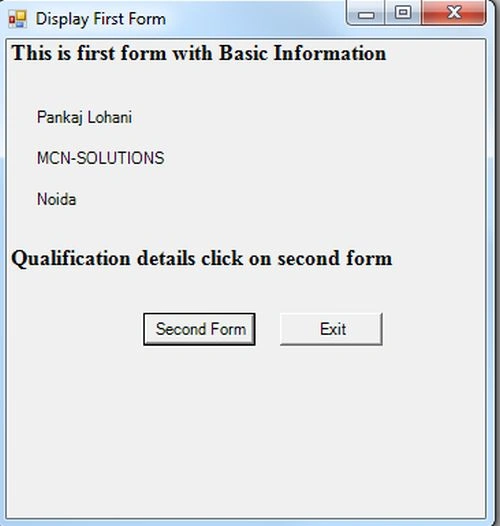
let fformlabel=new Label(Text="This is first form with Basic Information",AutoSize=true)
let fformlblfname=new Label(Text="Pankaj Lohani",Location=new System.Drawing.Point(20,50))
let fformlbllname=new Label(Text="MCN-SOLUTIONS",Location=new System.Drawing.Point(20,80))
let fformlblstate=new Label(Text="Noida",Location=new System.Drawing.Point(20,110))
let fformlblqul=new Label(Text="Qualification details click on second form",Location=new System.Drawing.Point(0,150),AutoSize=true)
//make a button,sets its caption to Second Form
let nxtbutton=new Button(Text="Second Form", Location=new System.Drawing.Point(100, 200),AutoSize=true)
//creates another button, set its text to exit
let fexitbutton=new Button(Text="Exit", Location=new System.Drawing.Point(200, 200),AutoSize=true)
//adds the controls we made to the first form
firstform.Controls.Add(fformlabel)
firstform.Controls.Add(fformlblfname)
firstform.Controls.Add(fformlbllname)
firstform.Controls.Add(fformlblstate)
firstform.Controls.Add(fformlblqul)
//applies font format to our label
fformlblqul.Font<-ffont
fformlabel.Font<-ffont
Join the conversation! Your thoughts help the community grow.