

This article is the next part of my previous article where we learned about Windows Ranking Function.
In this article, I am going to discuss the other Windows Functions - Lead and Lag. These functions also work on the Window, or Grouped Row DataSet, or Partition created by Windows Functions in the T-SQL. For a better understanding, I request you to please read the previous article, mentioned above and then read this one.
So, let’s get started. We will create a table and fill it with some random data.
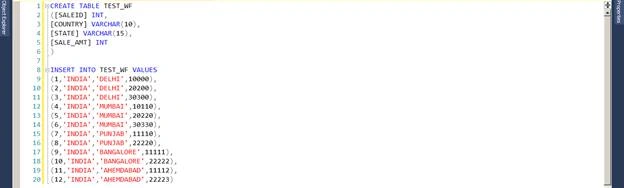
Now, our test table is ready and we will fire a T-SQL to understand how the Windows Functions work. So, let’s run our T-SQL.
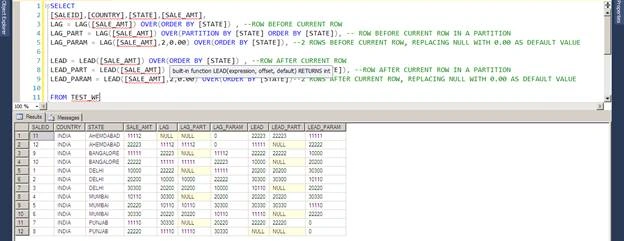
Now, let’s understand the LEAD and LAG functions.
LAG()
If you check the results, the LAG function returns NULL for the first row as there is no row before SaleID 11. Then comes LAG_PART which uses Partition By clause and partitioning the table on the basis of State Name. If you look the column value of LAG_PART, it states that for the partition Ahemdabad, for ID 11 there is no previous value hence NULL, and for ID 12 in the same partition, it is showing the previous value of ID11. Now, comes the column LAG_PARAM in which we used the LAG function with the parameters.
LAG_PARAM([SALE_AMT],2,0.00)
LEAD()
I hope this will help you in understanding LAG() and LEAD() Windows Functions and how to use them. One thing to keep in mind is that these two functions do not support the functionality of Windows Frame which I will discuss in the next part when we will learn about First_Value() and Last_Value() functions.
Thank you for taking time to read this article. Any feedback will be welcomed. Happy Learning!
Rushi MehtaPosted Oct 22, 2018, 3:21 AM
HI Rohit!.. Thanks for sharing