

Introduction
In this article, we are going to see how to work with a Bluetooth module with a relay and Arduino to produce a wireless mobile controlled light. This will make our life simple and efficient. The Bluetooth module is paired with a mobile's Bluetooth and using a specified app we are going to control the lights and fan. This project will be very useful for ill patients and will be a stepping stone to create complete home automation.
Requirements
- Arduino UNO
- Bluetooth Module
- Relay Module
- Lights
- Connecting wire
- Mobile App (BlueControl)
Circuit diagram
Connect the circuit diagram as per the below image.
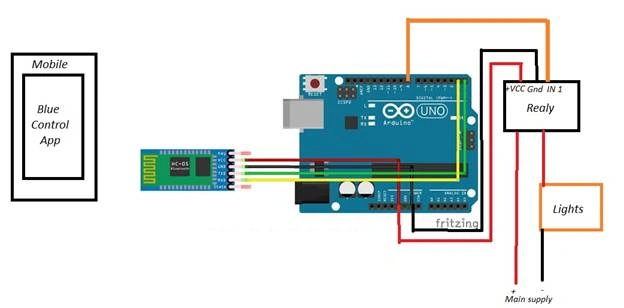
Connect Pin 8 to the IN1 of the Relay which will act as the output of the Arduino.
Connect the TX of the Arduino to the Rx of the Bluetooth module.
Rx of the Arduino to TX of Bluetooth
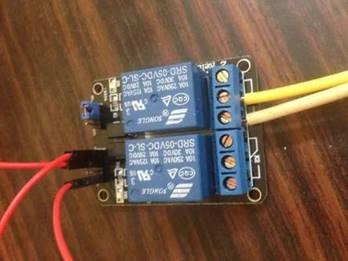
Relay Module
Since Arduino has a capacity to work only under 5V it cannot be operated at high voltages, so we use a relay module to act as a high supply trigger.
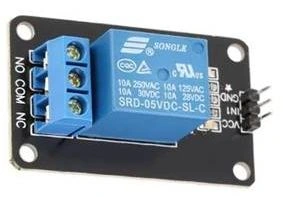
Steps to follow:
Step 1
Open the Arduino Software.

Step 2
Initialize the serial communication, the use of the "Serial.Available()” function is to check whether the signal is received or not.
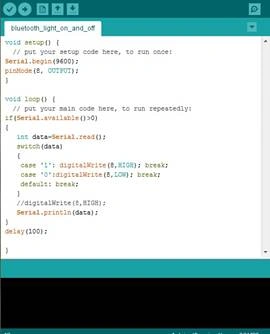
Step 3
Compile and upload the coding.
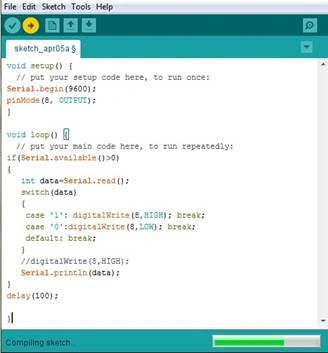
Relay module connected to Arduino
Step 4
Switch on your mobile's Bluetooth and then open the BlueControl application and pair it to your Bluetooth.
Summary
In this article, we saw how to work with Arduino, Bluetooth Sensor, and Relay module. This article will be very useful for patients and physically challenged people to handle their daily needs just using their app.
SUBRAHMANYAM PENTAPATIPosted Oct 10, 2019, 9:04 AM
Am working on a system to turn my room fan on if the temp reaches above a certain point. I figured out how to turn the relay on or off depending on temp, but it tries to turn the relay state on or off on every loop cycle. Is there a way to determine if the relay is currently in NO or NC position so I can have the loop cycle only change state if it is not in the correct position?