
Cookies in PHP
Hi guys, In this article
we are going learn how to deal with cookies; first of all we need to know "what
is the meaning of cookies" ?
A cookie is object used to identify
the user by his/her computer.
Cookies are small strings of data created by a Web server but stored on the
client. In addition to having names and values, cookies have an expiration time.
Cookies are often used to track user information.
'Or'
A cookie is often used to identify a user. A cookie is a small file that the
server embeds on the user's computer. Each time the same computer requests a
page with a browser, it will send the cookie too.
For this purpose you must install a XAMPP server.
Creating Your First PHP Cookie
For creating the very first cookies with PHP, we used the setcookie()
function. This is a built in function in php.
Syntax
setcookies(name,value,expiration)
Now we will understand the meaning of these arguments, the explanation of name,
value and expiration are given below:
- name: The name of your cookie. You will use this name to later retrieve your cookie, so don't forget it.
- value: The value that is stored in your cookie. Common values are username(string) and last visit(date).
- expiration: The date when the cookie will expire and be deleted. If you do not set this expiration date, then it will be treated as a session cookie and be removed when the browser is restarted.
This is the PHP script to set the cookies
for the particular user :
<html>
<head><title>PHP
cookies info</title>
</head>
<body
bgcolor="cyan">
<center>
<h3>
Setting up cookies</h3><hr>
<p>
setcookie('lastVisit', date("G:i - m/d/y"), $oneMonth)
</p><br>
<p>with
in php scripting<hr>
//Calculate 30 days in the future<br>
//seconds * minutes * hours * days + current time
<br>
$oneMonth = 60 * 60 * 24 * 30 + time();
<br>
setcookie('lastVisit', date("G:i - m/d/y"), $oneMonth);<hr>
</p>
<p> Cookies enabled............</p>
<?php
$oneMonth = 60 * 60 * 24 * 30 + time();
setcookie('lastVisit',
date("G:i
- m/d/y"),
$oneMonth);
?>
</center>
</body>
</html>
Save it as abc.php.
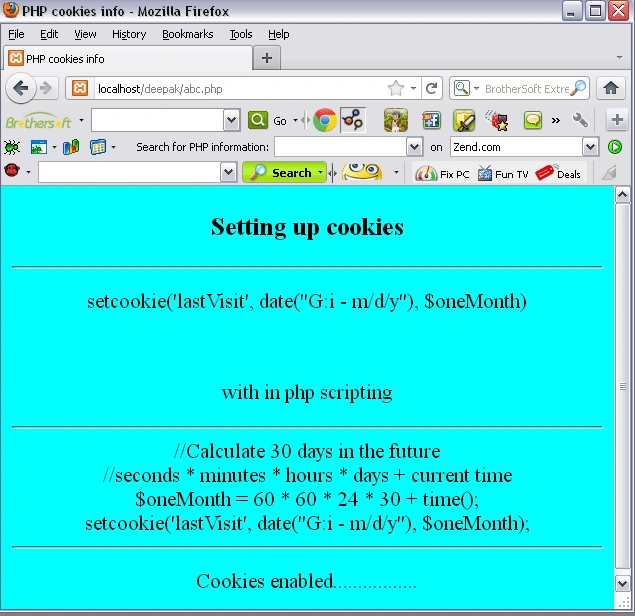
Output of above php scripting
Type
http://localhost/yourfoldername/function.php at your browser, here your
output look like:
PHP script to retrieve the information
<html>
<head>
<title>PHP
cookies info</title>
</head>
<body
bgcolor="orange">
<center>
<h3>
COOKIES INFORMATION
</h3><hr>
<?php
if(isset($_COOKIE['lastVisit']))
$visit = $_COOKIE['lastVisit'];
else
echo
" you got
stale cookies!";
echo
"Welcome
back! <br> You last visited on ".
$visit;
?>
</center>
</body>
</html>
Save it as ref.php.
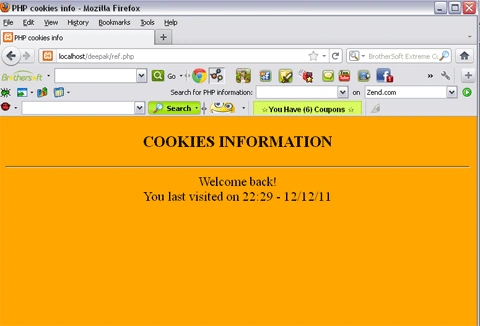
Output
Type
http://localhost/yourfoldername/function.php at your browser, here your
output look like :
Destroying the cookies
To destroy the cookie, simply use
setcookie again, only set the expiration date to be in the past. Here is an
example:
<?php
$past = time() - 60;
//this makes the time 60 seconds ago
setcookie(lastVisit, date("G:i
- m/d/y"),
$past);
?>
Remember: Cookies need to be set
in the header. This means they must be sent before any HTML is set to the page,
or they will not work. Thanks !!
Comments
Join the conversation! Your thoughts help the community grow.