


A long time ago........ . . . in another CPU galaxy, people where playing pong, pac-man and a dozen of other sprite-to-screen based games while someone was saying that 640k ought to be enough for everyone.
Since that time many things have changed. This includes the fact that we nowadays store thousands of sprites that have been manipulated with all kinds of colored effects by using an GUI application on a gigabyte hard disk, and started to call the result an image.
Stored images makes live so much easier. You can draw them in whatever paint program you prefer, save them to disk and use the result within your application or hence: game.
A picture image in DirectX is nothing more than a surface which can be loaded from your hard disk. By theory you can have up to as many surfaces as you would like, but for the sake of blue screens on your friends computer we always take memory consumption into account.
You can calculate the amount of bytes needed by using the following formula:
Width * Height * bytes per pixel
So on an canvas with the dimension of 800x600x16bit this will be.
800 x 600 x 2 = 960,000 bytes
If you work with 32bit mode, you will add an extra two bytes per pixel
800 x 600 x 4 = 1,920,000 bytes
Blitting your bits:
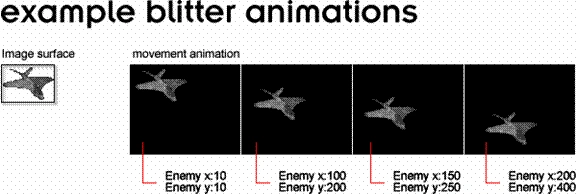
If you had a home computer you probably remember some terms like the blitter, or software blits. Blitting is used to make realtime image animations or just to combine a bunch of images on one surface. In more detail it is a way to transport a certain part of your image surface to a destination point on a surface.

Creating a bitmap surface class
Lets get on with it and extend our little framework to support bitmap images. I will explain the needed parts in between the code, so you will actualy understand the stuff I will present. We will create a new class that is capable of loading an image from a file and blit a certain rectangle on a destination surface.
DirectXBitmapSurface.cs
using System;
using DxVBLib;
namespace DX_CSharp_2
{
///
/// Summary description for DirectXBitmapSurface.
///
public class DirectXBitmapSurface
{
private DirectDrawSurface7 BitmapSurface;
protected DDSURFACEDESC2 BitmapSurfaceDescription;
The DirectDraw DDSURFACEDESC2 structure describes related information about our surface. This includes depth, width and height which must be initialized before actually using the DirectDrawSurface7.
We will create some public properties, so we can play a bit with the DDSURFACEDESC2 structure from outside our class code.
public int Width
{
get { return BitmapSurfaceDescription.lWidth; }
set { BitmapSurfaceDescription.lWidth = value; }
}
public int Height
{
get { return BitmapSurfaceDescription.lHeight; }
set { BitmapSurfaceDescription.lHeight = value; }
}
The DDSURFACEDESC2.lWidth and the DDSURFACEDESC2.lheight properties are quite useful when you got an image that needs to be stretched or shrunk onto the destination surface without touching the actual file. With a minor bit of code, you can use these properties to create your own zoom effects at run-time.
public DirectXBitmapSurface()
{ }
Next, we will create a public initialization function that takes two arguments. The first one is an initialized DirectDraw object needed for the creation of the surface, and the second one is a string containing the path to the Windows bitmap file. The DirectDraw CreateSurfaceFromFile function will populate the reference pointing to the DDSURFACEDESC2 structure. This means that the related information describing the image like e.g. Width, Height, and pixel format is loaded into a seperate structure. DirectDraw can only handle Windows bitmap (.bmp) images directly. This does not mean you can't use .Gif or .Jpg images at all. These picture types it requires to create a filetype specific loader, and then load the surface from memory by using the DirectDraw CreateSurfaceFromResource function. For me a bitmap image is a bitmap image so I don't realy see the point of writting a special .Gif loader, while I can just convert the picture in a paint program. If you realy need to code such a loader, I suggest you get yourself a copy of the book "Tricks of Windows Game programming" second edition, where this is fully explained and is a good read indeed.
public void Initialize( DirectDraw7 DirectDraw, string strBackgroundBitmap)
{
BitmapSurface = DirectDraw.CreateSurfaceFromFile( strBackgroundBitmap, ref BitmapSurfaceDescription );
}
The following function will globalize the BltFast functions so we can access it from our DirectX application class. The first argument is the DirectDrawSurface7 surface we want to blit our bitmap surface on. The X and Y values specify the location on the destination surface we are going to blit to. The last argument contains the reference to a rectangle which specifies the part of the source we want to blit. I overload the rectangle function, so you can easily blit the complete source image onto the destination position of the surface without the specifying the original size.
public void BltFast(DirectDrawSurface7 objBackBufferSurface, int int_X, int int_Y)
{
objBackBufferSurface.BltFast( int_X, int_Y, this.BitmapSurface, ref blitRectangle, CONST_DDBLTFASTFLAGS.DDBLTFAST_NOCOLORKEY | CONST_DDBLTFASTFLAGS.DDBLTFAST_DONOTWAIT );
}
public void BltFast(DirectDrawSurface7 objBackBufferSurface, int int_X, int int_Y, RECT RECTblitRectangle)
{
objBackBufferSurface.BltFast( int_X, int_Y, this.BitmapSurface, ref RECTblitRectangle, CONST_DDBLTFASTFLAGS.DDBLTFAST_NOCOLORKEY | CONST_DDBLTFASTFLAGS.DDBLTFAST_DONOTWAIT );
}
}
}
The DirectX constants CONST_DDBLTFASTFLAGS.DDBLTFAST_DONOTWAIT means that if the blitter is too busy the blit will be ignored. We will be updating game screens at a high rate, so dont worry if a blit gets ignored because the blitter was too busy. If a blit gets ignored it is due the fact that the CPU can not handle it, it is always better to unload some of its work rather than queuing more actions by using CONST_DDBLTFASTFLAGS.DDBLTFAST_WAIT. The DDBLTFAST_NOCOLORKEY constant indicates that I will not make use of transparency keys when blitting to the destionation. If you want to keep the source image transparency for the destionation surface, you should use of the DDBLTFAST_SRCCOLORKEY. You can even specify to apply the destionation transparency to the source blitting rectangle with DDBLTFAST_DESTCOLORKEY.
Thats all for our DirectX bitmap class code for now, so lets go back to our main DirectX application code that we created in the first article and implement the class to view some nifty pics !!!
DirectXApp.cs
using System;
using System.Windows.Forms; // Application DoEvents
using DxVBLib;
namespace DX_CSharp_2
{
///
/// Summary description for DirectXApp.
///
public class DirectXApp
{
private DirectXWrapper DX = new DirectXWrapper();
private DirectXBitmapSurface DX_overlay = new DirectXBitmapSurface();
...
We will jump to the initialization part of the DirectX application class and add the initialization code for our fresh created class object.
...
public void Initialize()
{
DX.InitializeDirectXFullScreen(this.handle,this.screenwidth,this.screenheight,this.screenbits);
DX.InitializeDirectInput(this.handle);
DX_overlay.Width = this.screenwidth;
DX_overlay.Height = this.screenheight;
DX_overlay.Initialize(DX.DirectDraw, @"critikill.bmp");
}
...
As you can see I decided to stretch the image as the exact screen size in order to fill the whole screen. If you do not specify these properties, the original image width and height will be used.
There is no problem with blitting a smaller surface onto a bigger surface, but the other way around will not work because when blitting a surface you can not exceed the size limit of the destination surface.
Our main loop will clear the backbuffer surface and blit the image when it exceeds the specified FPS limit. In this loop we also check if a quit button is pressed, in order to trigger the Application.Exit.

sou soueditedPosted Feb 15, 2007, 3:21 PMEdited Feb 15, 2007, 3:35 PM
I's a good web site.please.I need your help to find some code source in c# detecting contour of image..thank you. email:[email protected]