

What are Xamarin and Xamarin Forms?
- Xamarin is a cross-platform to develop Multi-Platform Applications.
- Xamarin is a shared code (C#) but Separately Design UIs Android (java), Windows(C#), iOS (Objective – C & XCODE).
- Xamarin forums are UIs & shared code (C#) are same. To develop multi-platforms Applications, run all the projects (Android, Windows, iOS) at the same time.
Prerequisites
- Visual Studio 2017 Enterprise.
The steps given below are required to be followed in order to design Horizontal & Vertical scroll views, using Xamarin Forms in Visual Studio 2017.
Step 1
- Go to Visual Studio.
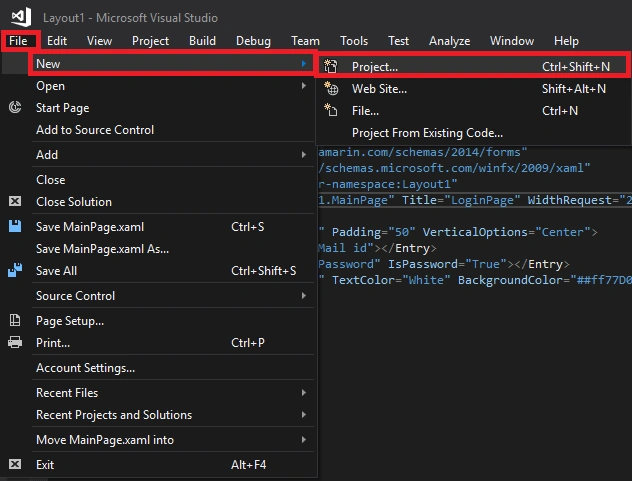
- Click File -> New -> Project.
Step 2
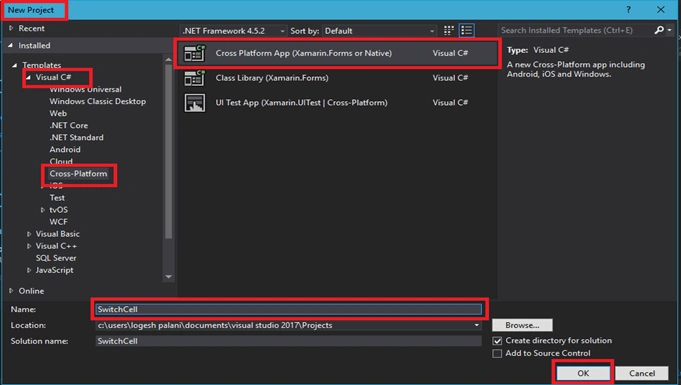
- In this step, click C# -> Cross Platform(Android, iOS, Windows) -> Cross Platform App (Native or Xamarin forms).
- Enter the Application Name, followed by clicking OK.
Step 3
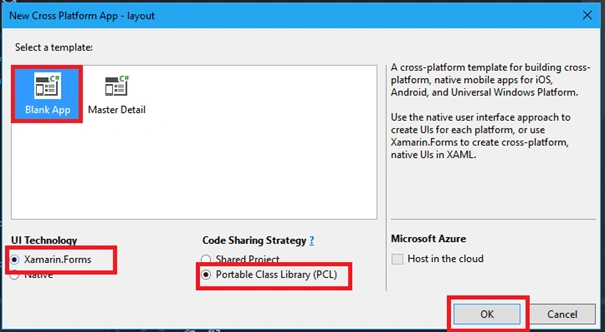
- Go to New Cross Platform app and click Blank App.
- UIs Technology needs to click Xamarin forums.
- Code sharing strategy needs to Click PCL(Portable Class Library).
- Click OK.
Step 4
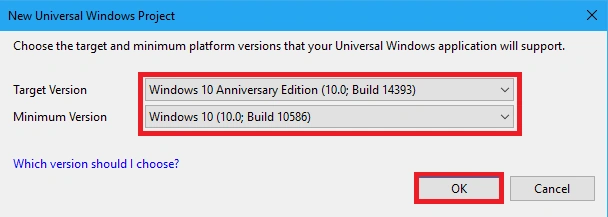
- In UWP Project, select Target version & Minimum Version, followed by clicking OK.
Step 5.1
- In this step, go to Solution Explorer -> Portable Class Library, followed by clicking Xaml.cs, inserting the code given below the MainPage.Xaml.cs Page and save it.
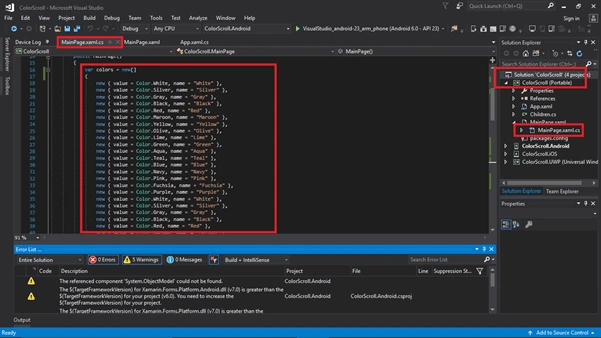
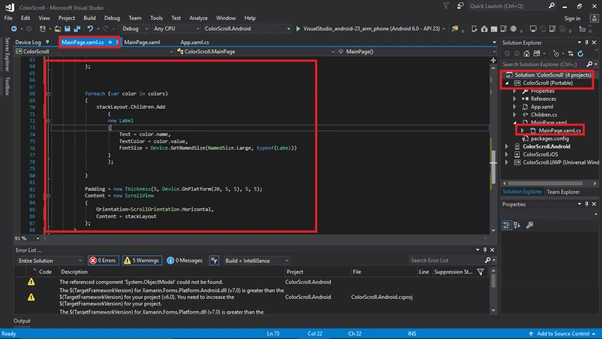
- using System;
- using System.Collections.Generic;
- using System.Linq;
- using System.Text;
- using System.Threading.Tasks;
- using Xamarin.Forms;
- namespace ColorScroll
- {
- public partial class MainPage : ContentPage
- {
- public MainPage()
- {
- var colors = new[]
- {
- new { value = Color.White, name = "White" },
- new { value = Color.Silver, name = "Silver" },
- new { value = Color.Gray, name = "Gray" },
- new { value = Color.Black, name = "Black" },
- new { value = Color.Red, name = "Red" },
- new { value = Color.Maroon, name = "Maroon" },
- new { value = Color.Yellow, name = "Yellow" },
- new { value = Color.Olive, name = "Olive" },
- new { value = Color.Lime, name = "Lime" },
- new { value = Color.Green, name = "Green" },
- new { value = Color.Aqua, name = "Aqua" },
- new { value = Color.Teal, name = "Teal" },
- new { value = Color.Blue, name = "Blue" },
- new { value = Color.Navy, name = "Navy" },
- new { value = Color.Pink, name = "Pink" },
- new { value = Color.Fuchsia, name = "Fuchsia" },
- new { value = Color.Purple, name = "Purple" },
- new { value = Color.White, name = "White" },
- new { value = Color.Silver, name = "Silver" },
- new { value = Color.Gray, name = "Gray" },
- new { value = Color.Black, name = "Black" },
- new { value = Color.Red, name = "Red" },
- new { value = Color.Maroon, name = "Maroon" },
- new { value = Color.Yellow, name = "Yellow" },
- new { value = Color.Olive, name = "Olive" },
- new { value = Color.Lime, name = "Lime" },
- new { value = Color.Green, name = "Green" },
- new { value = Color.Aqua, name = "Aqua" },
- new { value = Color.Teal, name = "Teal" },
- new { value = Color.Blue, name = "Blue" },
- new { value = Color.Navy, name = "Navy" },
- new { value = Color.Pink, name = "Pink" },
- new { value = Color.Fuchsia, name = "Fuchsia" },
- new { value = Color.Purple, name = "Purple" }
- };
- StackLayout stackLayout = new StackLayout
- {
- Orientation = StackOrientation.Horizontal,
- BackgroundColor = Color.Blue,
- };
- foreach (var color in colors)
- {
- stackLayout.Children.Add
- (
- new Label
- {
- Text = color.name,
- TextColor = color.value,
- FontSize = Device.GetNamedSize(NamedSize.Large, typeof(Label))
- }
- );
- }
- Padding = new Thickness(5, Device.OnPlatform(20, 5, 5), 5, 5);
- Content = new ScrollView
- {
- Orientation=ScrollOrientation.Horizontal,
- Content = stackLayout
- };
- }
- }
- }
Step 5.2
- In this step, go to Solution Explorer -> Portable Class Library, followed by clicking Xaml.cs, inserting the code given below the MainPage.Xaml.cs Page and save it.
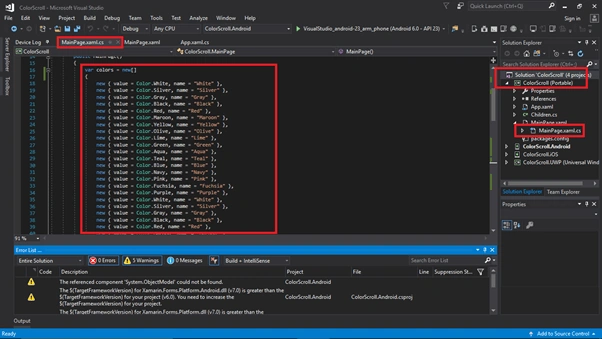
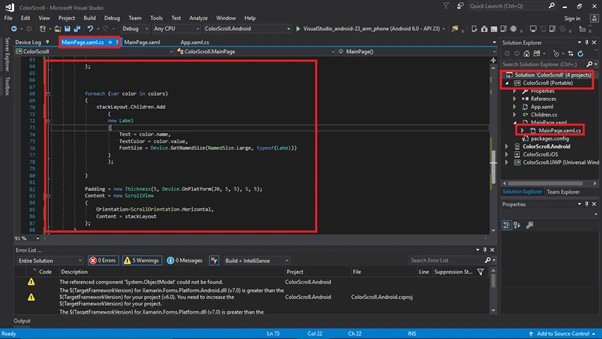
- using System;
- using System.Collections.Generic;
- using System.Linq;
- using System.Text;
- using System.Threading.Tasks;
- using Xamarin.Forms;
- namespace ColorScroll
- {
- public partial class MainPage : ContentPage
- {
- public MainPage()
- {
- var colors = new[]
- {
- new { value = Color.White, name = "White" },
- new { value = Color.Silver, name = "Silver" },
- new { value = Color.Gray, name = "Gray" },
- new { value = Color.Black, name = "Black" },
- new { value = Color.Red, name = "Red" },
- new { value = Color.Maroon, name = "Maroon" },
- new { value = Color.Yellow, name = "Yellow" },
- new { value = Color.Olive, name = "Olive" },
- new { value = Color.Lime, name = "Lime" },
- new { value = Color.Green, name = "Green" },
- new { value = Color.Aqua, name = "Aqua" },
- new { value = Color.Teal, name = "Teal" },
- new { value = Color.Blue, name = "Blue" },
- new { value = Color.Navy, name = "Navy" },
- new { value = Color.Pink, name = "Pink" },
- new { value = Color.Fuchsia, name = "Fuchsia" },
- new { value = Color.Purple, name = "Purple" },
- new { value = Color.White, name = "White" },
- new { value = Color.Silver, name = "Silver" },
- new { value = Color.Gray, name = "Gray" },
- new { value = Color.Black, name = "Black" },
- new { value = Color.Red, name = "Red" },
- new { value = Color.Maroon, name = "Maroon" },
- new { value = Color.Yellow, name = "Yellow" },
- new { value = Color.Olive, name = "Olive" },
- new { value = Color.Lime, name = "Lime" },
- new { value = Color.Green, name = "Green" },
- new { value = Color.Aqua, name = "Aqua" },
- new { value = Color.Teal, name = "Teal" },
- new { value = Color.Blue, name = "Blue" },
- new { value = Color.Navy, name = "Navy" },
- new { value = Color.Pink, name = "Pink" },
- new { value = Color.Fuchsia, name = "Fuchsia" },
- new { value = Color.Purple, name = "Purple" }
- };
- StackLayout stackLayout = new StackLayout
- {
- BackgroundColor = Color.Blue,
- };
- foreach (var color in colors)
- {
- stackLayout.Children.Add
- (
- new Label
- {
- Text = color.name,
- TextColor = color.value,
- FontSize = Device.GetNamedSize(NamedSize.Large, typeof(Label))
- }
- );
- }
- Padding = new Thickness(5, Device.OnPlatform(20, 5, 5), 5, 5);
- Content = new ScrollView
- {
- Content = stackLayout
- };
- }
- }
- }
Step 6
The processing given below is the same for Horizontal & Vertical Views
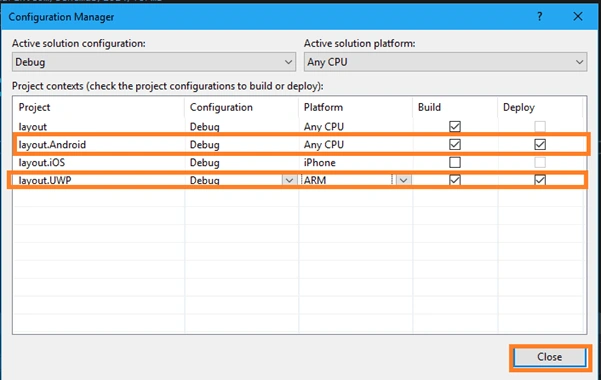
- Click Build menu and go to Configuration Manager.
- Configure your Android, Windows, IOS Depoly & Build Setting, followed by clicking Close.
Step 7
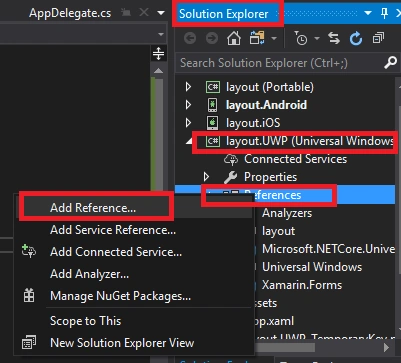
- Go to Solution Explorer -> click UWP Application ->Right click it and Add the Reference.
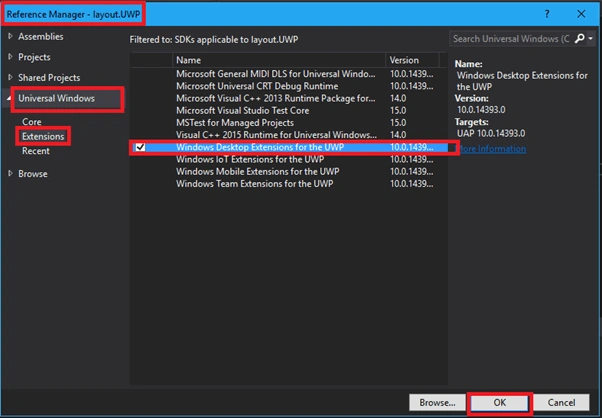
Click Cross Platform ->Extension->add Extension given below.
- Windows Desktop Extensions for UWP 10.0.143953
Step 8
- First, build your Application. Select Build & deploy option, followed by clicking Start your Application.
- In this step, go to Run option, choose from the list of an Android or an IOS or UWP Simulators, which are available (you can be choosing an IOS, wherein you need to first add MAC device in your Visual Studio). You can choose any one Simulator and run it

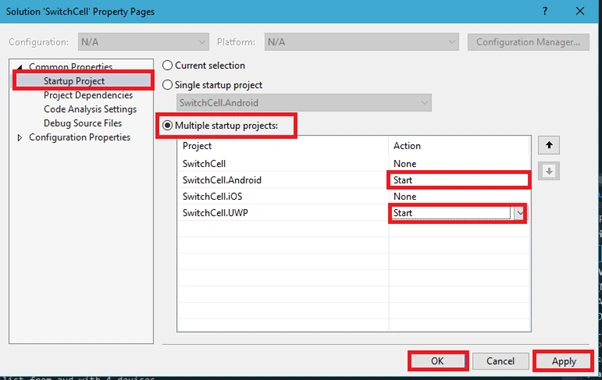
- You want to start up the multiple projects, so proceed, as shown below.
- Right click on Solution Explorer and select set start up project.
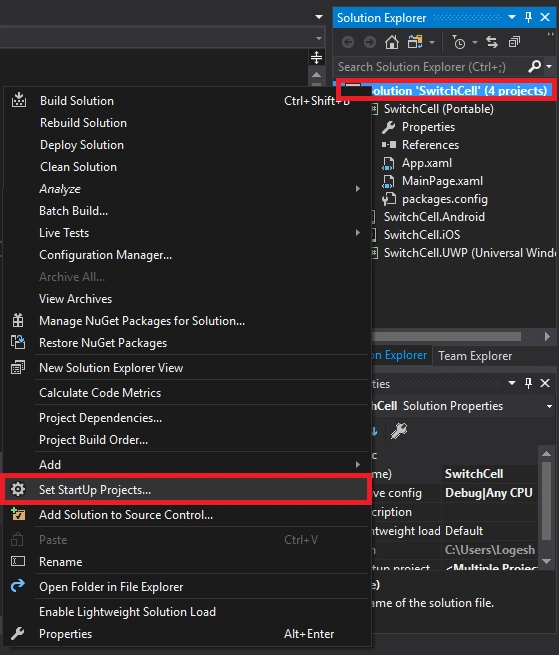
In this step, go to Startup Project and select Multiple Startup Project, followed by clicking Startup Projects and clicking Apply -> OK.
These are the features of Xamarin Forms.
Go to click to Start Debuging.

Thus, the outputs are given below.
Step 9.1

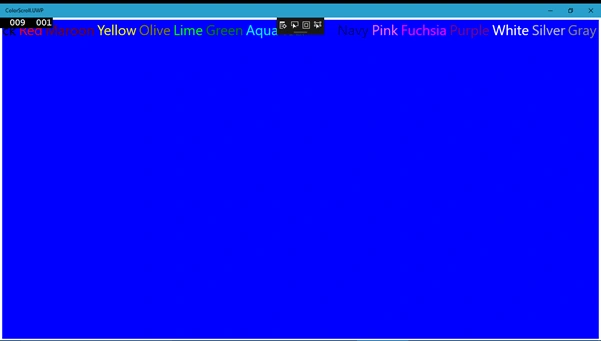

- After afew seconds, the app will start running on your Android Simulator and UWP Application. You will see your Application working successfully.
Thus, Horizontal ScrollView Android output is given below.
The UWP Horizontal ScrollView output is given below.
Step 9.2
Thus, Vertical ScrollView Android output is given below.
The UWP Vertical Scroll View Output is given below.

- Your Horizontal & Vertical ScrollView Application are created succesfully.
Conclusion
Thus, we learned how to design Vertical & Horizontal ScrollView Applications, using Xamarin forms in Visual Studio 2017.
Ammar ShaukatPosted Nov 24, 2017, 6:57 AM
Can you achieve the same thing using XAML ?
Joe WilsonPosted May 4, 2017, 5:11 AM
Thank you for sharing it.