

In C# we can write comment in 3 ways:
- Single line Comments
- Multi-line Comments
- XML Documentation Comments
Single line Comments
- classProgram
- {
- //This is an example of Auto Property Initializer in C# 6
- publicstringUserName
- {
- get;
- } = "Banketeshvar Narayan Sharma";
- }
Multi-line Comments
- /* This is an example of Dictionary initializer in C# 6
- Where as in C# 5 we have to write like
- { 101,"Banketeshvar Narayan Sharma"},
- { 102,"Rajnish Kumar Choudhary"},
- { 103,"Rajnish Kumar Choudhary"}
- */
- publicDictionary < int, string > _students
- {
- get;
- }
- = newDictionary < int, string > ()
- {
- [101] = "Banketeshvar Narayan Sharma", [102] = "Rajnish Kumar Choudhary", [103] = "Bhupesh"
- };
XML Documentation Comments
- ///<summary>
- ///
- ///</summary>
- ///<param name="emailId"></param>
- ///<param name="subject"></param>
- ///<param name="msgBody"></param>
- ///<param name="listOfCcEmailIds"></param>
- ///<param name="listofBccEmailIds"></param>
- publicvoidSendMail(stringemailId, string subject, stringmsgBody, string[] listOfCcEmailIds, string[] listofBccEmailIds)
- {
- //send mail.
- }
- ///<summary>
- ///
- ///</summary>
- ///<param name="emailId"></param>
- ///<param name="subject"></param>
- ///<param name="msgBody"></param>
- ///<param name="listOfCcEmailIds"></param>
- ///<param name="listofBccEmailIds"></param>
But there is some extra effort with these XML comments:
- We need to write Summary of Method/Class/property.
- I have to go to each method/class/property and write /// and then press enter.
If I have 50 classes and 5000 public entity (methods, classes, properties) then I have to Visit all those code snippet and write /// and then press enter 5K times and write Summary 5K times. But this can be eased by use of Visual Studio Extension GhostDoc.
XML Documentation Comments using GhostDoc
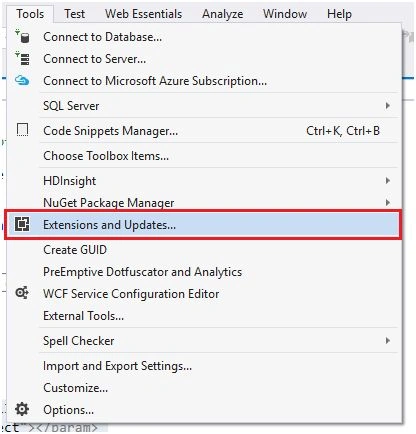
Go to Tools Menu - Extension and Update
Select online tab & Search for GhostDoc.
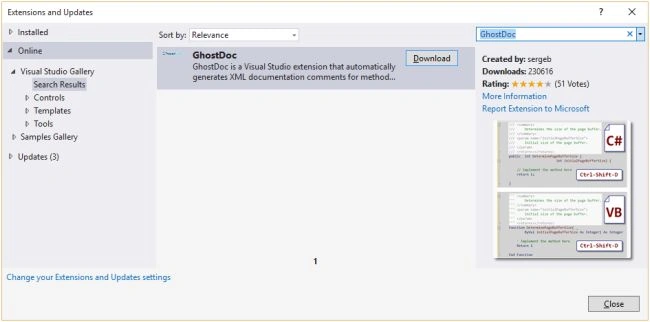
You can see that it’s showing a preview how it will make XML comments for C# & VB. Download and install it. You can visit the link here for complete details.
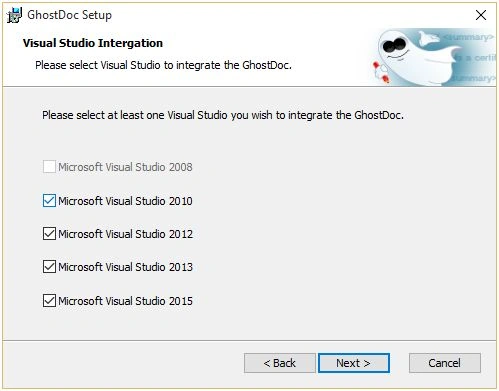
You can choose on which version you want to install it.
Now see an example how it is fast & accurate.
My Class without XML Comment
- namespaceXMLDocumentationComments
- {
- classGhostDocCommentDemo
- {
- publicintUserId
- {
- get;
- } = 1001;
- publicstringUserName
- {
- get;
- } = "Banketeshvar Narayan Sharma";
- publicstringEmailAddress
- {
- get;
- } = "[email protected]";
- publicvoidSendMail(stringemailId, string subject, stringmsgBody, string[] listOfCcEmailIds, string[] listofBccEmailIds)
- {
- //send mail.
- }
- publicvoidSomeObject(double width, double height, double length, double weight, double volume, double density, boolisMetal, boolisConductor)
- {
- //do something
- }
- }
- }
Now I click on select all (Ctrl+A) and press Ctrl+Shift+D (GhostDoc default shortcut).
My Class with XML Comment done by GhostDoc
- namespaceXMLDocumentationComments
- {
- ///<summary>
- ///
- ///</summary>
- classGhostDocCommentDemo
- {
- ///<summary>
- ///Gets the user identifier.
- ///</summary>
- ///<value>
- ///The user identifier.
- ///</value>
- publicintUserId
- {
- get;
- } = 1001;
- publicstringUserName
- {
- get;
- } = "Banketeshvar Narayan Sharma";
- publicstringEmailAddress
- {
- get;
- } = "[email protected]";
- ///<summary>
- ///Sends the mail.
- ///</summary>
- ///<param name="emailId">The email identifier.</param>
- ///<param name="subject">The subject.</param>
- ///<param name="msgBody">The MSG body.</param>
- ///<param name="listOfCcEmailIds">The list of cc email ids.</param>
- ///<param name="listofBccEmailIds">The listof BCC email ids.</param>
- publicvoidSendMail(stringemailId, string subject, stringmsgBody, string[] listOfCcEmailIds, string[] listofBccEmailIds)
- {
- //send mail.
- }
- ///<summary>
- ///Somes the object.
- ///</summary>
- ///<param name="width">The width.</param>
- ///<param name="height">The height.</param>
- ///<param name="length">The length.</param>
- ///<param name="weight">The weight.</param>
- ///<param name="volume">The volume.</param>
- ///<param name="density">The density.</param>
- ///<param name="isMetal">if set to <c>true</c> [is metal].</param>
- ///<param name="isConductor">if set to <c>true</c> [is conductor].</param>
- publicvoidSomeObject(double width, double height, double length, double weight, double volume, double density, boolisMetal, boolisConductor)
- {
- //do something
- }
- }
- }
Darrell PlankPosted Dec 7, 2021, 4:44 AM
I SO wish I could get the beginning and ending Summary tags on separate lines from the summary comments and an empty line after the summary before the parameters but it will absolutely not do that for me. The Rule for methods has the tags on separate lines but it makes no difference - they come out on the same line. I put <para> between the tags and the generated text and the generated text stopped generating. I'm working in VS 2022 so I'm really hoping that this will eventually start working but it's very frustrating as it is.
Bhuvanesh MohankumarPosted May 4, 2016, 2:42 PM
Good one...
Banketeshvar NarayanPosted Dec 1, 2015, 3:49 AM
Thanks Suman Verma
Suman VermaPosted Nov 30, 2015, 5:48 AM
nice one
Suman VermaPosted Nov 30, 2015, 5:47 AM
nice one
Banketeshvar NarayanPosted Nov 18, 2015, 10:52 AM
Thanks Yaduveer for giving your precious time
Yaduveer SainiPosted Nov 18, 2015, 9:26 AM
Nice Article
Banketeshvar NarayanPosted Nov 16, 2015, 10:15 AM
Thanks Anish
Banketeshvar NarayanPosted Nov 16, 2015, 10:10 AM
Thanks Aishwarya
Aishwarya DPosted Nov 16, 2015, 7:06 AM
Nice. Thanks for sharing
Anish AnsariPosted Nov 16, 2015, 12:38 AM
Nice
Banketeshvar NarayanPosted Nov 14, 2015, 2:34 PM
Thanks Harshad
Harshad PansuriyaPosted Nov 13, 2015, 11:01 PM
Nice one
Banketeshvar NarayanPosted Nov 13, 2015, 4:40 PM
Thanks Santhakumar
Banketeshvar NarayanPosted Nov 13, 2015, 4:40 PM
Thanks Sibeesh
Santhakumar MunuswamyPosted Nov 13, 2015, 10:12 AM
Good one
Banketeshvar NarayanPosted Nov 13, 2015, 2:47 AM
Thnx Suman
Suman VermaPosted Nov 13, 2015, 2:32 AM
Thanks for sharing
Sibeesh VenuPosted Nov 12, 2015, 4:04 AM
Nice Share
Banketeshvar NarayanPosted Nov 12, 2015, 12:05 AM
I am using GhostDoc from last 4 years and one more reason behind using GhostDoc is that in the project on which I work there are user from different locations e.g. UK, INDIA, USA, FRANCE... And it may me possible that a people from different region may write comment differently... But we used globalized setting and GhostDoc make the same XML comment regardless of region.
Banketeshvar NarayanPosted Nov 12, 2015, 12:01 AM
Thanks Debasis
Debasis SahaPosted Nov 11, 2015, 11:16 PM
good one..