
Introduction
- XML stands for Extensible Markup Language.
- XML was designed to store and transport data.
- XML was designed to be both human and machine readable.
Use For XML in SQL Server
- You can retrieve result as XML and then use the XML clause in the query.
- The "FOR XML" uses top-level queries and sub-queries.
- "FOR XML" is also used with a DML command.
There are four Models:
- Raw
- Explicit
- Path
- Auto
Description for Models
- Raw
It generates a single <row> element as per row in the rowset that is returned by a select statement. It also uses nested "FOR XML" queries.
- Explicit
You can mix attributes and elements in deciding the shape of XML. It requires a specific format for resulting format. This rowset format is then mapped into XML shape.
- Path
The nested "FOR XML" query capability provides the flexibility. These models are for the execution of the query for which they are set. They do not affect the results of any subsequent query.
- Auto
It generates a nested result, the Minimal control over the shape of XML data.
( Ref: MSDN).
All Models Examples
Firstly, create a table and insert data in the table
Step 1: Create a table.
You can create a table or use your existing table.
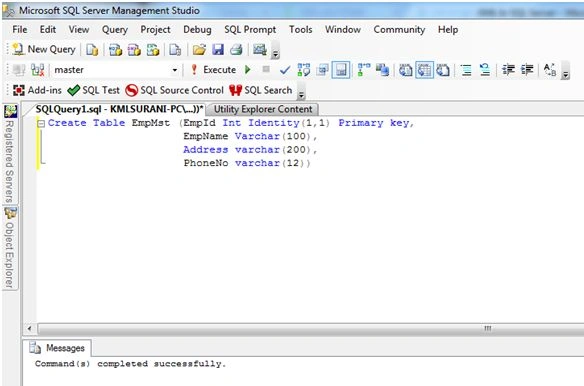
Figure 1.1
Step 2: Insert data in table.
Insert data of created table structure.
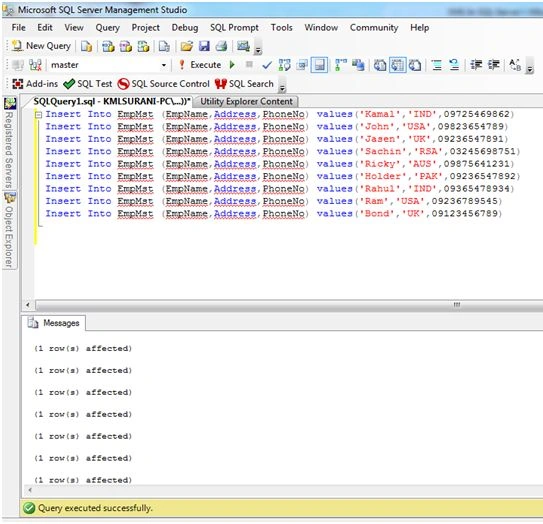
Figure 1.2
Step 3: Retrieve data in table.
You can see data is inserted from the table:
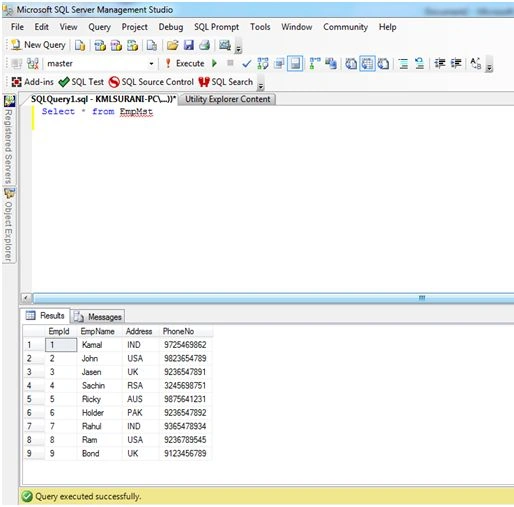
Figure 1.3
RAW
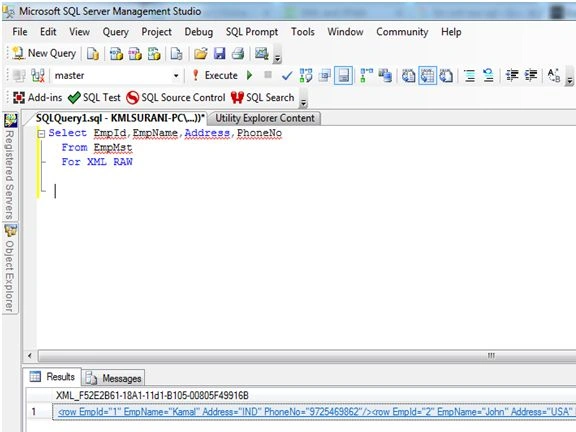
Figure 1.4
Simple used RAW
Output
- <row EmpId="1" EmpName="Kamal" Address="IND" PhoneNo="9725469862" />
- <row EmpId="2" EmpName="John" Address="USA" PhoneNo="9823654789" />
- <row EmpId="3" EmpName="Jasen" Address="UK" PhoneNo="9236547891" />
- <row EmpId="4" EmpName="Sachin" Address="RSA" PhoneNo="3245698751" />
- <row EmpId="5" EmpName="Ricky" Address="AUS" PhoneNo="9875641231" />
- <row EmpId="6" EmpName="Holder" Address="PAK" PhoneNo="9236547892" />
- <row EmpId="7" EmpName="Rahul" Address="IND" PhoneNo="9365478934" />
- <row EmpId="8" EmpName="Ram" Address="USA" PhoneNo="9236789545" />
- <row EmpId="9" EmpName="Bond" Address="UK" PhoneNo="9123456789" />
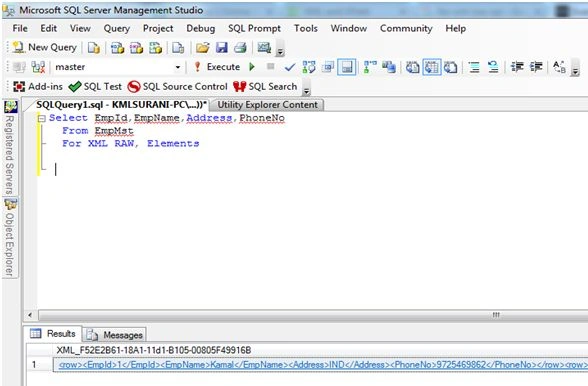
Figure 1.5
Figure 1.5 - Used RAW with Elements.
Output
- <row>
- <EmpId>1</EmpId>
- <EmpName>Kamal</EmpName>
- <Address>IND</Address>
- <PhoneNo>9725469862</PhoneNo>
- </row>
- <row>
- <EmpId>2</EmpId>
- <EmpName>John</EmpName>
- <Address>USA</Address>
- <PhoneNo>9823654789</PhoneNo>
- </row>
- <row>
- <EmpId>3</EmpId>
- <EmpName>Jasen</EmpName>
- <Address>UK</Address>
- <PhoneNo>9236547891</PhoneNo>
- </row>
- <row>
- <EmpId>4</EmpId>
- <EmpName>Sachin</EmpName>
- <Address>RSA</Address>
- <PhoneNo>3245698751</PhoneNo>
- </row>
- <row>
- <EmpId>5</EmpId>
- <EmpName>Ricky</EmpName>
- <Address>AUS</Address>
- <PhoneNo>9875641231</PhoneNo>
- </row>
- <row>
- <EmpId>6</EmpId>
- <EmpName>Holder</EmpName>
- <Address>PAK</Address>
- <PhoneNo>9236547892</PhoneNo>
- </row>
- <row>
- <EmpId>7</EmpId>
- <EmpName>Rahul</EmpName>
- <Address>IND</Address>
- <PhoneNo>9365478934</PhoneNo>
- </row>
- <row>
- <EmpId>8</EmpId>
- <EmpName>Ram</EmpName>
- <Address>USA</Address>
- <PhoneNo>9236789545</PhoneNo>
- </row>
- <row>
- <EmpId>9</EmpId>
- <EmpName>Bond</EmpName>
- <Address>UK</Address>
- <PhoneNo>9123456789</PhoneNo>
- </row>
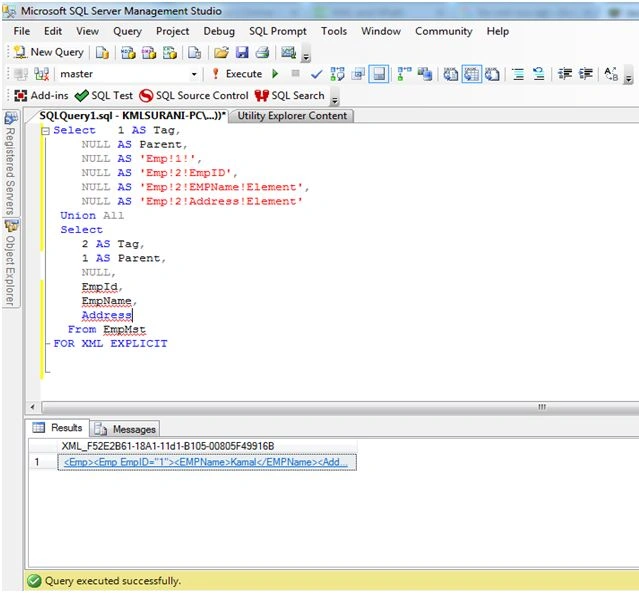
Figure 1.6
Figure 1.6 - Used Explicit Model
Output
- <Emp>
- <Emp EmpID="1">
- <EMPName>Kamal</EMPName>
- <Address>IND</Address> </Emp>
- <Emp EmpID="2">
- <EMPName>John</EMPName>
- <Address>USA</Address> </Emp>
- <Emp EmpID="3">
- <EMPName>Jasen</EMPName>
- <Address>UK</Address> </Emp>
- <Emp EmpID="4">
- <EMPName>Sachin</EMPName>
- <Address>RSA</Address> </Emp>
- <Emp EmpID="5">
- <EMPName>Ricky</EMPName>
- <Address>AUS</Address> </Emp>
- <Emp EmpID="6">
- <EMPName>Holder</EMPName>
- <Address>PAK</Address> </Emp>
- <Emp EmpID="7">
- <EMPName>Rahul</EMPName>
- <Address>IND</Address> </Emp>
- <Emp EmpID="8">
- <EMPName>Ram</EMPName>
- <Address>USA</Address> </Emp>
- <Emp EmpID="9">
- <EMPName>Bond</EMPName>
- <Address>UK</Address> </Emp>
- </Emp>
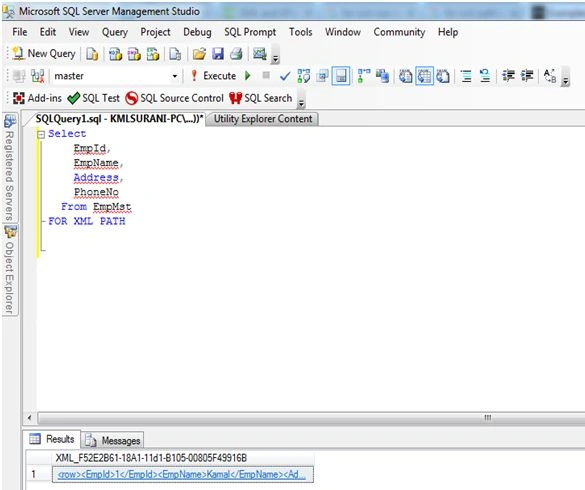
Figure 1.7
Output
- <row>
- <EmpId>1</EmpId>
- <EmpName>Kamal</EmpName>
- <Address>IND</Address>
- <PhoneNo>9725469862</PhoneNo>
- </row>
- <row>
- <EmpId>2</EmpId>
- <EmpName>John</EmpName>
- <Address>USA</Address>
- <PhoneNo>9823654789</PhoneNo>
- </row>
- <row>
- <EmpId>3</EmpId>
- <EmpName>Jasen</EmpName>
- <Address>UK</Address>
- <PhoneNo>9236547891</PhoneNo>
- </row>
- <row>
- <EmpId>4</EmpId>
- <EmpName>Sachin</EmpName>
- <Address>RSA</Address>
- <PhoneNo>3245698751</PhoneNo>
- </row>
- <row>
- <EmpId>5</EmpId>
- <EmpName>Ricky</EmpName>
- <Address>AUS</Address>
- <PhoneNo>9875641231</PhoneNo>
- </row>
- <row>
- <EmpId>6</EmpId>
- <EmpName>Holder</EmpName>
- <Address>PAK</Address>
- <PhoneNo>9236547892</PhoneNo>
- </row>
- <row>
- <EmpId>7</EmpId>
- <EmpName>Rahul</EmpName>
- <Address>IND</Address>
- <PhoneNo>9365478934</PhoneNo>
- </row>
- <row>
- <EmpId>8</EmpId>
- <EmpName>Ram</EmpName>
- <Address>USA</Address>
- <PhoneNo>9236789545</PhoneNo>
- </row>
- <row>
- <EmpId>9</EmpId>
- <EmpName>Bond</EmpName>
- <Address>UK</Address>
- <PhoneNo>9123456789</PhoneNo>
- </row>
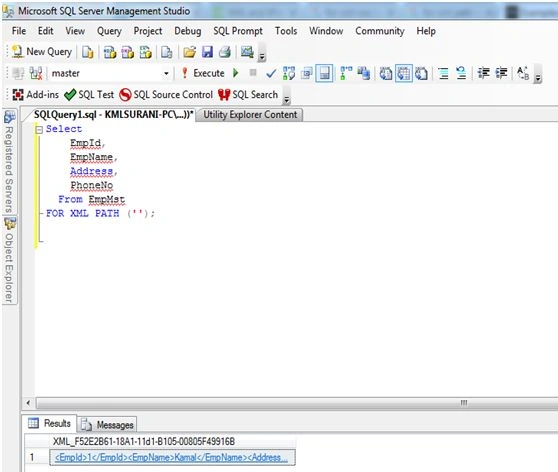
Figure 1.8
Figure 1.8 - Another way to use path.
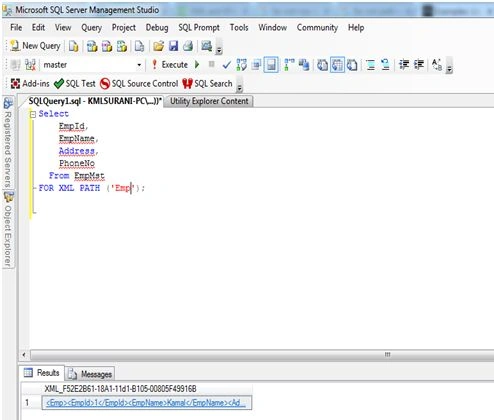
Figure 1.9
Figure 1.9 - Example: used path as root element.
Auto
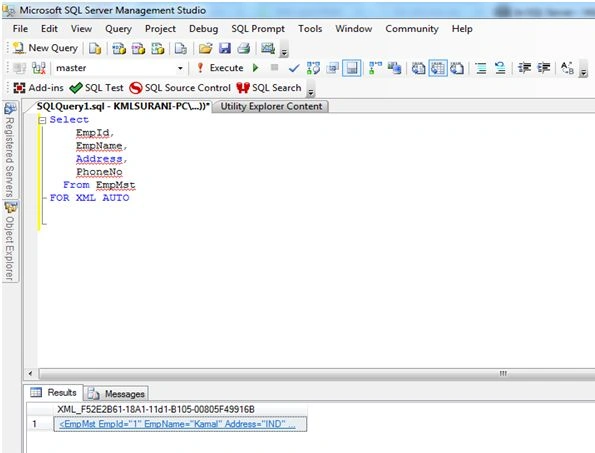
Figure 1.10
Figure 1.10 - Used as AUTO models.
Output
- <EmpMst EmpId="1" EmpName="Kamal" Address="IND" PhoneNo="9725469862" />
- <EmpMst EmpId="2" EmpName="John" Address="USA" PhoneNo="9823654789" />
- <EmpMst EmpId="3" EmpName="Jasen" Address="UK" PhoneNo="9236547891" />
- <EmpMst EmpId="4" EmpName="Sachin" Address="RSA" PhoneNo="3245698751" />
- <EmpMst EmpId="5" EmpName="Ricky" Address="AUS" PhoneNo="9875641231" />
- <EmpMst EmpId="6" EmpName="Holder" Address="PAK" PhoneNo="9236547892" />
- <EmpMst EmpId="7" EmpName="Rahul" Address="IND" PhoneNo="9365478934" />
- <EmpMst EmpId="8" EmpName="Ram" Address="USA" PhoneNo="9236789545" />
- <EmpMst EmpId="9" EmpName="Bond" Address="UK" PhoneNo="9123456789" />
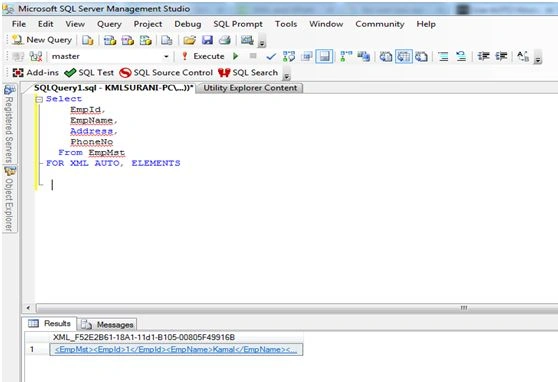
Figure 1.11
Note: Please find the attachment for code.
Santhakumar MunuswamyPosted Jan 10, 2016, 11:44 AM
Thanks for nice share
Humayun Kabir MamunPosted Jan 10, 2016, 8:56 AM
Nice...
Ankit BansalPosted Jan 10, 2016, 2:47 AM
nice one..keep sharing..
Ankur MistryPosted Jan 9, 2016, 11:05 AM
Interesting, thanks for sharing
Raja TPosted Jan 9, 2016, 6:28 AM
Nice,Thanks for sharing