Introduction
In this blog post, we are going to focus on the jump statements of the C# language. You’ve probably been working with it for a while, but needed more clarity, especially with the notorious goto statement. Thus, that’s the main goal of this post. However; If you are a total beginner, I encourage you to continue reading until the end without skipping.
C# provides three (3) different types of jump statements that enable you to move immediately to another line in the program. These jump statements are break, continue and goto. Thus, these jump statements are very handy in one of these scenarios: in case that you need to terminate a loop before it has reached the end or might need to skip an iteration of a loop.
Break statement
Let me guess, you’ve met the break statement for the first time when you used it to exit inside a switch statement.
See the example below:
- [Flags]
- public enum Status : byte
- {
- NotStarted = 0,
- InProgress = 1,
- Done = 2
- }
-
- Status myStatus = Status.Done;
-
- switch (myStatus)
- {
- case Status.NotStarted:
-
- break;
- case Status.InProgress:
-
- break;
- case Status.Done:
-
- break;
- default:
- break;
- }
As you learn more about the C# language, you’ve possibly faced with the different looping statements such as for, for-each, while, and do-while loops. In fact, break can be also used to exit from these looping statements.
See the example below:
- [Fact]
- public void Jump_Statement_Break_Test()
- {
- int counter = 0;
- int length = 10;
- int breakWhenEqualsToFive = 5;
- string message = string.Empty;
-
- for (int i = 0; i < length; i++)
- {
- counter = i;
- message += $"Inside the loop counter = {counter} to {length}.{Environment.NewLine}";
- if (i == breakWhenEqualsToFive)
- {
- message += $"Breaking out counter at counter = {counter}";
- break;
- }
- }
-
- Assert.Equal(breakWhenEqualsToFive, counter);
- this._output.WriteLine(message);
- }
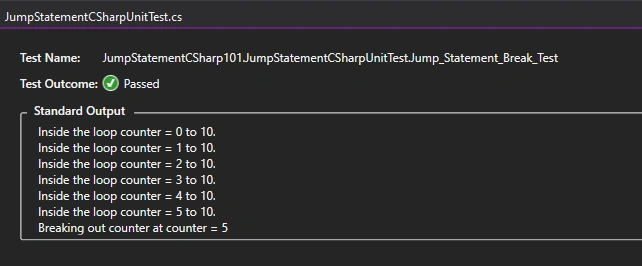
The example above shows that when the counter variable i equals the variable breakWhenEqualsToFive, (i == breakWhenEqualsToFive) will eventually get out of the loop.
See the sample output below:
Continue statement
You might be asking: “So, is the continue statement similar to the break statement?”. You are correct, but there is a slight difference. The continue statement causes the program control to jump back to skip and start the loop rather than restarting outside the loop altogether.
See the example below:
- [Fact]
- public void Jump_Statement_Continue_Test()
- {
- List<int> evenNumbers = new List<int> { };
- Func<int, bool> isEven = x => x % 2 == 0;
- string message = string.Empty;
-
- for (int i = 0; i < 10; i++)
- {
- if (isEven(i))
- {
- evenNumbers.Add(i);
- message += $"{i} is Even. {Environment.NewLine}";
- }
- else
- {
- continue;
- }
- }
-
- Assert.True(evenNumbers.SequenceEqual(new List<int> { 0, 2, 4, 6, 8 }));
- this._output.WriteLine(message);
- }
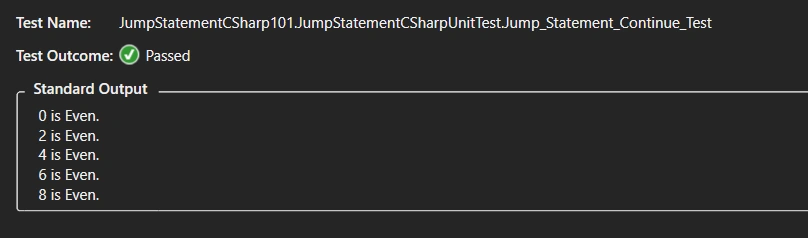
The example above shows that everytime a number isn't an even number, it will automatically jump back to skip and start the new iteration of the loop.
See the sample output below:
Difference between the two statements
The break statements allow you to terminate or exit a loop before reaching the end, while the continue statement allows us to skip the iteration of the loop.
Goto statement
The goto statement enables you to jump directly to another specified line in the program, indicated by a label. This is an identifier followed by a colon.
See the example below:
- [Fact]
- public void Jump_Statement_Goto_Inside_Switch_Statement()
- {
- var random = new System.Random();
-
- var values = Enum.GetValues(typeof(Status));
-
- var myStatus = (Status)values.GetValue(random.Next(values.Length));
-
- switch (myStatus)
- {
- case Status.NotStarted:
- goto LabelNotStarted;
- case Status.InProgress:
- goto LabelInProgress;
- case Status.Done:
- goto LabelDone;
- default:
- break;
- }
-
- LabelNotStarted:
- Assert.True(myStatus == Status.NotStarted);
- this._output.WriteLine("jumped into LabelNotStarted & status not yet started");
- return;
- LabelInProgress:
- Assert.True(myStatus == Status.InProgress);
- this._output.WriteLine("jumped into LablInProgress & status in progress");
- return;
- LabelDone:
- Assert.True(myStatus == Status.Done);
- this._output.WriteLine("jumped into LabelDone & status done");
- return;
-
- }
See the sample output below:
Goto statement warning
Knowing the goto statement is a good tool under your belt. However, developers have a bad impression of it. Therefore, we need to be cautious about it. See the reasons why we need to be cautious about it below:
- It doesn't have a good reputation in most developers because it leads to many unwanted bugs and inelegant programs.
- Well known cause of 'spaghetti code'
- When you have implemented this into your code, expect massive criticism from other developers.
Summary
In this blog post, we have discussed the following,
- Break statement
- Continue statement
- The difference between break and continue
- Goto statement
- Things you need to be cautious about the goto statement
Back in the day, I still remember when I was a total noob and asked myself: “Why do you need to learn these statements?”. Hopefully, this blog was able to answer that.
I hope you have enjoyed this article, as I have enjoyed it while writing. You can also find the sample code here at
GitHub. Until next time, happy programming!



preeti kumariPosted Feb 5, 2020, 4:19 AM
Very well explained.