

REST stands for the Representational State Transfer, which is an architectural style for networked hypermedia applications. It is primarily used to create the Service, which is lightweight, maintainable and scalable. A Service based on REST is called RESTful Service.
This article explains how to create RESTful Service, using WCF (Windows Communication Foundation).This can be accomplished in the steps given below.
Create WCF Project
- Open Visual Studio.
- Add New ASP.NET Web Application.
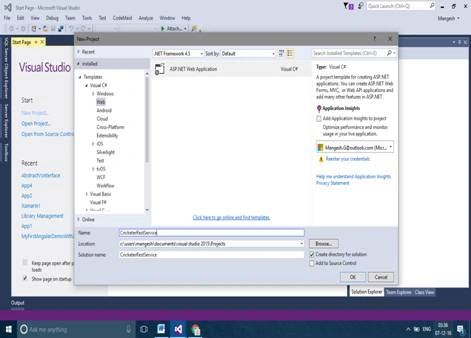
- Choose Empty and select Web Form, if you are using Visual Studio 2015.
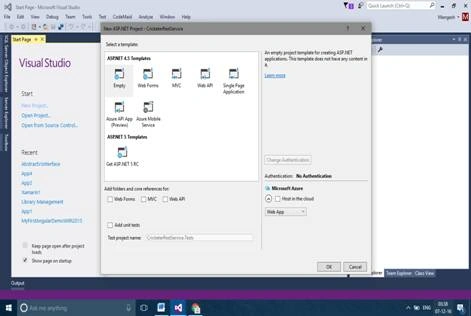
Now, we are ready with our project and let's add the Service named “Cricket”.
Adding Datacontract
Thus, we are ready with our Service, which will do our work for us. Now, the next step is to add the Datacontract, which will be used to pass the data to and from the Services .
- [DataContract]
- publicclassCricketer {
- [DataMember]
- publicstring Name {
- get;
- set;
- }
- [DataMember]
- publicstring Team {
- get;
- set;
- }
- [DataMember]
- publicstring ODI {
- get;
- set;
- }
- [DataMember]
- publicstring Test {
- get;
- set;
- }
- }
Thus, we are ready with the DataContractClass. Lets see what changes are required to make to the ServiceContract.
ServiceContract
The main part of the RESTful Service is the Service contract part that is our interface, which has defined Operation contract. Our Service contract is given below.
- using System;
- usingSystem.Collections.Generic;
- usingSystem.Linq;
- usingSystem.Runtime.Serialization;
- usingSystem.ServiceModel;
- usingSystem.Text;
- usingSystem.ServiceModel.Web;
- usingWCFRestServices;
- namespaceWCFRestServices {
- // NOTE: You can use the "Rename" command on the "Refactor" menu to change the interface name "ICricket" in both code and config file together.
- [ServiceContract]
- publicinterfaceICricket {
- [OperationContract]
- [WebInvoke(UriTemplate = "/GetCricketer", Method = "Get", RequestFormat = WebMessageFormat.Json, ResponseFormat = WebMessageFormat.Json)]
- CricketerGetCricketerDetails();
- [OperationContract]
- [WebInvoke(UriTemplate = "/AddCricketer", Method = "Post", RequestFormat = WebMessageFormat.Json, ResponseFormat = WebMessageFormat.Json)]
- intAddCricketer(CricketerobjCricketer);
- }
- }
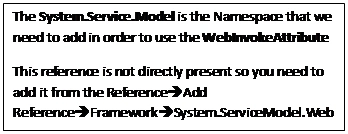
Now, coming to the OperationContract, we can see one more attribute is added. WebInvokeit has few parameters, which are as follows.
- Method
Gets and sets the protocol (for example HTTP) method the Service operation responds to (Get, Post, Put, Delete etc.)
- RequestFormat
Get or set the format of the request and it can be JSON or XML.
- ResponseFormat
Get or set the format of the response and it can be JSON or XML.
- UriTemplate
It is the Uniform Resource Identifier(URI) for the Service operation.
Configuring Service and Behaviors in Web.Config
- <system.serviceModel>
- <services>
- <servicename="WCFRestServices.Cricket" behaviorConfiguration="servicebehavior">
- <endpointaddress="" binding="webHttpBinding" contract="WCFRestServices.ICricket" behaviorConfiguration="web">
- </endpoint>
- </service>
- </services>
- <behaviors>
- <serviceBehaviors>
- <behaviorname="servicebehavior">
- <serviceMetadatahttpGetEnabled="true" />
- <serviceDebugincludeExceptionDetailInFaults="true" /> </behavior>
- </serviceBehaviors>
- <endpointBehaviors>
- <behaviorname="web">
- <webHttp/> </behavior>
- </endpointBehaviors>
- </behaviors>
- <serviceHostingEnvironmentmultipleSiteBindingsEnabled="true">
- </serviceHostingEnvironment>
- </system.serviceModel>
It is “webHttpBinding”. This binding is used for RESTful Services in WCF.
I hope you understood the basics of creating the RESTful Services. WCF data operations are not included in this article as the main focus is on the Service part. We can create the database interaction, using ADO.NET, Entity Framework or any other data access technology.
Happy coding.
Former memberPosted Dec 12, 2016, 3:41 AM
How to call this function CricketerGetCricketerDetails() from client side ? what will be the url ? do we need to create proxy to make call from client side ? or can we call wcf function like web api using rest like url ?
Ranjan MallickPosted Dec 7, 2016, 5:51 AM
Hi Mangesh Nice Article but need some explanation regarding how user can cosume this service on different platform like Web,Mobile ...If that part you can elaborate it will be great...