

Introduction
Here in this article, we will create twitter style textbox (glow) by using CSS3. Here we put the prient screens of every step from start to end if you want to make it then you can take the help of these images.
If facing any problem then put comment
1. This is twitter Textbox. Our goal is to give same look to our textbox.

2. First open VS2010 and add a new asp.net webapp. , Now go inside style folder and open stylesheet and enable CSS 3.0

3. Now edit the styleSeet with the following code.
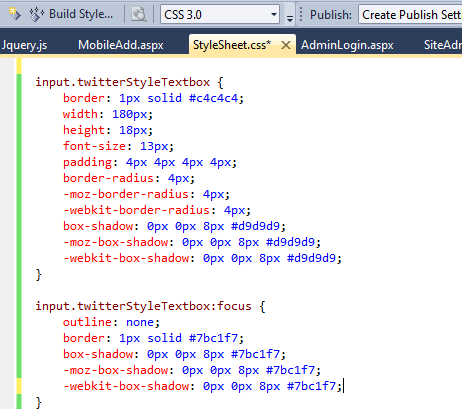
- input.twitterStyleTextbox
- {
- border: 1px solid #c4c4c4;
- width: 180px;
- height: 18px;
- font-size: 13px;
- padding: 4px 4px 4px 4px;
- border-radius: 4px;
- -moz-border-radius: 4px;
- -webkit-border-radius: 4px;
- box-shadow: 0px 0px 8px #d9d9d9;
- -moz-box-shadow: 0px 0px 8px #d9d9d9;
- -webkit-box-shadow: 0px 0px 8px #d9d9d9;
- }
- input.twitterStyleTextbox:focus
- {
- outline: none;
- border: 1px solid #7bc1f7;
- box-shadow: 0px 0px 8px #7bc1f7;
- -moz-box-shadow: 0px 0px 8px #7bc1f7;
- -webkit-box-shadow: 0px 0px 8px #7bc1f7;
- }?

5. Implement cssclass on textboxes

6. Now your textbox will look like

Reference:
Comments
Join the conversation! Your thoughts help the community grow.